39
WATCHING TV/PROGRAMME CONTROL
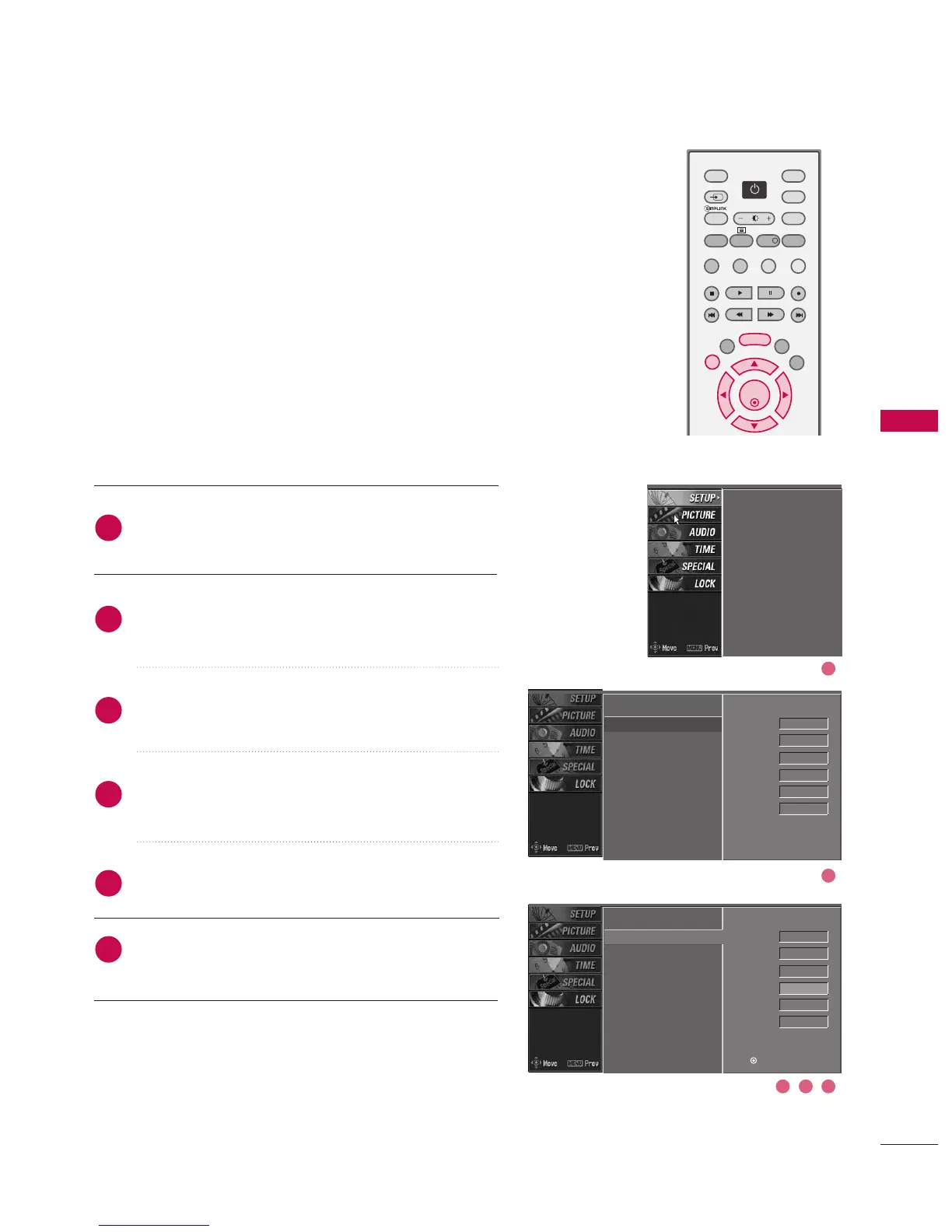
FINE TUNING -
In Analogue Mode only
Normally fine tuning is only necessary if reception is poor.
The finely tuned programme will be indicated by a yellow
number during programme selection.
Press the MMEENNUU button and then use
DD
or
EE
button
to select the SSEETTUUPP menu.
Press the
GG
button and then use
DD
or
EE
button to
select MMaannuuaall pprrooggrraammmmee.
Press the
GG
button and then
FF
or
GG
button to
select FFiinnee.
Press the
DD
or
EE
button to fine tune for the best
picture and sound.
Press the OO KK button to store.
Press EEXXIITT button to return to normal TV viewing.
2
3
4
5
6
1
Auto programme
Manual programme
G
Programme edit
Signal strength
Set ID
Auto programme
Manual programme
Programme edit
Signal strength
Set ID
Auto programme
Manual programme
Programme edit
Signal strength
Set ID
DD
EE
Band V/UHF
Channel 1
Search
Up/Down
Fine
Up/Down
G
Name - - - - -
Storage 0
Band V/UHF
Channel 1
Search
Up/Down
Fine
Up/Down
Name - - - - -
Storage 0
Press (OK) to store.
3 4 5
2
1



 To Next Page