27
ENGLISH
26
WIND SETTING
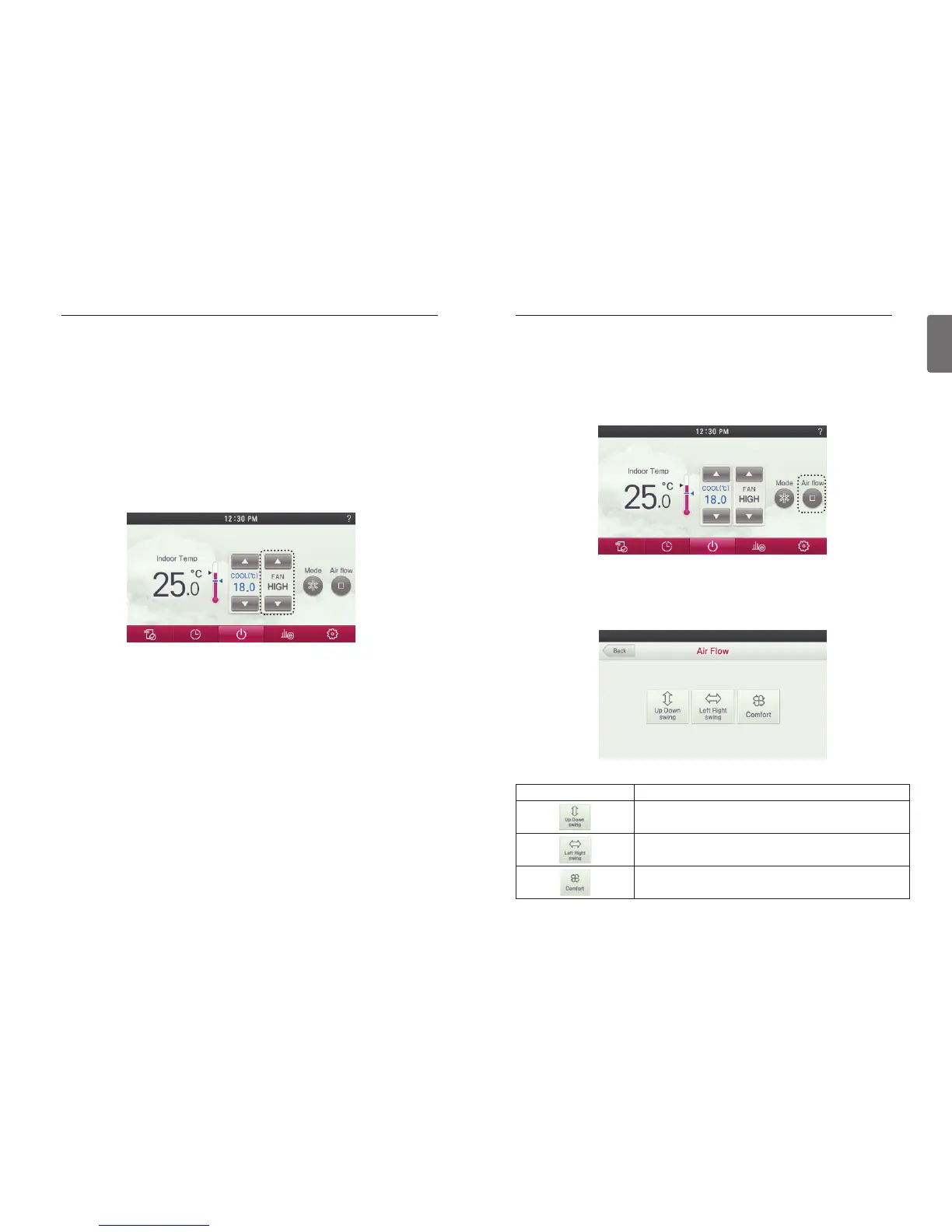
Airflow Control
● In the airflow selection screen, press the button in the desired air flow direction.
- Some Air Flow options may not be available due to the of indoor unit selected.
● During the indoor unit operation, press the screen’s ‘Air flow’ button.
- It moves to the direction of air flow selection screen.
Figure Description
Automatically changes the airflow to up and down.
Automatically changes the airflow to left and right.
If it is connected to a indoor unit with 4 vanes exits, Air moves by
crossing over and swinging 1,3 and 2,4 vanes.
WIND SETTING
Fan speed Control
● Press the fan speed button to set the desired fan speed.
- Every time you press the fan speed button
You can select the fan speed in the order of ‘SLOW’ → ‘LOW’ → ‘MED’ → ‘HIGH’ →
‘POWER’ → ‘AUTO’.
- Depending on the product function, some fan speed may not be selected.
WIND SETTING


 To Next Page
 Loading...