Trackit Mk3 User Manual
41
Allow a ut o re cord ( blan k card) : check the box if you rout inely want recordings t o t ake place
over several blank cards. This is a very useful feat ure if a recording over several days is required.
Allow ext ernal eve nt s: an external event m ar ker can be at t ached t o the Aux. port.
Allow I Red e ve nt s: t he opt ional Trackit infra- red ev ent m arker ( Trackit Mk 1 only) can be used to
annot at e a recording.
I m m e d. ca r d load ( or at door close) : off by default, allowing t he card to be loaded only when
the rear door is shut . Leave t his box unchecked if you want to m ake recordings over several cards
on a regular basis.
3 but t on Off ( or 2 ) : unchecked by default , allowing Tr ackit Mk3 t o be turned off using only two
but t on presses ( on/ off butt on and down arrow but t on sim ult aneously) . Trackit Mk 1 only.
All new Trackit s have all the logic funct ions enabled by default except I m m ed. card load and 3 but-
ton Off. To updat e the logic funct ions in t he Trackit Mk3 recorder when changes are m ade, click on
Se nd va lues to Tr a ckit , followed by Sa ve curr e nt values. This saves t he values in the Trackit
Mk3’s non- volatile m em ory. See Figure 33 above.
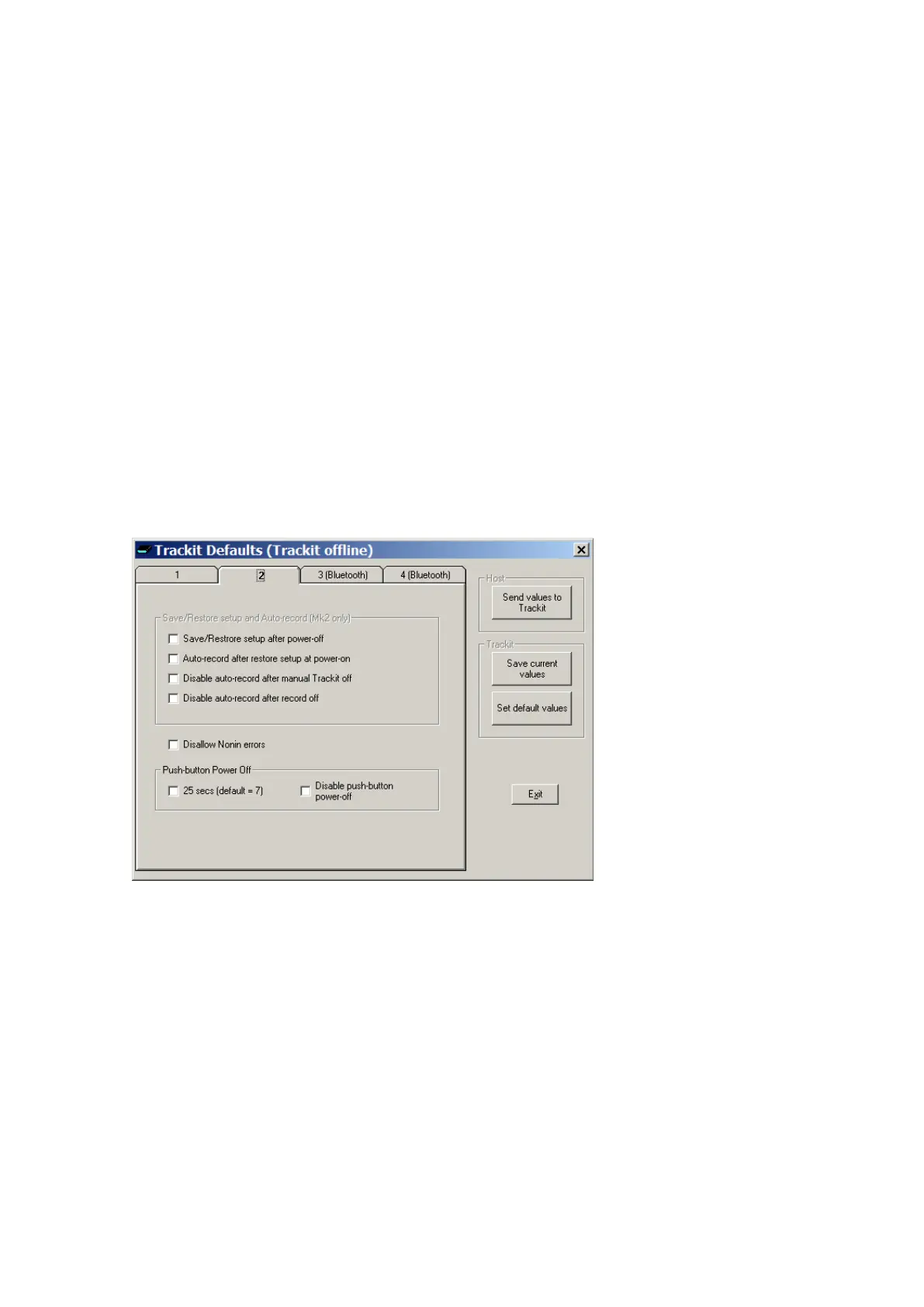
Trackit Default s Tab 2 (Mk2 and Mk3 only)
The Trackit Mk2 and Mk3 have addit ional opt ional par am et ers. These are accessed via Tab 2 of
Trackit Default s, as shown in Figure 34 below.
Figur e 3 4 Tra ck it De f a ult s | Tab 2
Save/ Restore setup and Auto-record
The Trackit Mk2 and Mk3 have m uch incr eased int ernal non-volat ile m em ory. This m em ory allows
it t o save its entire Setup before powering- off. When next powered-on, it is able t o restore its last
saved Set up. This feat ure can significant ly speed- up t he download of a Set up t o the Trackit be-
cause the Host soft ware autom at ically det erm ines if the Trackit is already Set up correctly.
Another benefit t o t his save/ recall of Set up is t hat the Trackit can resum e recording in exactly the
sam e st at e is was in t he last t im e it was powered- off. This is especially useful if, during a record-
ing, t he User takes a long tim e to replace t he batteries. To control t his feature, t he following op-
t ions are available:



 To Next Page