Operation 4
Special equipment
Logging on and starting the truck:
¾ Apply the parking brake.
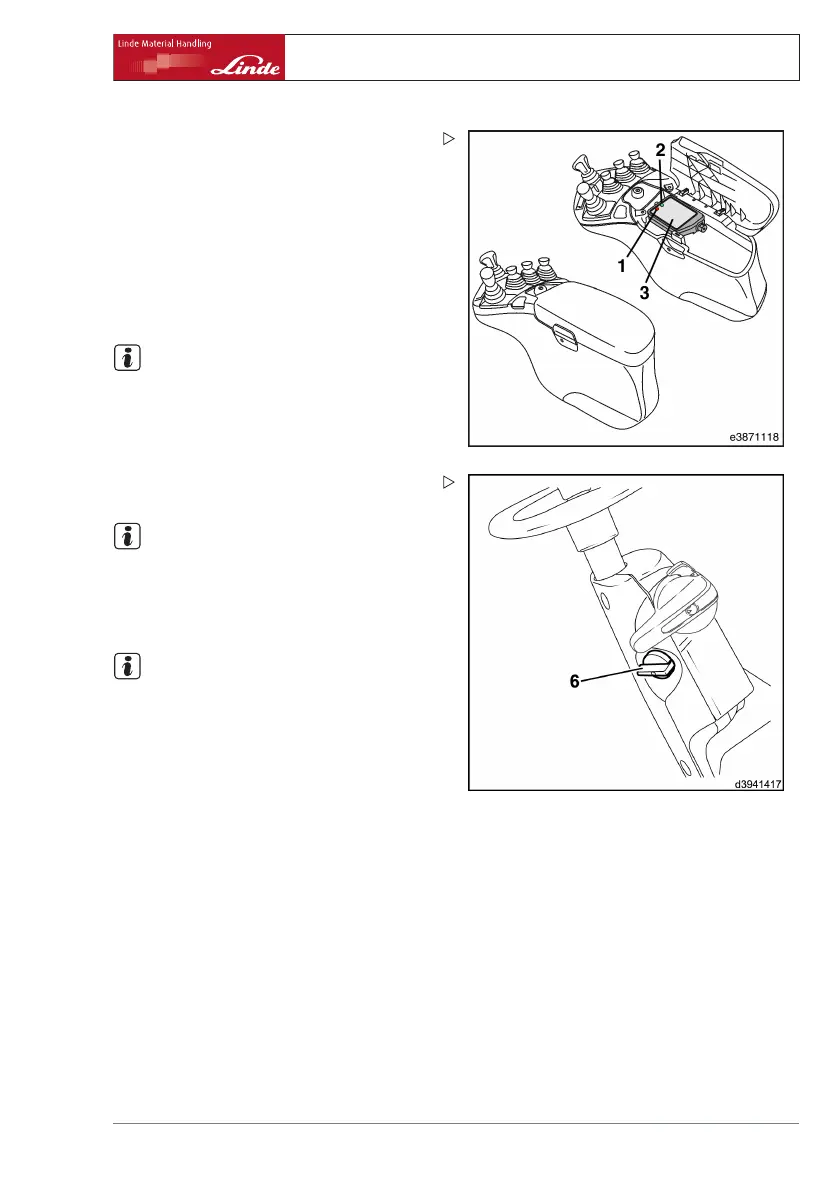
¾ Fold open the armrest support o
n the side
to the right.
¾ Place the valid transponder on the field (3).
Data is read in and the green LED (2) lights up
with a steady light.
¾ Remove transponder.
NOTE
If the red LED (1) lights up, the transponder is
invalid or there was a reading error. The input
device is reactivated automatically when a
valid transponder is used and read in.
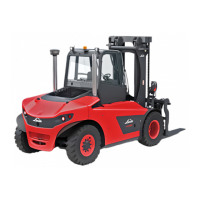
¾ Rotate the turning knob (6) clockwise to the
stop and start the truck.
NOTE
If the truck does not
start properly the first time,
the starting proced
ure can be repeated until
the turning knob (6)
is returned to the zero
position.
NOTE
If the green (2) and red (1) LEDs both light up
as steady lights, the data must be read out.
Please inform your fleet manager at once.
Operating Instructions – 394 807 10 01 EN – 07/2011 87


 To Next Page