D9U003VS0-0101_01
31
OptiCare for Eleganza 5
10.2 Mattress Screen (Eleganza 5 with OptiCare)
2
3
8
14
9
101113 12
5
6
7
4
1
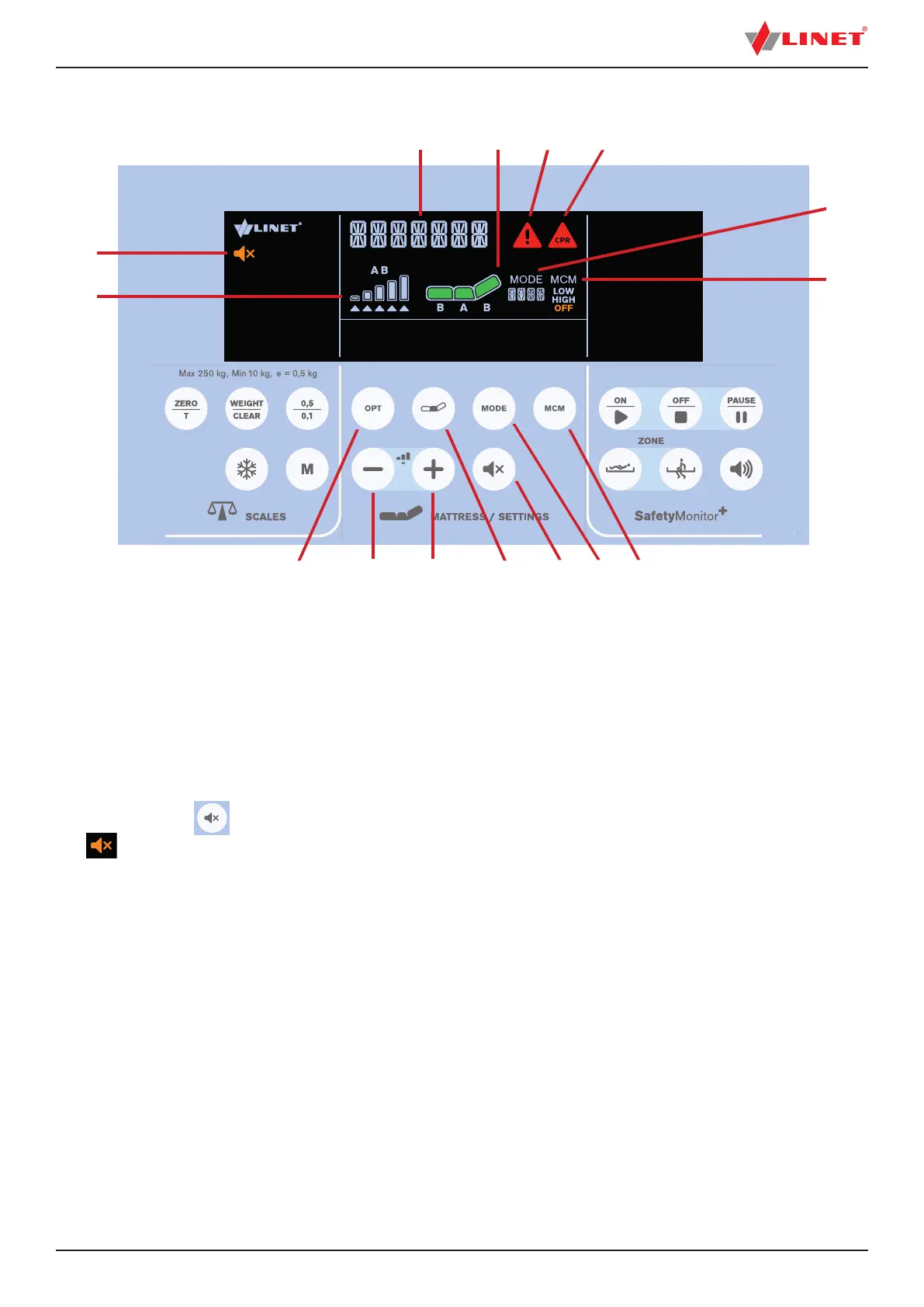
Fig. Mattress Display and Keyboard (iBoard Standard)
15
1. OPT Mode Button
2. MINUS Button
3. PLUS Button
4. COMFORT Button
5. MUTE Button
6. MODE Button
7. MCM Button
8. MCM Mode Icon (LOW/HIGH/OFF)
9. Mode Icon with Mode Name
10. Mattress CPR Alert Icon
11. Alert Icon
12. Mattress Icon
13. Status Indicator
14. MUTE Icon
15. Pressure Level Icon
To mute compressor of the integrated mattress:
► Press button
.
Icon indicates activated Mute Mode.



 To Next Page