D9U003VS0-0101_01
46
OptiCare for Multicare
12.4.5 PATIENT ON THE MATTRESS
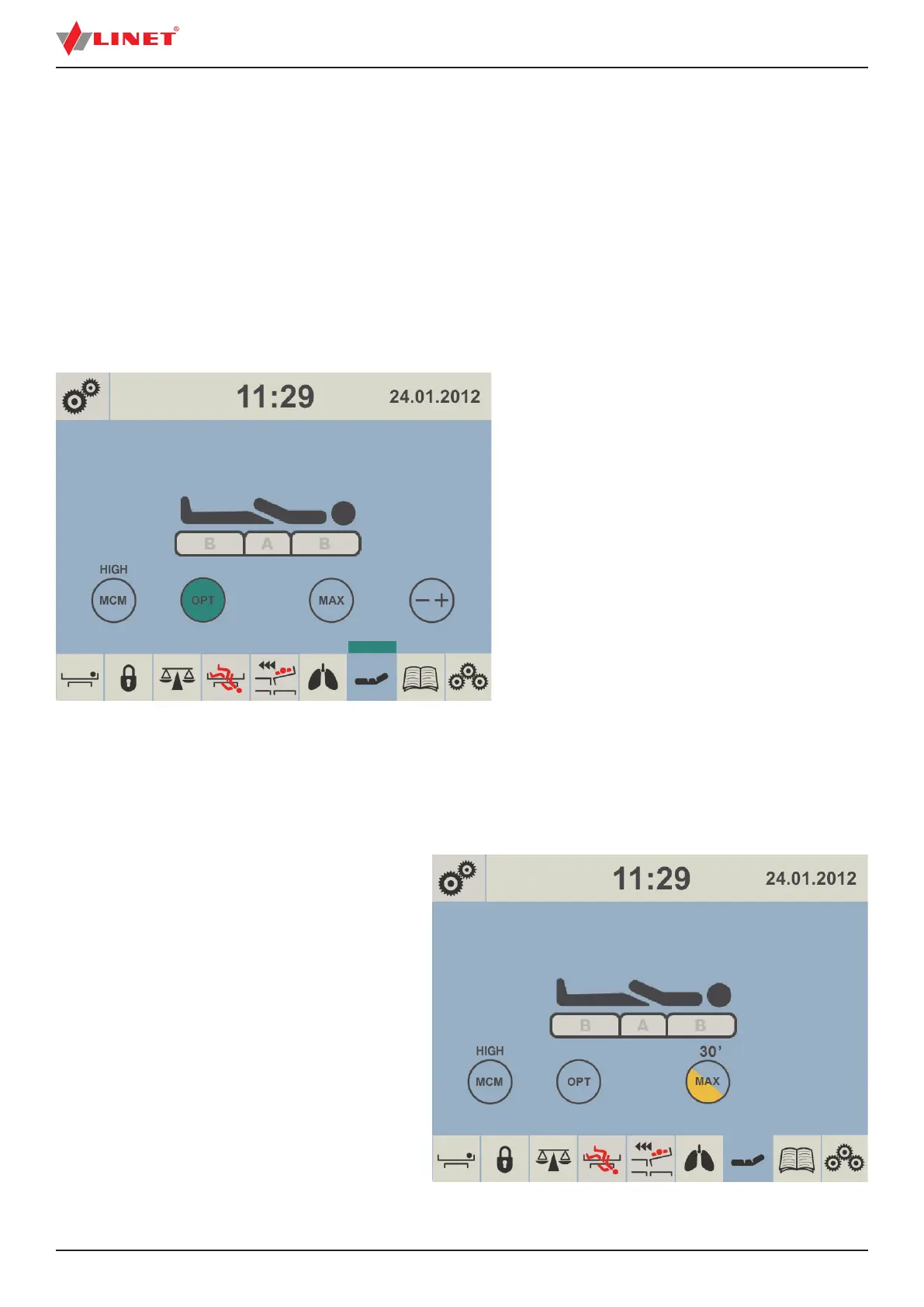
When there is a patient on the mattress patient icon turns to black color. As long as the patient remains on the mattress automatic
optimization will continue. Optimization will occur if the patient´s position changes su ciently to trigger Optimization Detection or
if initiated by the Optimization automatic timer. The integrated Micro-Climate Management system will start working automatically
when the patient gets into bed and stop if the patient gets out.
NOTE: During pressure optimization the OPT icon is ashing. Fully green OPT icon and green strip above mattress icon indicate
mattress has achieved optimum pressure.
Optimization will stop working and the mattress air pressure will be set at a xed level if
► the mattress support platform is tilted by 10 and more degrees (Anti-Trendelenburg Tilt)
► the mattress support platform is tilted by 10 and more degrees (Lateral Tilt)
► the mattress support platform is tilted by 5 and more degrees (Trendelenburg Tilt)
► tilt reduction of the mattress support platform has value of 7 or less degrees (Anti-Trendelenburg Tilt)
► tilt reduction of the mattress support platform has value of 7 or less degrees (Lateral Tilt)
► tilt reduction of the mattress support platform has value of 3 or less degrees (Trendelenburg Tilt)
NOTE: If at any time nursing sta feel it necessary to
re-optimize the patient then this can be initiated manu-
ally by touching the OPT icon. This does not over-ride
Optimization settings and this process will continue as
before.
Manual pressure optimization:
► press OPT icon.
To reduce intensity of Micro-Climate Management:
► press MCM icon until lower intensity is display-
ed above the icon.
12.4.6 MAXIMUM MATTRESS INTERNAL PRESSURE
To set Maximum Mattress Internal Pressure:
► press MAX icon.
Fig. Patient on the Mattress
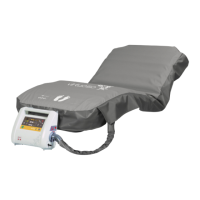
NOTE: During in ation MAX icon is ashing until it turns
yellow.
NOTE: After 30 minutes the pressure optimization starts
again.
Countdown is displayed on the screen above MAX icon.
NOTE: Maximum Mattress Internal Pressure can be ope-
rated with or without a patient on the mattress.
NOTE: To extend Maximum Mattress Internal Pressure
you can press MAX icon again.
Fig. Maximum Mattress Internal Pressure


 To Next Page