D9U003VS0-0101_01
34
OptiCare for Eleganza 5
10.3.7 PRESSURE COMFORT ADJUSTMENT
The mattress pressure can be adjusted based on the patient´s needs.
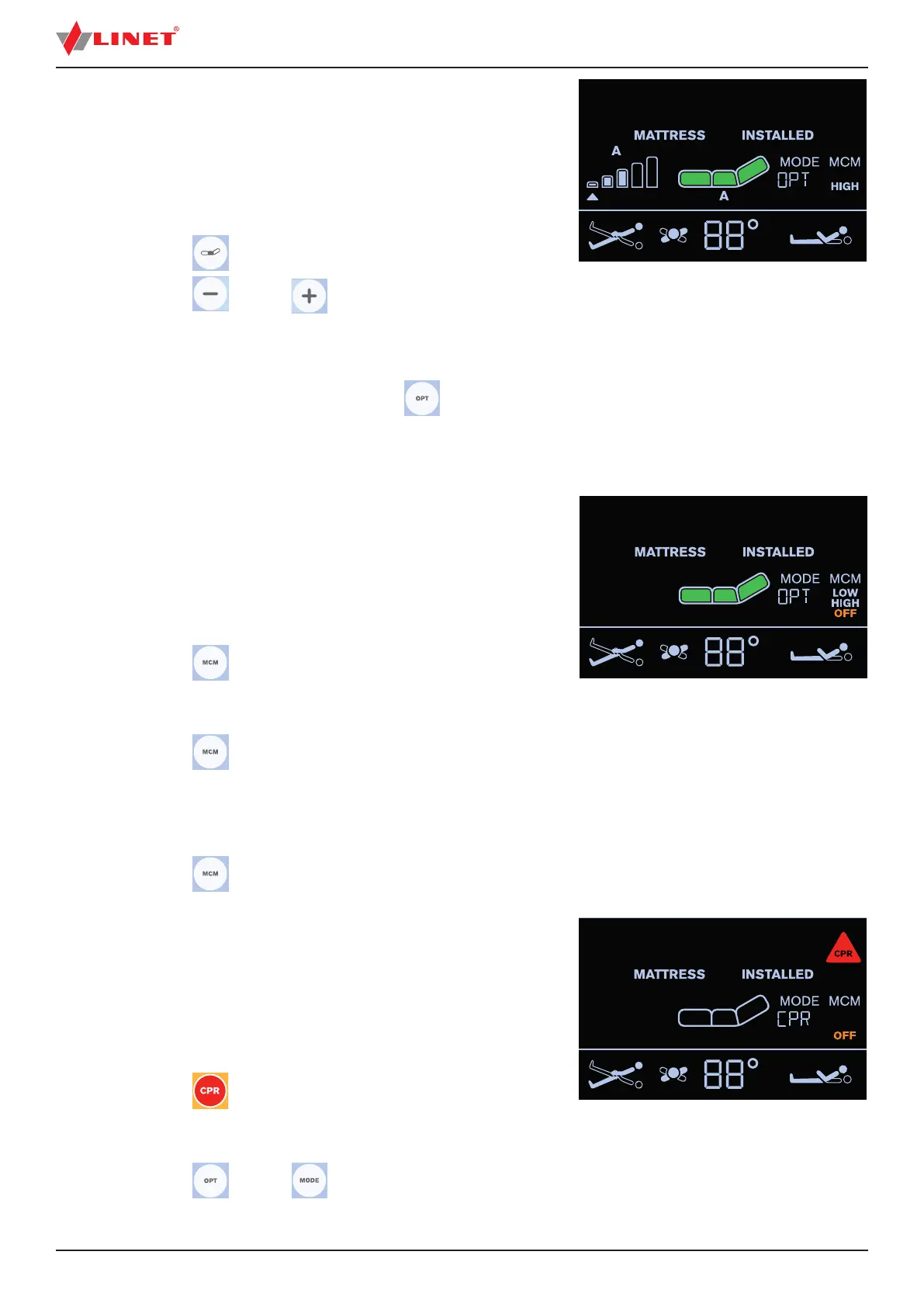
The pressure can be separately adjusted in the Area A (seat section)
or in the Area B (torso and legg mattress sections). The grey arrow
below the Area A or Area B Pressure Level Icons indicates the
optimized pressure.
To adjust pressure after pressure optimization:
► press button
to select Area A or B
► press button or button to adjust pressure
in the selected Area (A or B)
NOTE Letter A or B under the Mattress Icon indicates the selected Area.
NOTE To remove these individual settings, press button
and
the pressure levels go back to optimized pressure.
10.3.8 MICRO-CLIMATE MANAGEMENT (MCM
MODE)
The Micro-Climate Management blows through the parts under
the patient and removes moisture as one of the factors contributing
to the development of pressure injuries.
To enter MCM Mode:
► press button
until OFF is not
displayed under the MCM text.
To change intensity of MCM:
► press button
to set LOW or HIGH
intensity of Micro-Climate Management.
LOW or HIGH is displayed under the MCM text in accordance
with selected intensity level.
To turn o MCM Mode:
► press button
until OFF is displayed under the MCM text.
10.3.9 CPR MODE (CPR ACTIVATED)
When CPR is activated the mattress will deate and chest
compression can start immediately.
NOTE During CPR mode text „CPR“ alternates with text indicating
remaining minutes of the CPR mode (e.g. 60´).
To activate CPR Mode:
► press button
in the Positioning Section
of the iBoard Standard.
To deactivate CPR Mode:
► press button
or button .
The mattress will inate again and return to the mode it was in before CPR started.
Fig. Pressure Comfort Adjustment
Fig. MCM Mode
Fig. CPR Mode


 To Next Page