D9U003VS0-0101_01
48
OptiCare for Multicare
12.4.9 CPR MODE (CPR ACTIVATED)
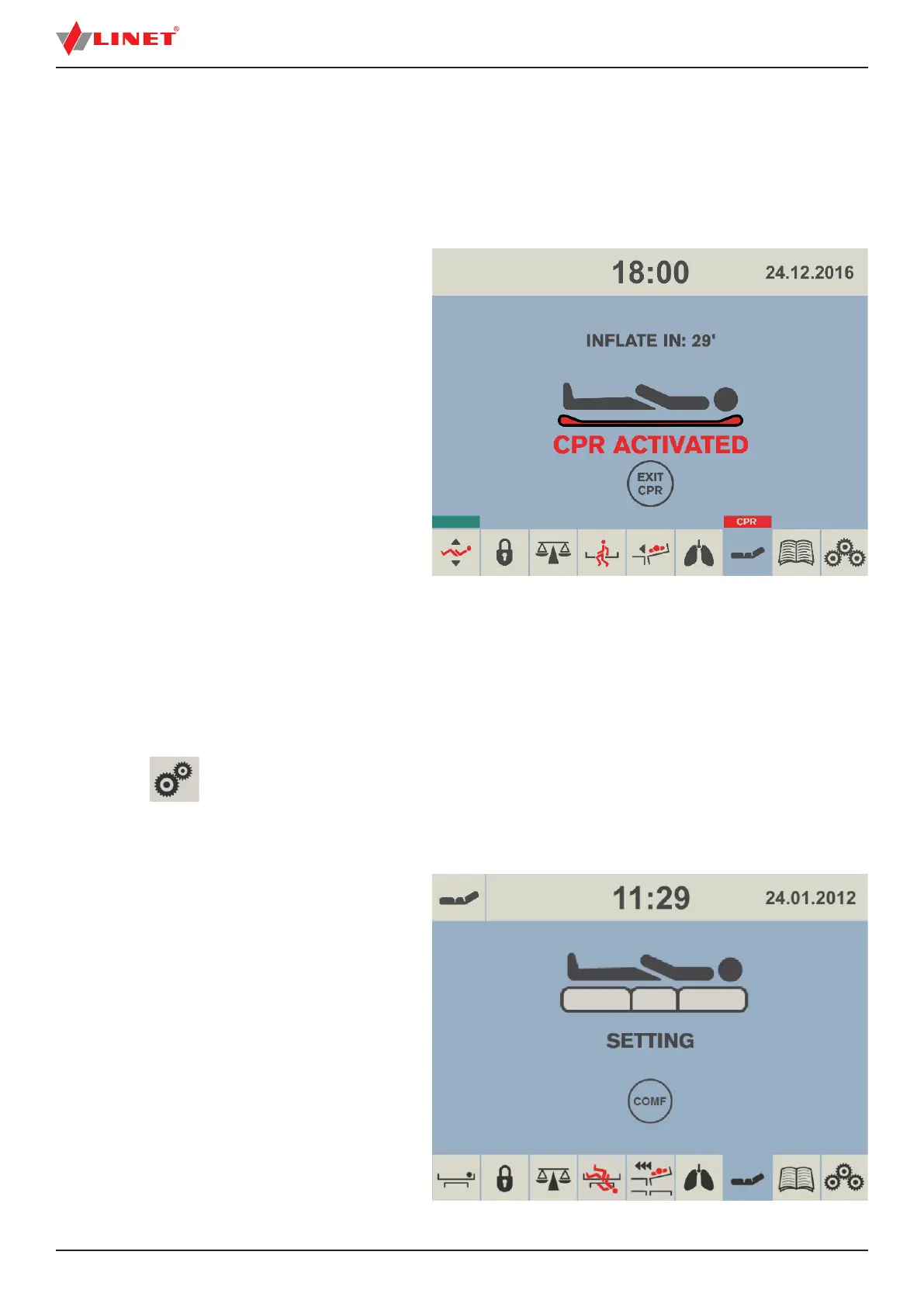
When CPR is activated the mattress will de ate and chest compression can start immediately.
NOTE: The countdown is displayed above the patient icon and indicates the amount of minutes the mattress stays de ated. Red
strip with „CPR“ text appears above the mattress icon.
NOTE: EXIT CPR icon is optional. Service technician approved by manufacturer is allowed to display or hide this icon.
To deactivate CPR Mode:
► press EXIT CPR icon.
The mattress will in ate again and return
to the mode it was in before CPR started.
Fig. CPR Activated
12.4.10 SETTING
Setting screen is used to enable or disable pressure (comfort) adjustment. To return to the mattress screen press either of the small
mattress icons.
NOTE: A red cross over any icon means the function is disabled.
To enter Setting screen:
► press
icon.
To hide or unhide - + icon on the other screens:
► press COMF icon in the Setting Screen.
Fig. Setting Screen



 To Next Page