8 9
Getting Started
Getting Started
Turning Your Phone On (1st time)
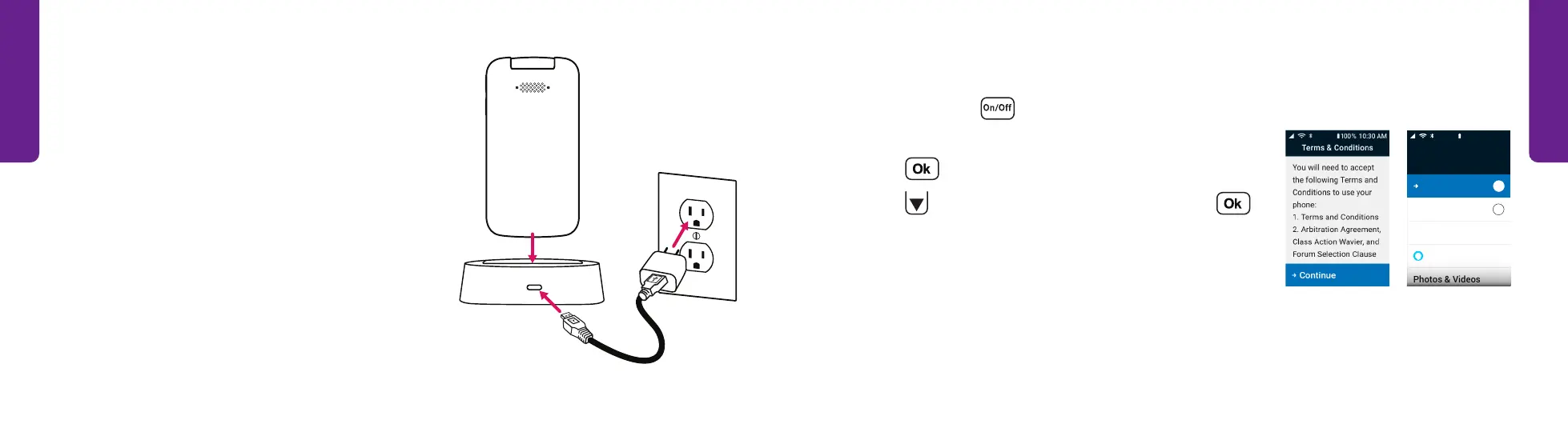
1. Press and hold on the keypad and wait while the
phone sets up.
2. Press to review the Terms & Conditions.
3. Press
to read the Terms & Conditions and to
accept them. You must review four screens.
4. When you finish, the phone’s Main Menu is shown.
4
Phone
Contacts
Amazon Alexa
Text Messages
4
My #(888) 555-5555
Main Menu
10 0% 10:30 AM
Charging the Battery (continued)
With the Charging Dock:
1. Plug the larger end of the USB Cable into the
Wall Charger.
2. Plug the Wall Charger into a wall outlet.
3. Plug the smaller end of the USB Cable into the
back of the Charging Dock.
4. Place the phone on the Charging Dock.
STEP 2 STEP 4



 To Next Page