12 13
Getting Started
Getting Started
Main Menu (continued)
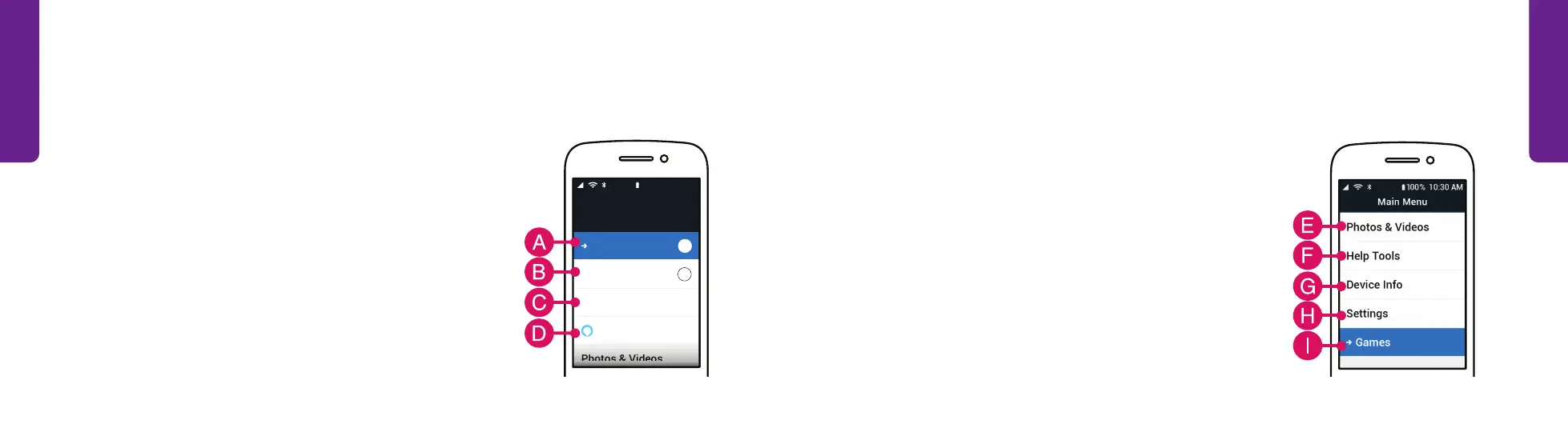
E. Photos & Videos – View or capture photos
or videos.
F. Help Tools – Access helpful tools, such as a
flashlight, calculator, FM radio and more.
G. Device Info – View phone information, such as
remaining battery, storage and signal strength.
H. Settings – Adjust sounds, notifications, colors
and more.
I. Games – Play fun games that stimulate your brain.
Main Menu
The Main Menu shows a list of all your phone’s options. You can select an option to
perform a task, including:
A. Phone – Make calls, see call history or check voicemail.
B. Text Messages – Read received messages and
send texts.
C. Contacts – View or add a new contact.
D. Amazon Alexa – Set up Alexa to ask questions, get
information, and more. (Optional)
4
Phone
Contacts
Photos & Videos
Amazon Alexa
Text Messages
4
My #(888) 555-5555
Main Menu
100% 10:30 AM



 To Next Page