76 77
Lively Voice
Lively Voice
Setting up Alexa (continued)
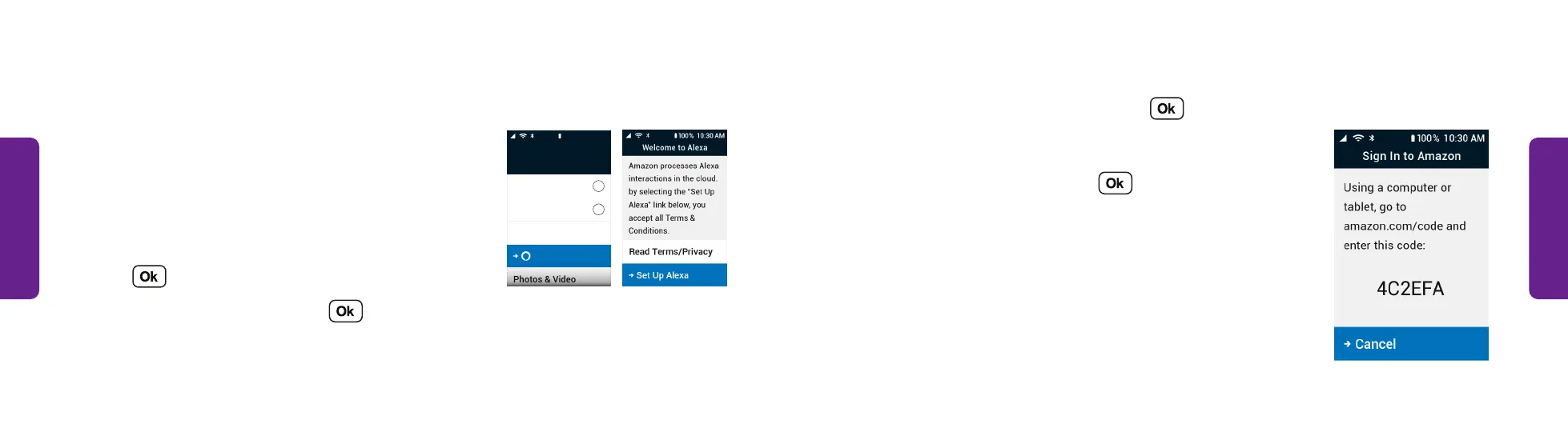
3. Select Sign In To Amazon and press .
OR
Select Skip Sign-In and press . Skip to step 8
on page 79.
(Create an Amazon account if you do not already
have one.)
4. On a computer or tablet, go to amazon.com/us/code,
log in to Amazon, and on the Amazon code page enter
the code that displays on your phone's screen.
STEP 4
Setting up Alexa
Amazon Alexa gives you a way to easily navigate
your phone with voice controls. It is not required
but can provide a better experience when using the
phone. Before you start, make sure that your phone is
connected to a Wi-Fi network.
1. From the Main Menu, select Amazon Alexa and
press .
2. Select Set Up Alexa and press .
Text Messages
4
Contacts
Amazon Alexa
Phone
4
My #(888) 555-5555
Main Menu
10 0% 10:30 AM
STEP 1 STEP 2



 To Next Page