LiveU Live Video Uplink System User Guide
140
• Only use the originally approved power supply adapter.
• Only use the supplied accessories. Accessories (including cables) must not
be replaced.
• Do not use the product if there is any physical damage to the enclosure.
• Keep all air inlets and outlets free of any objects that may interfere with
the air flow for at least 10 cm.
• It is normal for the product to become slightly hot during use. However, if
the enclosure's temperature becomes unbearable to touch, turn the
product off and contact the support.
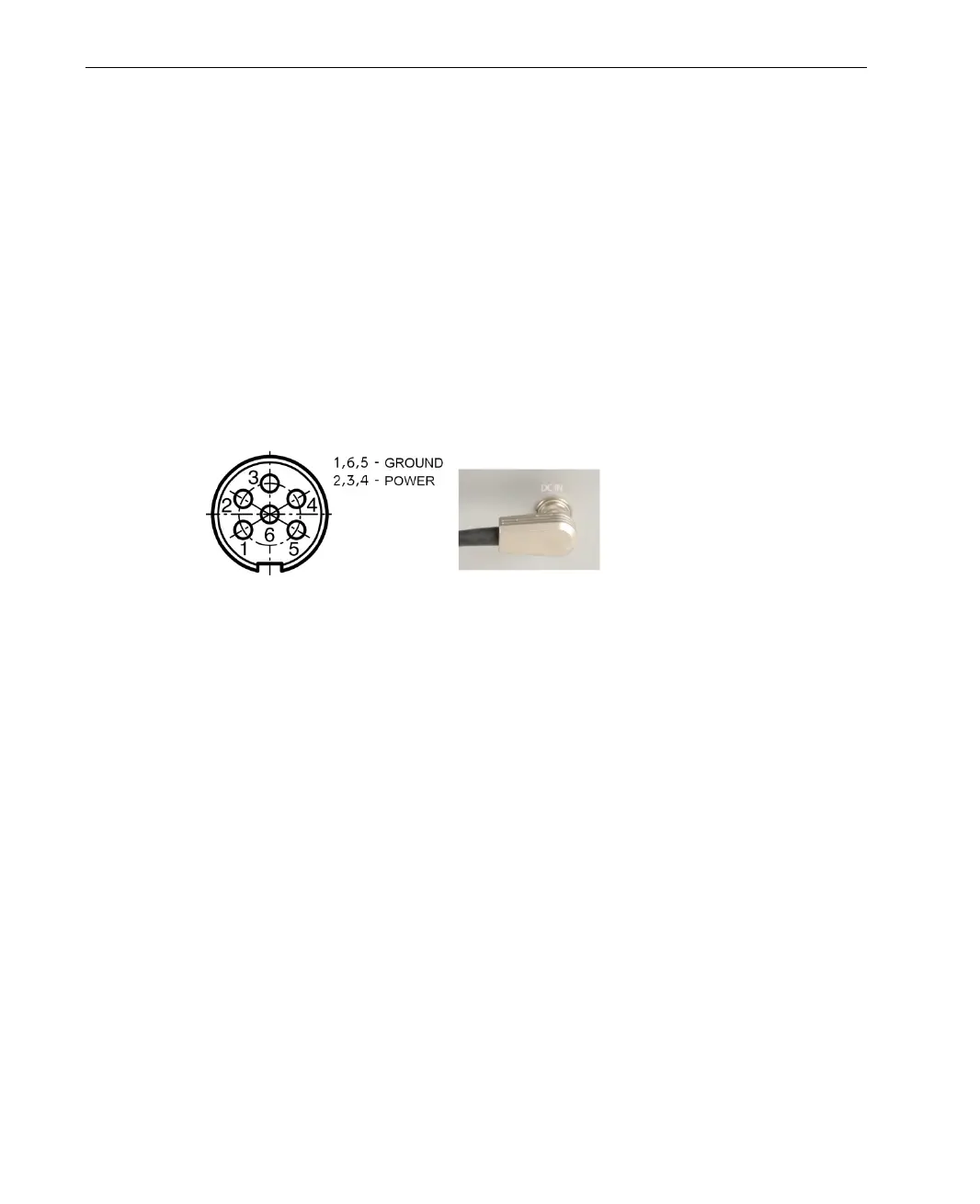
• Refer to the following figure for power input pinout:
Figure 118: Power Input Pinout
• Avoid leaving the product unprotected in direct sunlight for more than five
minutes.
• Do not let the product come into contact with corrosive materials.
• Do not let the product come into contact with explosive or corrosive gas.
• Do not let the product come into contact with fire.
• To prevent fire or shock hazard, do not expose the product to rain, liquid
or moisture. The product can be used in light rain while it is protected by
the attached rain hood. The product is definitely not designed to be used
under water.
• Only use the original LiveU backpack. Do not place the product in a
non-LiveU bag.



 To Next Page