32
ZENIT
STYLE
Style (Style Memory)
Up to 20 styles with the associated clearer settings can be
saved in the Style List (Style memory).
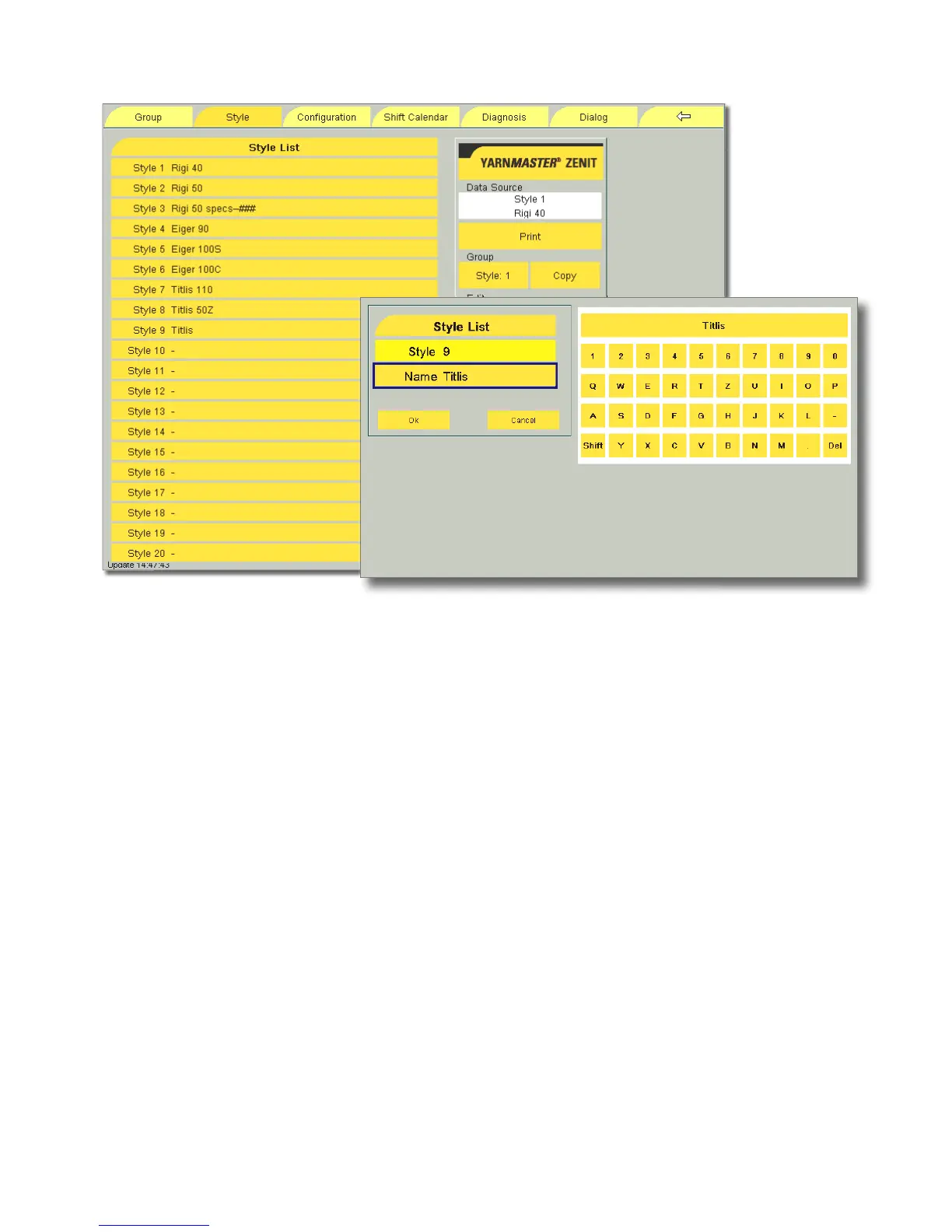
Saving a new style
All clearer settings of the Yarn Structure, Foreign Matter and Ba-
sic Settings menus have to be assigned to a style.
Example: New Style 9, “Titlis”
•
Call up the Yarn Structure menu.
•
Make the appropriate settings and assign these to Style 9.
•
Call up the Foreign Matter menu.
•
Make the appropriate settings and assign these to Style 9.
•
Call up the Basic Settings menu.
•
Make the appropriate settings and assign these to Style 9.
•
Call up the Style menu.
•
Select Style 9.
•
Enter “Titlis” under Name via the alphanumeric keyboard
and confirm with OK.
•
Assign the settings to Style 9.
All settings made are now saved as Style “Titlis”.
Copying a style
!
If a style is copied, all settings of the Yarn Structure, For-
eign Matter and Basic Settings menus are copied.
Changing a style
If settings that were assigned to a style are changed, these
will be shown in the Style List with # # #.
If settings for the current style have been purposefully
changed, the addition # # # can be deleted and the changed
settings assigned to the style.



 To Next Page