ZENIT
51
YARN STRUCTURE
Class Clearing
Clearing according to classes allows the creation of com-
pletely optional clearer characteristics. An advantage for fan-
cy yarn, core-spun yarn etc.
The use of class clearing in combination with conventional
clearing often achieves better results when short and long
faults occur at the same time.
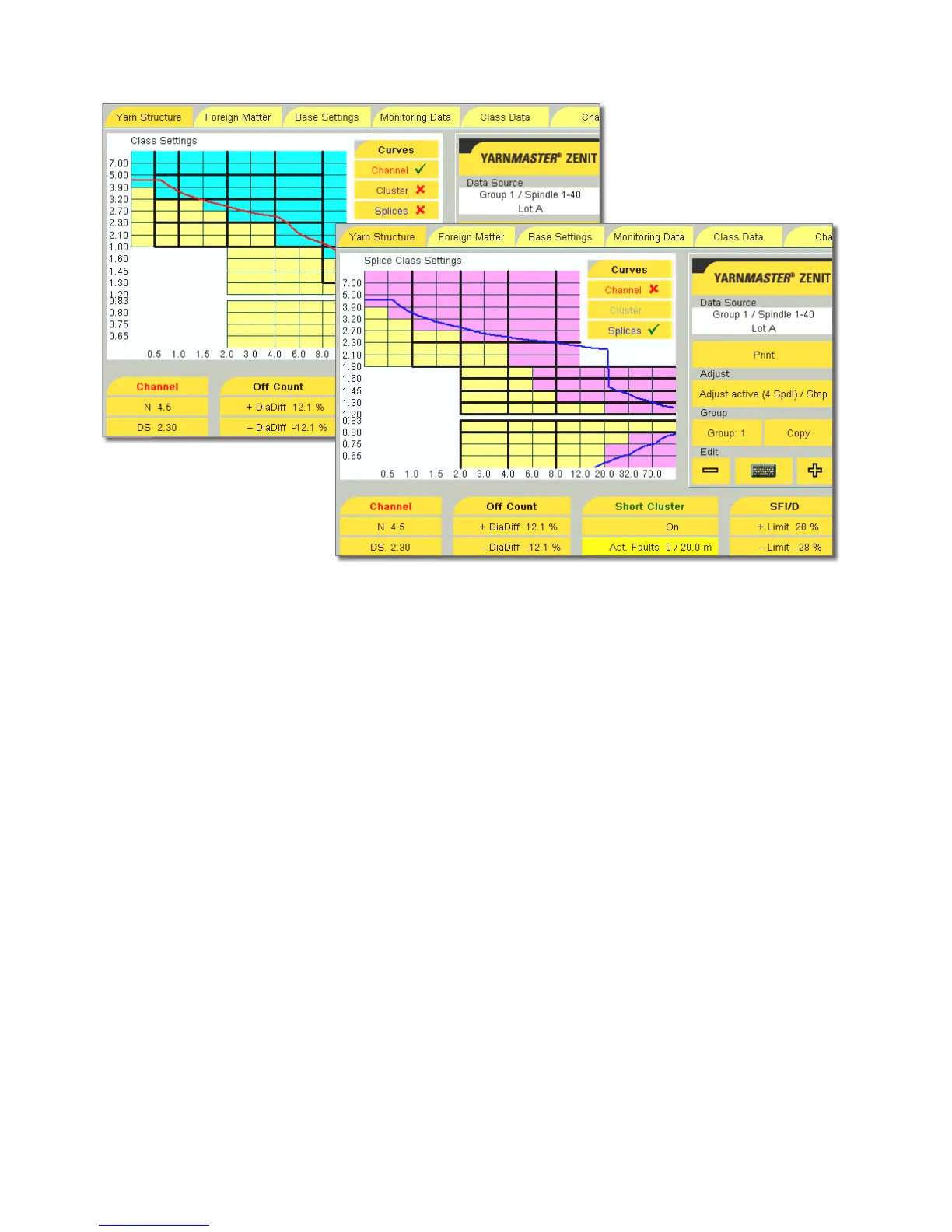
Class Settings
Blue class fields = Class clearing is active
Yellow class fields = Class clearing is not active
The displayed clearing curve is defined by the settings of the
clearer channels. Yarn faults situated inside of this curve are
cut, while faults outside the curve remain in the yarn.
During clearing according to classes, specific faults can also
be cut outside the clearing curve (select the desired fields).
Note: Class settings (blue) are not active during the splice
check.
Splice Class Settings
The splice class settings are active during each spindle start
for the first 0–120 cm (CheckLen splice).
To show the Splice Class Settings window, Splices must be
activated.
Purple class fields = Splice class clearing is active
Yellow class fields = Splice class clearing is not active
The displayed splice curve is defined by the settings of the
splice channels. When clearing according to classes, the splic-
es are also cut in the activated class fi elds outside the clear-
ing curve.



 To Next Page