72
ZENIT
SERVICE FUNCTIONS
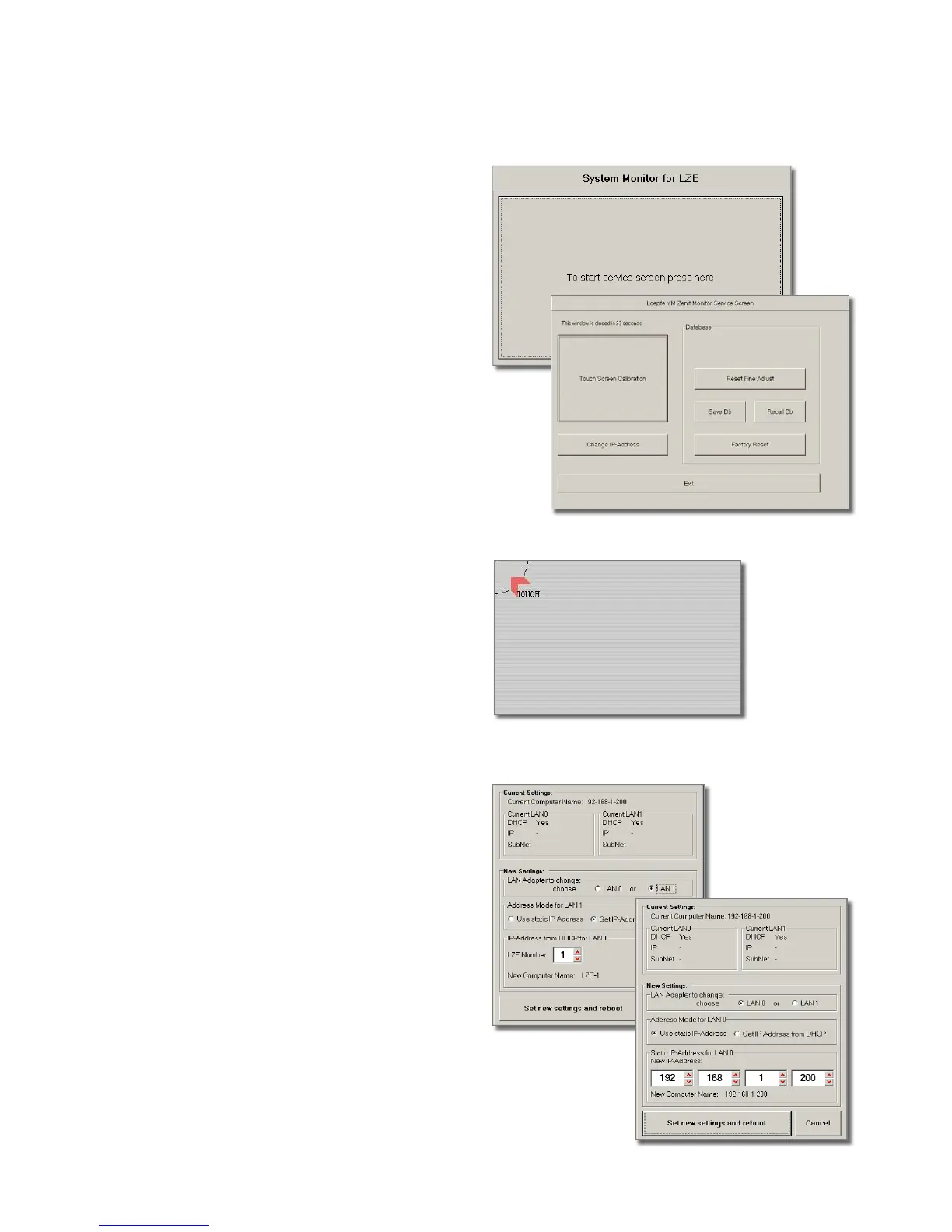
Change of IP Address
!
If required, these settings should be altered by in-
structed personnel only!
•
Tap the Change IP-Address button in the Loepfe YM Zenit
Monitor Service Screen window within 30 seconds.
•
Select the User static IP-Address address mode.
•
Enter the respective IP address.
Screen Calibration
•
Tap the Touch Screen Calibration button in the Loepfe YM
Zenit Monitor Service Screen window within 30 seconds.
The calibration screen opens. Calibration points marked with
red blinking arrows are shown in the screen.
•
Touch the center of all calibration points in the screen
successively with a non-scratching, fine object (e.g. ball
pen tip). Confirm the calibration with Accept button.
•
Exit the Loepfe YM Zenit Monitor Service Screen window
with Exit.
Service Functions
Various service functions can be called up during the start of
the system.
•
Switch the central unit off (Power OFF) and on again
(Power ON) or call up the Dialog menu and select Reboot
System.
•
Tap System Monitor for LZE after it is displayed.
The Loepfe YM Zenit Monitor Service Screen window opens.



 To Next Page