Page 30 of 188
User Manual MAS-100 Regulus en.docx, Version: 4.0
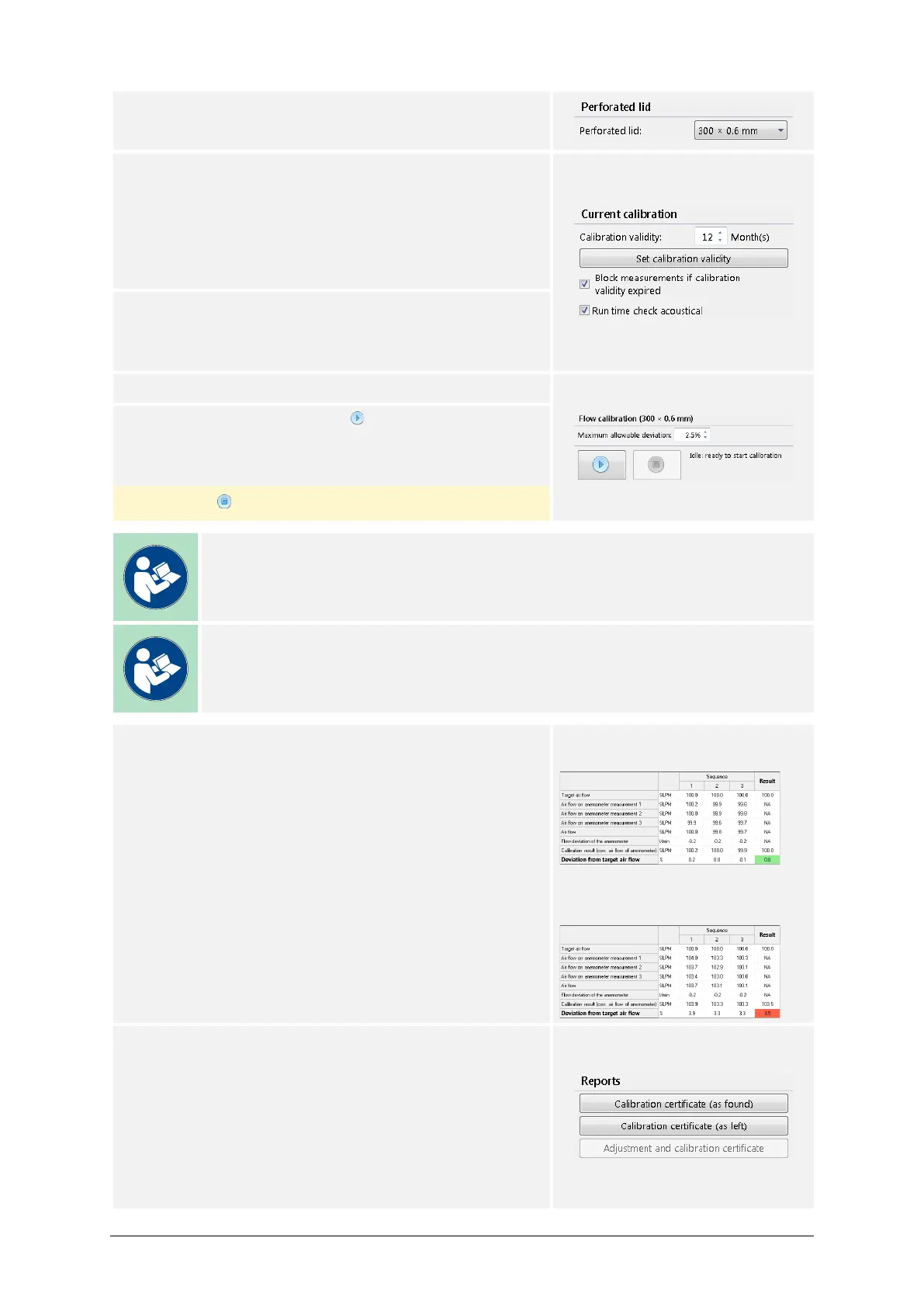
13) Select the perforated lid of the sampling head:
300 × 0.6 or 400 × 0.7
14) Choose the calibration validity:
– Values from 0 to 12 months may be entered.
– A value of 0 disables the calibration validity
check upon starting up the air sampler.
Press Set calibration validity to set the value.
15) Set the optional calibration process parameters:
– Measurement blocking upon expired calibration.
– Acoustic feedback for the Run time check.
16) Set the value for the Maximum allowed deviation.
17) Start the process with the button.
Pressing afterwards aborts the process.
Note
The standard factory setting for the Calibration validity is 12 months.
Note
The standard factory setting for the Maximum allowed deviation is ±2.5 %.
18) Once the process is done, the final calibration re-
sult will be displayed by the value Deviation from
the Target Air Flow.
A calibration was successful if:
Deviation from the Target Air Flow is within ± the
Maximum allowed deviation.
Successful calibration, value
marked green:
Failed calibration, value marked
red:
19) To document the results, the user may now create
a calibration certificate. The following options are
available:
– Calibration certificate (as found)
– Calibration certificate (as left)
The user may choose by pressing the appropriate
button.



 To Next Page