McHale Fusion 3 Baler & Wrapper
62
7.2.9 Manual Wrapping
Softkeys B & C on the main screen 1 are used to manually rotate the wrapper ring.
Pressing and holding the forward (Softkey C) or reverse (Softkey B) once will rotate the
ring slowly. Pressing forward (Softkey C) twice and holding it will rotate the ring forward
at full speed.
In Automatic Mode, the rotate buttons will not be active unless the ring is NOT in the
“home” position.
7.2.10 Knives Operation
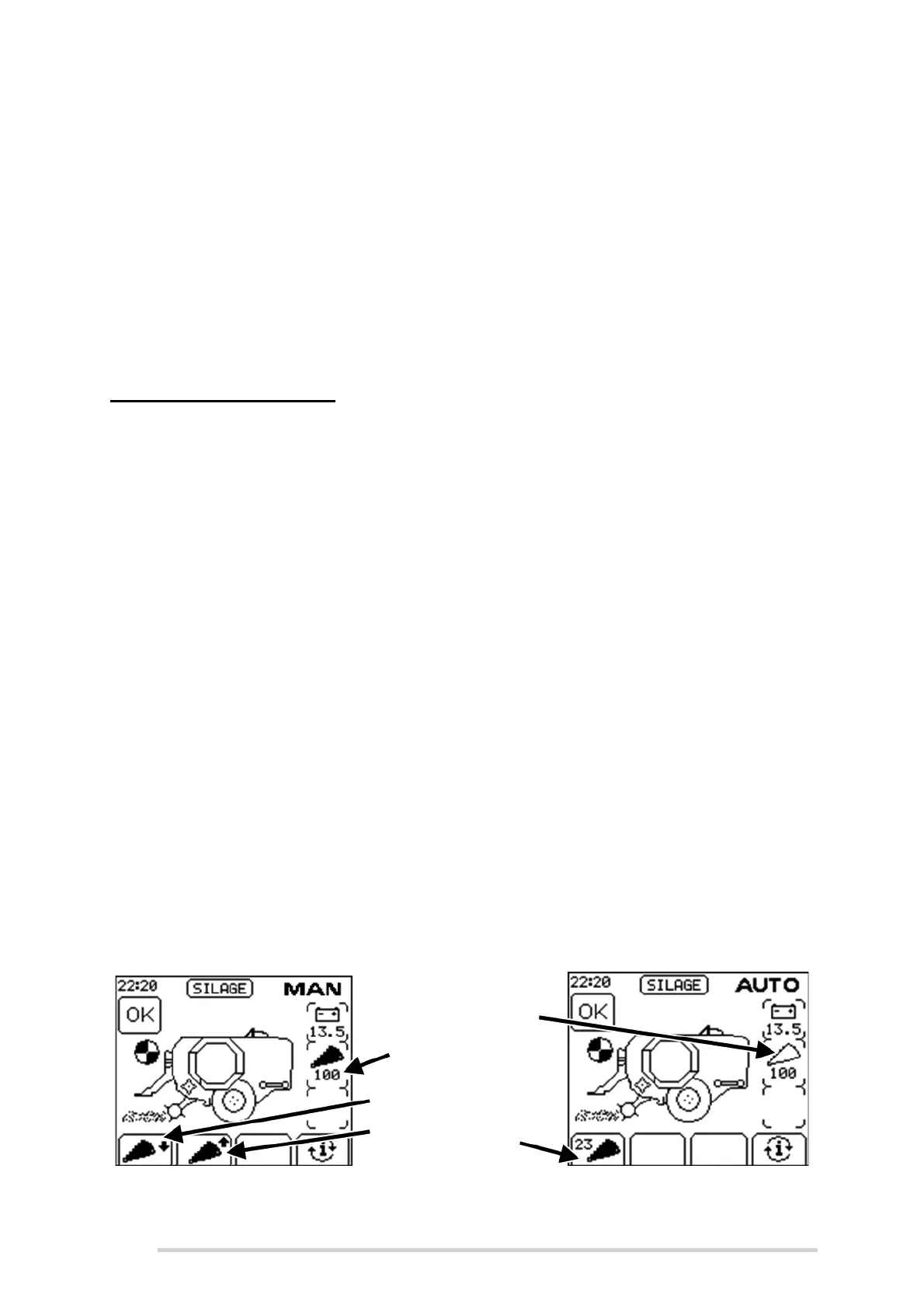
Standard Knife Operation allows all 23 knives to be raised/lowered together.
If Manual Mode is selected there are two soft keys active for the knives on the second
working screen. Softkey A lowers the knives and Softkey B raises the knives. The knife
pressure in Bar is displayed on the middle right information display, if you cannot see
it on the screen, toggle to the other screen display by pressing the Softkey D button.
When the knives are raised the pressure will increase and stop at the normal working
pressure, approx. 50 bar.
Sometimes, if the knives have not been used for a while, full pressure may need to be
used. To do this, the “knives up button” (Softkey B) should be released and when
normal working pressure is reached, it should be pressed again.
The pressure will then increase to the maximum allowed and a “Knife pressure too
high” warning will be displayed to warn the operator not to bale with the pressure this
high. To release the pressure, lower the knives fully by pressing “knives down” (Softkey
A) and press it again to raise them and reset the normal operating pressure.
In Automatic Mode, Softkey A is toggled to select the number of knives desired, 0 or
23. The machine will automatically move the knives to the correct position and
constantly monitor the knife pressure and correct it as necessary
A sensor indicates when the knives are fully up. The knife symbol will be shown as
follows (See Figure 7.c):
Completely black when the knives are up
Only an outline of the knife will be shown if they are down
Figure 7.c - Standard Knife Operation
Knives up
indicator
Knives
up
Knives
down
Knives down
indicator
Toggle to
select 0 or 23
knives


 To Next Page