McHale Fusion 3 Baler & Wrapper
63
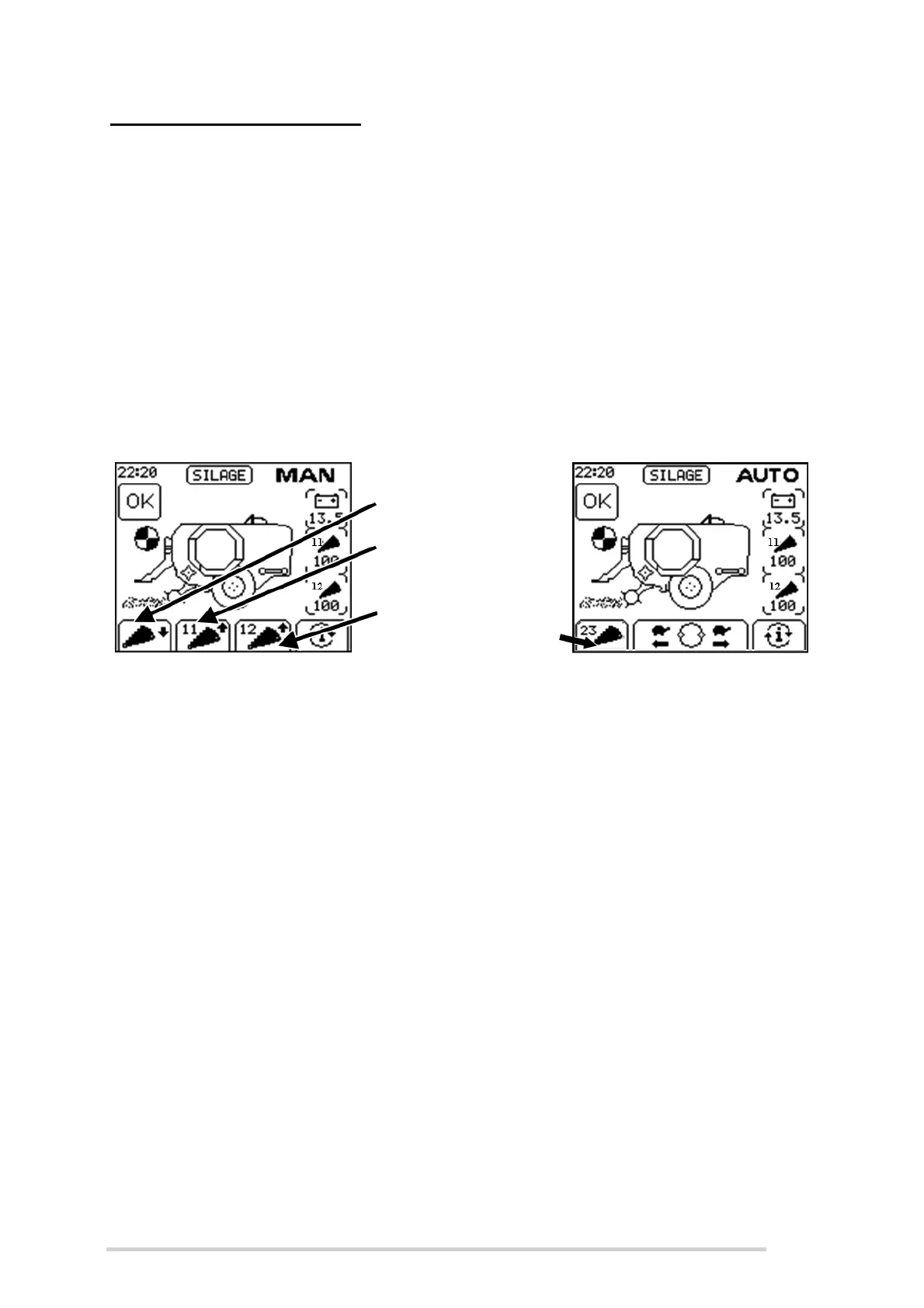
Selectable Knives Operation is an optional extra with the Fusion 3 which allows the
selection of 0, 11, 12 or 23 knives from the control unit.
In Manual Mode, there are 2 buttons use to the raise the knives, one for 12 knives
(Softkey C) and one for 11 knives (Softkey B). Pressing “knives down” (Softkey A)
lowers both sets (11 & 12) together. There are two knife pressure displays, one for the
set of 11 knives and one for the 12 set.
In Automatic mode, 0, 11, 12, or 23 knives can be selected. This is done by toggling
the knives button (Softkey A) to the desired knife setting.
A sensor indicates when the knives are fully up. The knife symbol, for 11 & 12 knives
will be shown as follows (See Figure 7.d):
Completely black when the knives are up
Only an outline of the knife will be shown if they are down
(
Figure 7.d - Selectable Knife Operation
7.2.11 Automatic Operation
Automatic operation is the preferred method of operation on a day-to-day basis,
allowing the machine to free-flow through each cycle. Manual operation is generally
used when the user wants to have direct control over individual functions for service/
maintenance reasons.
When the control box is switched on, Automatic mode can be selected by pressing
button 3. AUTO will be displayed in the top right of the screen and the Fusion 3 image
shows crop moving into the pick-up on the screen to show that baling is ready to start.
Netting: As crop continues to build up in the chamber, a series of beeps will sound for
3 seconds when the bale has reached the predetermined density (bale full) to alert the
operator that netting is about to start. The operator must stop the forward movement of
the tractor at once. The “Net Feed” (Button 6) may be held at this point to delay the net
from feeding, if the operator wants to pack a little extra crop into the chamber. Next, a
continuous beep informs the operator that the netting has started. and the wrapped
bale on the wrapper will be tipped off automatically, if “Auto tip” is turned on (See
Section “Auto Tip” on page 67). If the net knife does not trip within 20 seconds, then it
is presumed that there is no net / a problem has occurred and a “check net” warning
will be displayed (See Section “Check net” on page 70). The roll of net can be replaced
and “Net Feed” (Button 6) is pressed to start netting again.
All knives down
11 knives
up
12 knives
up
Toggle to
select 0,
11, 12 or 23
knives



 To Next Page