User Manual for the Meca500 Industrial Robot (for rmware 10.1) 21
OPERATING THE ROBOT
5.2.4 Activating and homing the robot
Click the button in the menu bar and select "Activate then Home".
The robot will move slightly during homing. Before homing it, make sure that there is no risk for
mechanical interference.
5.2.5 Testing joint 6
After homing, type "0" in the text field next to θ
6
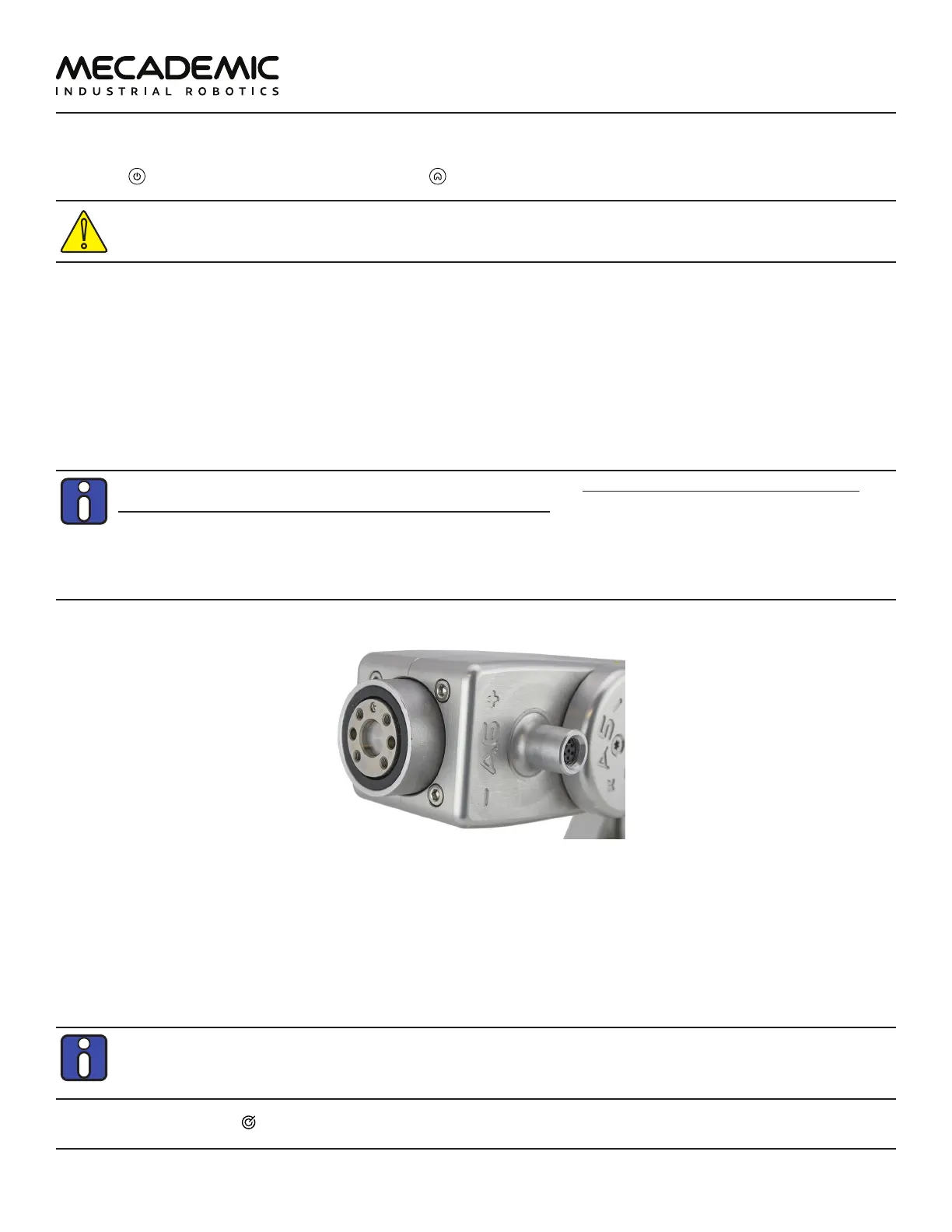
(joint 6) in the Jog joint tab and press Enter. The flange
of the robot must be exactly as in Figure17. Later, when you connect tooling to the flange of the robot,
you must remember the correct orientation of the tooling when joint 6 is at zero degrees, and continue
to perform this test every time you start your robot.
If the flange is rotated ±120° with respect to the orientation shown in Figure17, perform the procedure
given below, before continuing to use the robot.
The range of the absolute encoder of joint 6 is only ±420°. Therefore, you must always rotate
joint 6 within that range before switching the robot o. Failure to do so may lead to an oset of
±120° in joint 6. If this happens, unpower the robot and disconnect your tooling. Then, power up
and activate the robot, perform its homing, and zero joint 6. If the screw on the robot's ange
is not as in Figure17, then rotate joint 6 to +720°, and deactivate the robot. Next, reactivate it,
home it and zero joint 6 again. Repeat one more time if the problem is not solved.
Figure17: Joint 6 at zero degrees
5.2.6 Moving the robot
A six-axis robot arm is a complex mechanism and no matter how intuitive its programming interface
is, the robot will still have limits. These limitations are not always obvious. For example, in any six-axis
robot arm, there are often paths that the robot cannot follow, even though they seem to be inside the
robot's workspace. The workspace of a typical six-axis robot is a very intricate six-dimensional entity.
If you know nothing about orientation representations and robot singularities, we strongly
advise you to read some introductory notes on robotics and our tutorials on Euler angles and
on robot singularities.
After homing, click the button in the jogging panel and select "Zero all joints". The robot will move all



 To Next Page