User Manual for the Meca500 Industrial Robot (for rmware 10.1) 47
OPERATING THE SMART POWER SUPPLY
Reset – A (7)
Reset – K (15)
External reset
Inside power supply
R
V
in
5 V ≤ V
in
≤ 24 V
R = V
in
/ 0.024
P
res ≥
V
in
²
/ R
Inside power supply
V
in
5 V ≤ V
in
≤ 24 V
Reset – A (7)
Reset – K (15)
External reset
current
limiter
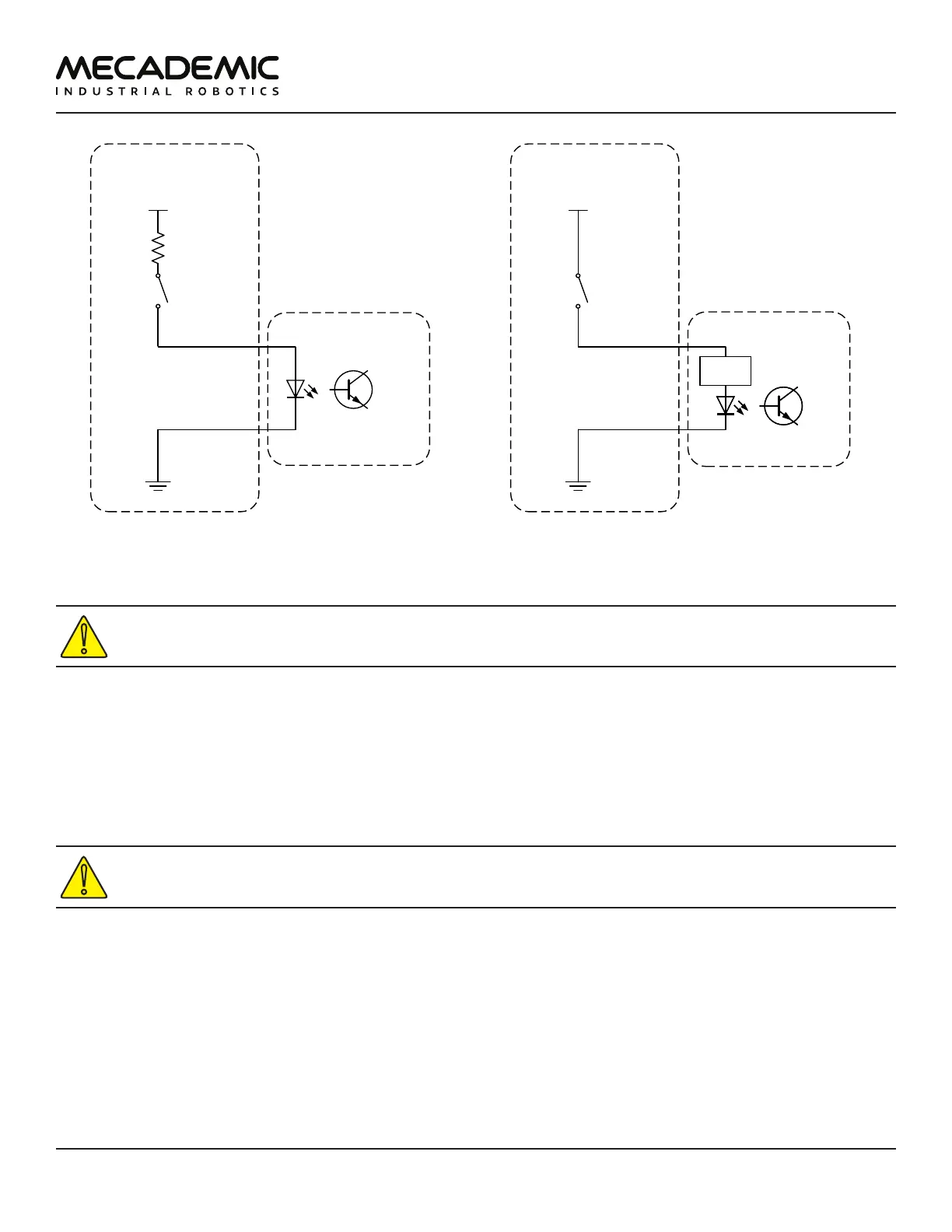
(a) Wiring the external reset in the Meca500 R3 (b) Wiring the external reset in the Meca500 R4
Figure30: Examples of wiring the external reset in the Meca500 R3 and R4
In the Meca500 R3, YOU MUST USE RESISTANCES to limit to current applied to the external reset
terminals to 24mA, or else you will damage the power supply.
7.3.5 Power Status
The power status terminals provide an output signal that corresponds to the power state of the robot
(in the case of R3) or of the robot motors (in the case of R4). The current on these terminals is limited to
60mA, and the voltage to 24 V (DC). There is no difference between the R3 and R4 with regards to the
power status connection.
Two examples of wiring the power status terminals are given in Figure31.
In both the R3 and R4 versions of the Meca500, the maximum voltage applied at the power
status terminals must be 24 V (DC), and the maximum current must be limited to 60 mA.



 To Next Page