46 User Manual for the Meca500 Industrial Robot (for rmware 10.1)
OPERATING THE SMART POWER SUPPLY
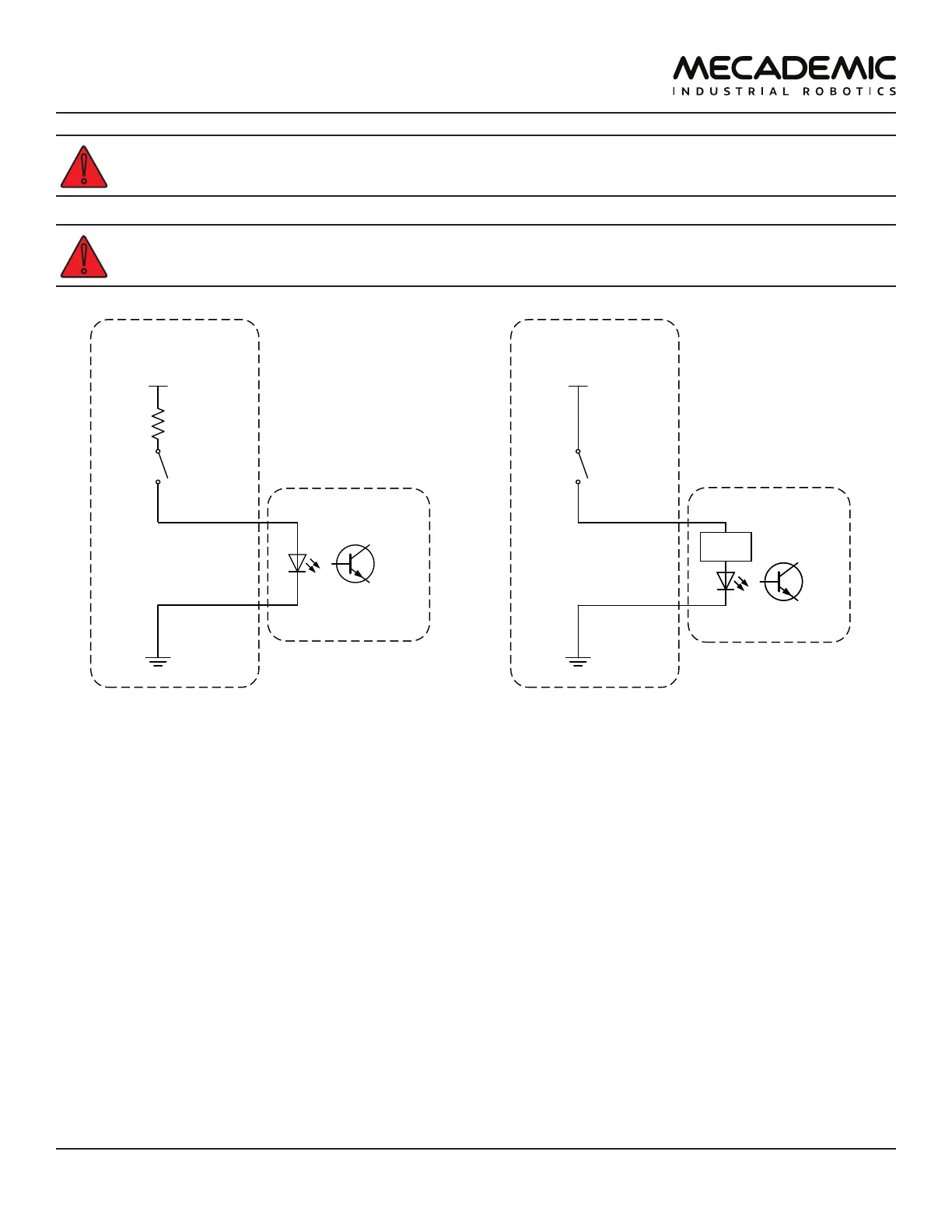
The software stop marked SWStop is not a safety-rate protective stop.
The SWStop circuit must be open for the robot to be able to move.
SWStop – A (6)
SWStop – K (14)
External software stop
Inside power supply
R
V
in
5 V ≤ V
in
≤ 24 V
R = V
in
/ 0.024
P
res ≥
V
in
²
/ R
SWStop – A (6)
SWStop – K (14)
External software stop
V
in
5 V ≤ V
in
≤ 24 V
Inside power supply
current
limiter
(a) Wiring the SWStop in the Meca500 R3 (b) Wiring the SWStop in the Meca500 R4
Figure29: Examples of wiring the SWStop in the Meca500 R3 and R4
7.3.4 External Reset
The external reset connection performs the same function as the Reset button on the power supply. The
terminals of the external reset are connected in parallel with the E-Stop on the power supply.
The external reset signal would normally come from a safety PLC. Simple examples for wiring diagrams
in the case of the R3 and R4 versions of the Meca500 are shown in Figure30. The same specifications for
the input voltage and current apply, as in the case of the SWStop, as shown in Figure30.



 To Next Page