User Manual for the Meca500 Industrial Robot (for rmware 10.1) 35
THE MECAPORTAL
6.7.1 The joint jog tab
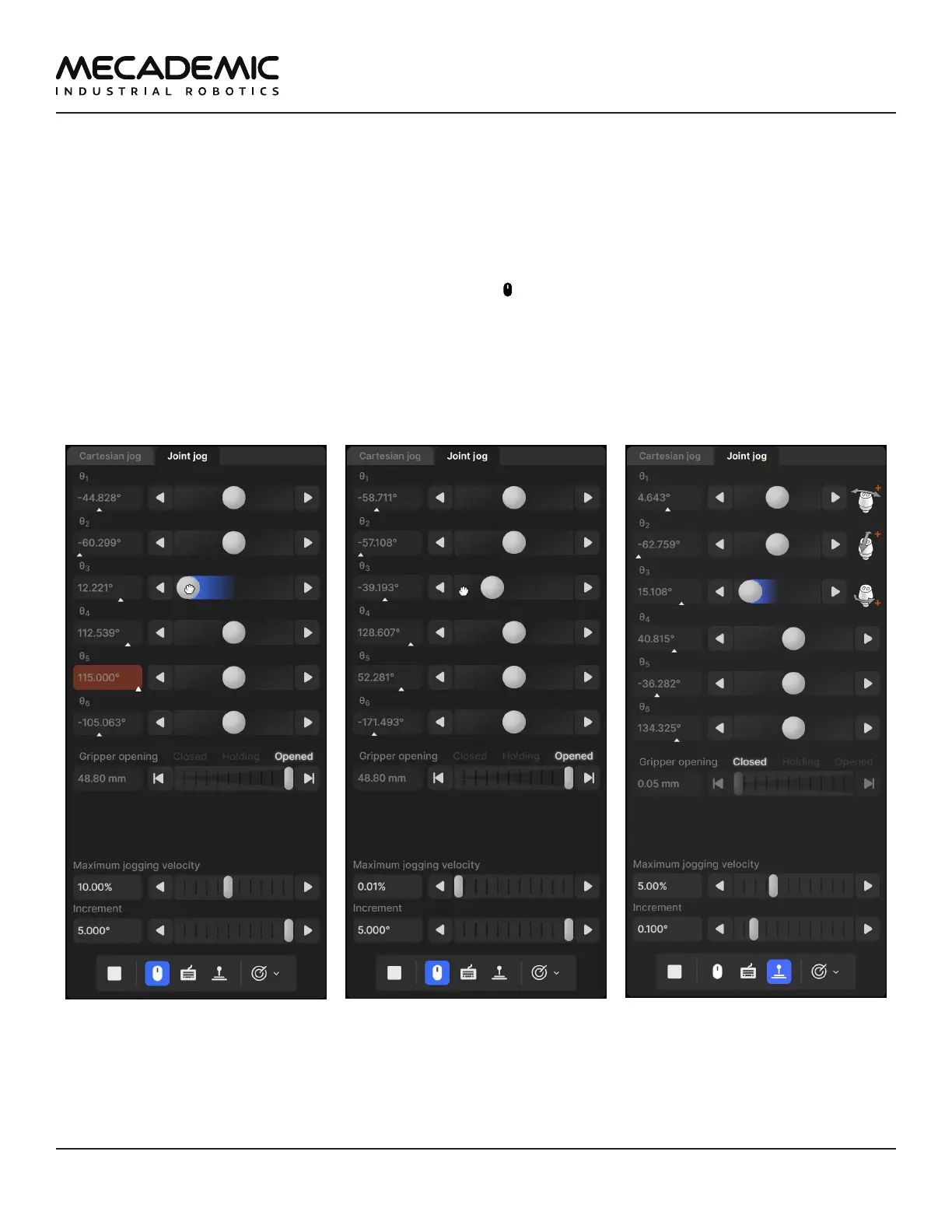
We use an innovative UI element (patent pending) for jogging each joint. That jogging bar is a mixture of
a slider and a virtual single-axis joystick and has dual functionality, depending on which mouse button
is used to interact with it (Figure21). You can also jog each joint using keyboard shortcuts, as well as a
three-axis or a six-axis joystick with at least two buttons. (Technically, you can use other joysticks, such
as a PlayStation controller, but the icons displayed will be those for the SpaceMouse.)
By default, only the mouse is activated, and the button at the bottom of the jogging panel is
highlighted in blue. To jog each axis as if using a joystick, click the primary mouse button onto the thumb
of the corresponding jogging bar and drag it right or left (Figure21a). The further you drag the thumb
away from its central position, right or left, the faster the joint turns, in positive or negative direction,
respectively. In other words, you are directly controlling the joint speed, rather than the joint position.
Alternatively, you can directly click with the primary mouse button on either of the two arrow buttons of
the jogging bar and hold, which makes the joint rotate at the specified maximum jogging velocity.
(a) Joint jogging using primary
mouse button
(b) Joint jogging using secondary
mouse button
(c) Joint jogging using Mecademic's
three-axis joystick
Figure21: Joint jog tab



 To Next Page