Have a question or need assistance?
Call Medicomp’s Patient Support: 877-996-5553
Safely Loading the Pendant Battery
Universal Pendant operates on a rechargeable, lithium ion battery. The battery locks into the
battery well of the back of the Universal Pendant.
To safely load the battery into the Pendant:
● Remove the Pendant and one battery from the zippered kit
Insert battery into Pendant.
● Hold Pendant face down in hand or place on a flat surface. There is a well where
battery will be inserted
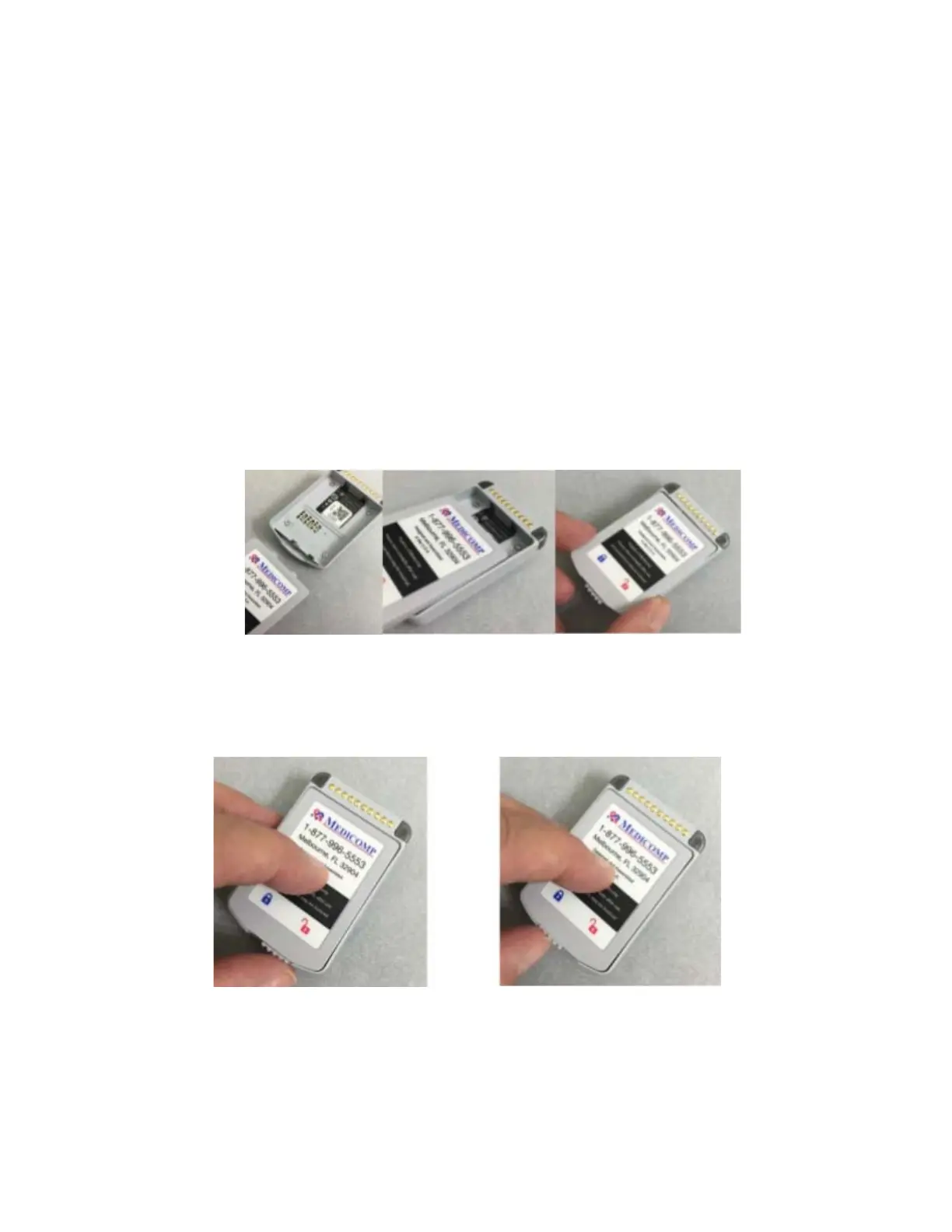
● Insert battery into well of Pendant: with the Medicomp label facing up, and the two
small tabs into notches in flat wall of the well
Inserting battery into Pendant battery well
● Slide the latch at back of the battery to left, securing battery in place. Battery is locked
in place when moveable latch is under blue lock icon on label
Battery is unlocked (latch under RED icon) Battery Is locked (latch under BLUE icon)
Tele
Patch™ Cardiac Monitor PM750
USER MANUAL - UTM0000701-05E
| APRIL 4, 2019
71



 To Next Page