Have a question or need assistance?
Call Medicomp’s Patient Support: 877-996-5553
● Keep the Handset charged and turned on.
● Keep Handset within 10’ of the Pendant during procedure.
● Review how to record a SYMPTOM, make a Diary Entry.
● Review how to charge the Handset daily.
● Review how to change and charge the Pendant battery.
Recording Symptoms: Standard TelePatch
Procedure
When a Symptom is felt, or at other times as directed by your physician:
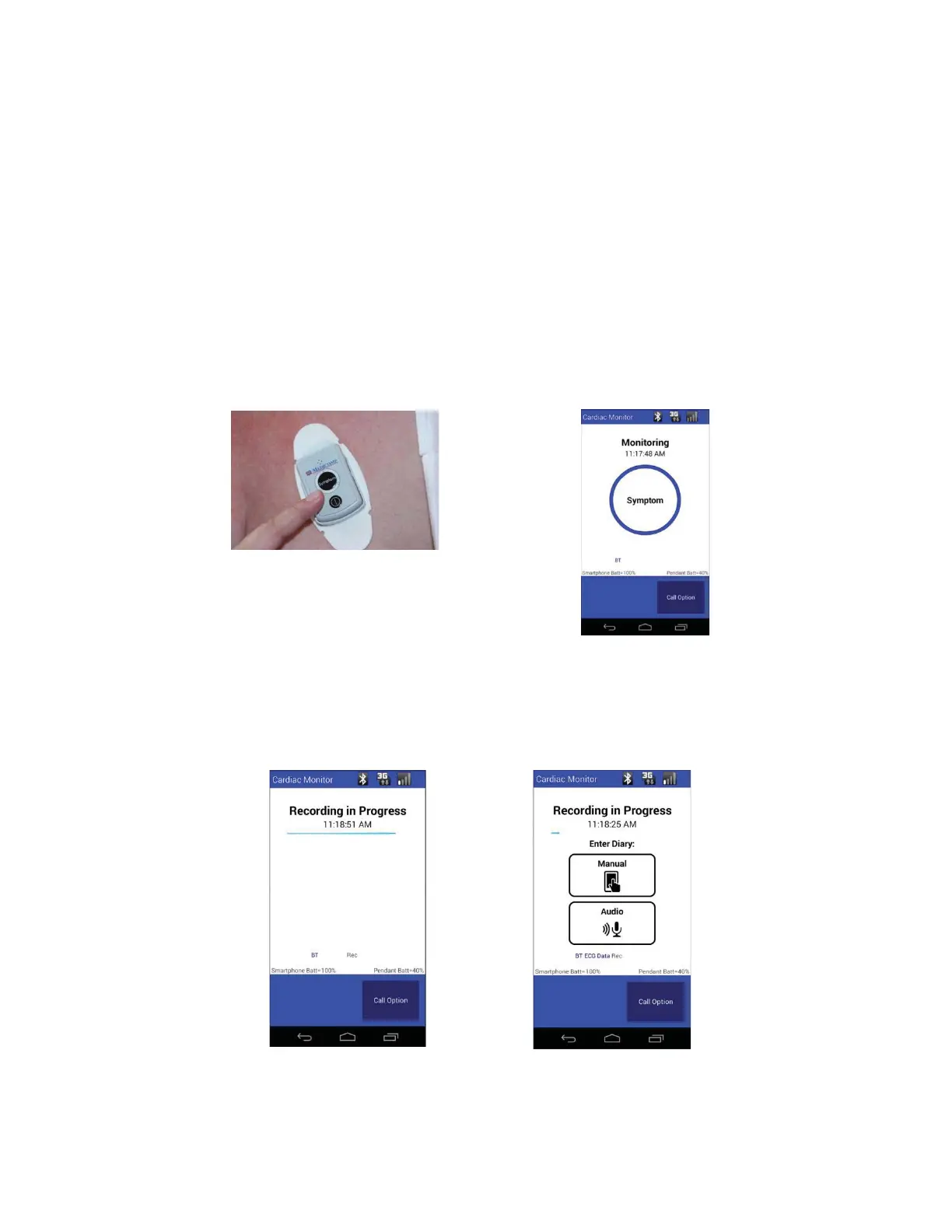
● Press the SYMPTOM button on the Pendant or on the Handset, to record heart’s
activity.
The SYMPTOM button on the Pendant
has two raised bars so it can be easily located.
Press SYMPTOM on Universal Pendant
OR Press SYMPTOM on Handset
●
The TelePatch Handset will display Recording in Progress for 60 seconds.
●
The Tele
Patch Handset will light up with a message to make a Diary Entry.
Tele
Patch™ Cardiac Monitor PM750
USER MANUAL - UTM0000701-05E
| APRIL 4, 2019
45



 To Next Page