medin Medical Innova ons GmbH
Adam-Geisler-Str. 1
82140 Olching, Germany
+49 8142 448 460
info@medin-medical.com
www.medin-medical.com
IFU_medin-NC3 EN
Rev 05 Status as of 28.04.2021
16 of 68
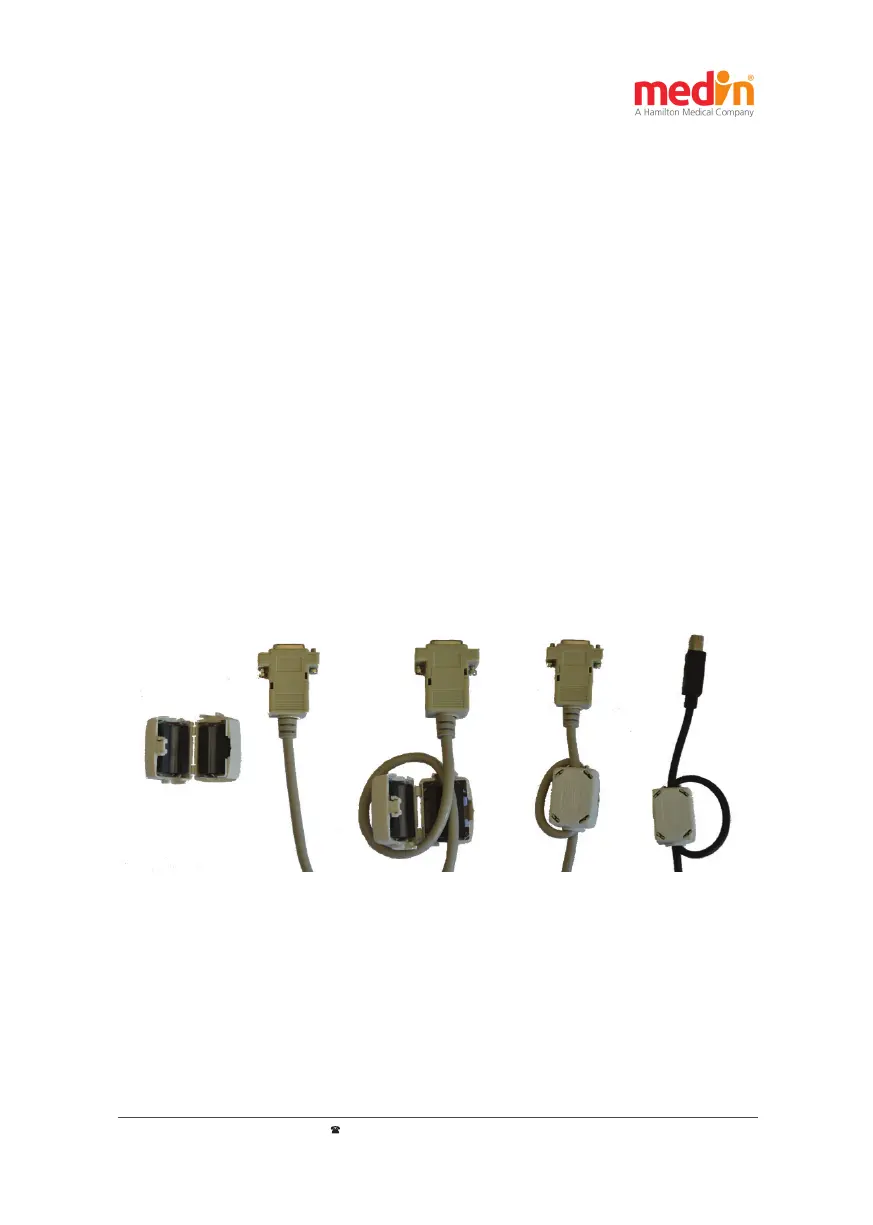
a) b) c) d)
- Data type: serial
- Baud rate: 115200
- Data bits: 8
- Parity: none
- Stop bits: 1
- Handshaking: none
To connect the medin-NC3® to a system for archiving and processing pa ent data, a crossover RS232 cable ("null
modem cable") can be used (see Figure 3-3: RS232 and USB cable with ferrite). Nonetheless, the func on of the
medin-NC3® must be observed to avoid disrup ons by the en re system with regard to electromagne c in uences.
The protocol speci ca on for integra on into a system for archiving and processing pa ent data can be found in
sec on 3.4.4.
3.4.2. USB interface
The USB interface is purely a service interface, for example, to install so ware updates. Its cover should be opened
only by trained personnel.
3.4.3. Cable
The cables to be used (RS232 / USB) must contain a ferrite (REF 39-125; Würth Elektronik – type: 742-711 32, gray
or black) with a double wound cable in accordance with Figure 3-3.
Figure 3-3: RS232 and USB cable with ferrite
A) RS232 cable without ferrite b) RS232 cable with a ferrite that is s ll open whereby the cable must be carried
through the core twice, that is, wrap the ferrite core once. c) RS232 cable with ferrite d) USB cable with ferrite (the
cable must also be carried through the ferrite core twice as in the case of RS232 cable)


 To Next Page