medin Medical Innovaons GmbH
Adam-Geisler-Str. 1
82140 Olching, Germany
+49 8142 448 460
info@medin-medical.com
www.medin-medical.com
IFU_medin-NC3 EN
Rev 05 Status as of 28.04.2021
29 of 68
5.1 Operator console
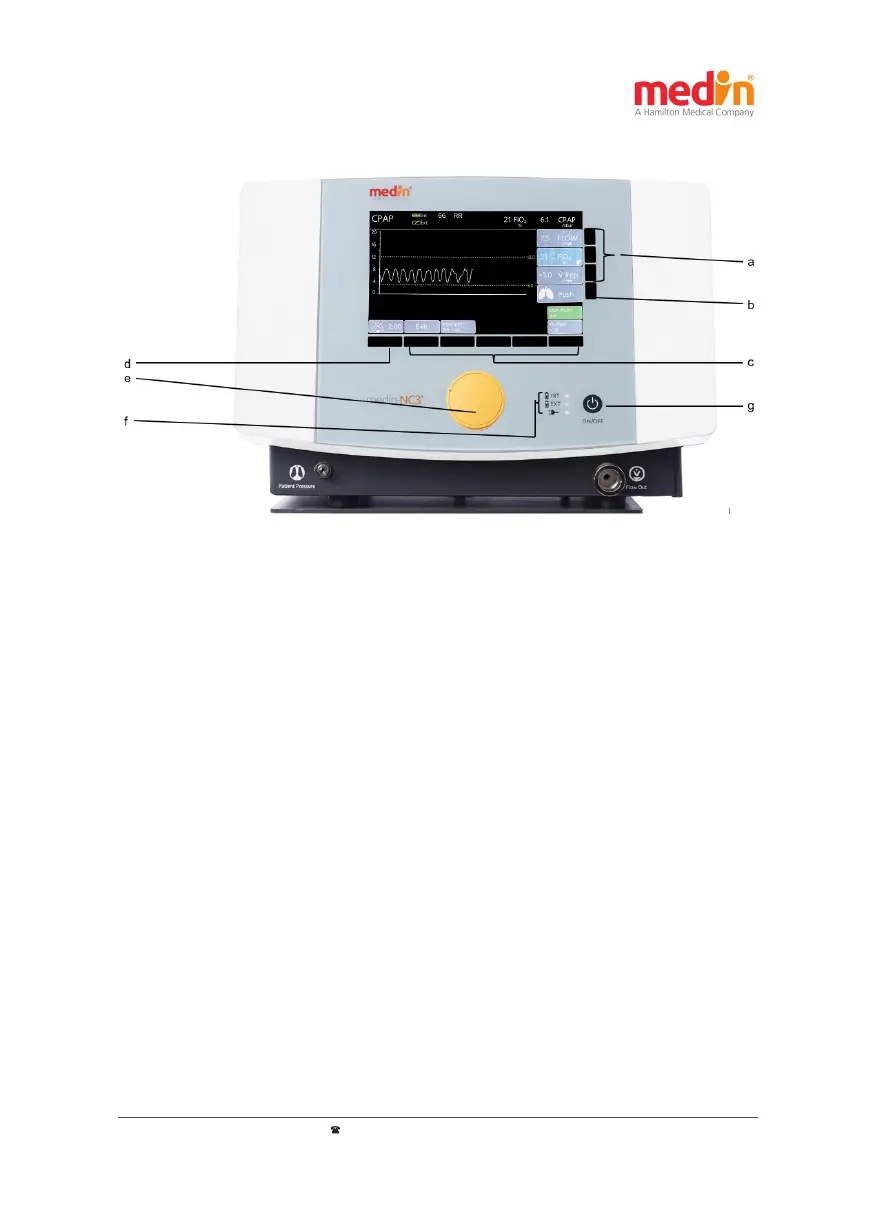
Figure 5-1: Operang unit of the medin-NC3®: a) Buons for seng the basic CPAP parameters;
b) Trigger buon for manual pushes c) Buons for mode-specic and other sengs; d) Alarm buon;
e) Dial to change and conrm sengs; f) Baery and power supply unit LEDs; g) ON/OFF;
The medin-NC3® is operated by means of several buons and a dial. The usual procedure is to press a buon to
select the parameter indicated next to that buon on the display, then use the dial to select the required value. This
is conrmed by pressing the dial.
The various buons are divided into several groups:
- Basic CPAP sengs: (Figure 5-1–a) to select and adjust the two basic CPAP parameters of oxygen
concentraon (FiO
2
and Flow). In addion, to set the addional ow for pushes (F
insp
) and to trigger an
O
2
ush.
- Push buon (PUSH): (Figure 5-1–b) to trigger a push manually and immediately
- Other sengs: (Figure 5-1–c) to select and alter mode-specic and other sengs
- Alarm: (Figure 5-1–d) to conrm alarms and control alarm statuses. Pressing this buon results in an
acve alarm being transferred to "Conrmed" status; the associated alarm sound is muted for 120
seconds and then reacvated. By pressing the buon again, the alarm sound can be switched to become
audible again before the 120 seconds are up. However, if a new alarm becomes acve during the mute
period, this will also be emied acouscally. In addion, the status Audio paused can be ended using
this buon. A countdown shows the user how much me remains in the Conrmed and Audio paused
statuses.
- ON/OFF: (Figure 5-1–g) to switch the medin-NC3® on and o


 To Next Page