medin Medical Innovaons GmbH
Adam-Geisler-Str. 1
82140 Olching, Germany
+49 8142 448 460
info@medin-medical.com
www.medin-medical.com
IFU_medin-NC3 EN
Rev 05 Status as of 28.04.2021
31 of 68
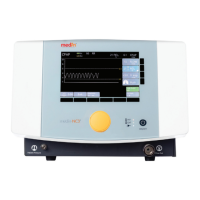
- Buon assignment: The elds m to r in Figure 5-2 have changing funcons. The current meaning of
each buon is shown in the display over it. In some menus, two dierent parameters are assigned to
a single buon in elds m to r. In this case, the operator can press the relevant buon several mes
to switch between the parameters.
5.3 Basic CPAP sengs
The CPAP therapy generated in the Medijet® is largely determined by two factors: the ow volume (Flow) emied
by the CPAP driver and the oxygen concentraon (FiO
2
) contained in this. These two fundamental factors are set in
the same way in all modes and are transferred when the operator switches from one mode to another.
Flow:
Press buon a as shown in Figure 5-2 to change the ow value that has been selected. This acon acvates the
ow seng (a green background appears). The target value can then be changed by turning the dial. As this also
immediately changes the ow volume produced by the medin-NC3®, the operator can see the eect of this change
on the CPAP pressure produced as shown in graph h in Figure 5-2. The operator can terminate acvaon, and thereby
the ability to change the ow value, by pressing the dial. If the dial is not pressed to conclude the ow change, the
medin-NC3® sll accepts the ow volume change.
If the ow value is altered in situaons when no paent is connected to the Medijet®, the Medijet® prong adapter
must be closed by the operator during this process (e.g. by holding it shut). This simulates the CPAP pressure which
is produced. If a paent is connected to the Medijet® during ow adjustment, the prong or mask must be checked
for leaks before any adjustment to the ow is made as the presence of leaks could aect the CPAP pressure which
is produced.
The medin-NC3® automacally produces a ow of 7 L/min on start-up. The user must adjust this ow while keeping
the Medijet® prong adapter closed unl the ow produces the desired CPAP pressure.
Warning:
Since the set basic ow (Flow) and addionally the set push ow (F
insp
) are emied during a push, an increase in the
basic ow also increases the CPAP pressure during a push. Therefore the seng for F
insp
must always be monitored
when the Flow seng is changed. (Adjustment according to chapter 5.5)
Please note:
The mask or prong should always be checked for leaks before adjusng the ow that has been selected, as the
presence of leaks aects the CPAP pressure which is produced.
If the Leak-Assist funcon is acvated in CPAP or Apnea CPAP mode or NIPPV mode, it is automacally deacvated
by adjusng the ow. If it is once again desired, it must then be manually restarted (see chapter 5.6).
Oxygen concentraon FiO
2
:
Alter the oxygen concentraon by using buon b in Figure 5-2 to highlight the current oxygen concentraon and
then turning the dial to select the desired value. Press the dial to conrm the new value. This completes the process
of adjusng the oxygen concentraon. It is only now that the medin-NC3® alters the oxygen concentraon in the
paent ow. If the oxygen concentraon adjustment is not conrmed by pressing the dial, the medin-NC3® connues
to blend the oxygen concentraon that was set before the target value was adjusted.


 To Next Page