medin Medical Innovaons GmbH
Adam-Geisler-Str. 1
82140 Olching, Germany
+49 8142 448 460
info@medin-medical.com
www.medin-medical.com
IFU_medin-NC3 EN
Rev 05 Status as of 28.04.2021
23 of 68
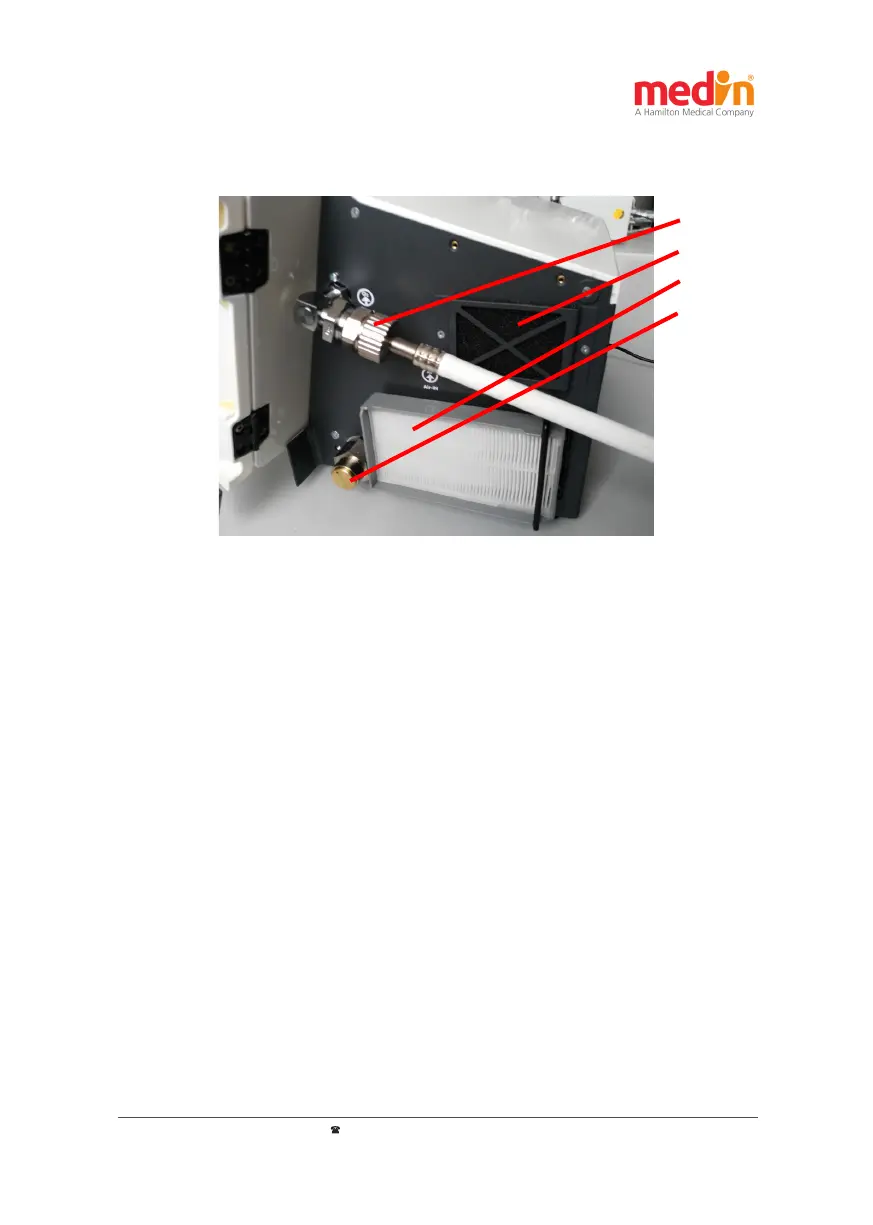
a) O
2
-In
b) Fan-In
c) Air-In
d) Overpressure
valve
Figure 4-1: Connecons of the medin-NC3®: a) Gas supply oxygen; b) Fan intake
c) Air inlet lter; d) Overpressure valve
Before switching on the medin-NC3®, its oxygen inlet "O
2
-In" (see Figure 4-1 a)) must be connected to an external
oxygen supply using a gas supply tube. The oxygen must comply with the quality requirements described in
chapter 3.3.
Aenon:
The medicinal oxygen supplied to the medin-NC3® must meet the quality requirements described in
chapter 3.3 as otherwise the medin-NC3® could be damaged.
Power supply connecon:
The power connecon of the medin-NC3® "Power" (Figure 4-2-c) must be connected to the mains by means of
the power supply unit for the device. Users are recommended to keep the medin-NC3® connected to the mains at
all mes while it is in use. The internal and external rechargeable baery in the medin-NC3® allows the device to
keep working in the event of a brief interrupon in mains power supply. The medin-NC3® can run on a fully loaded
baery for up to approximately four hours.
4.2 Connecng the medin-NC3® and seng up the CPAP system
Connecng the supply gas:


 To Next Page