22
2.1.1.4 Installation steps for options at position 2
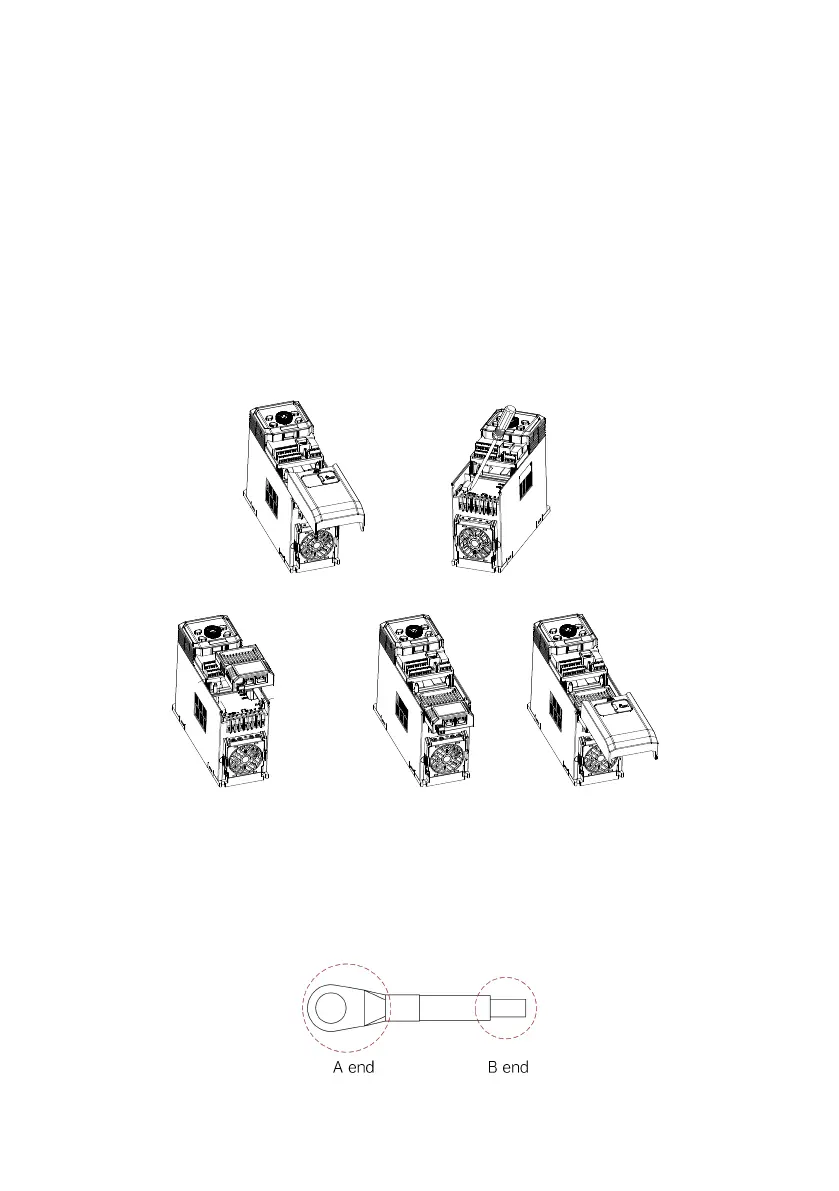
Installation method: front side mounting for the option (PN/EtherCAT bus options/IO expansion options)
(1) When the drive is powered off, press the granulated part on the middle-upper of the lower cover, slide it down firmly
to take down the cover, as shown in Fig. 2-4 a.
(2) Use a straight screwdriver to pry open the dustproof cap, as shown in Fig. 2-4 b.
(3) Install the PN option: hold the expansion box (a bus card inside) upwards (indicators up), then align the expansion
box with the electrical bus interface of position 2, and press down horizontally to buckle the spring snap of the
expansion box into the groove at the lower part of the drive, as shown in Fig. 2-4 c and d.
(4) The bus card is successfully installed, as shown in Fig. 2-4 e.
Fig. 2-4 Position 2 - Communication option/IO option installation steps
(5) Grounding: MV810-PNET01 and MV810-ECAT01 must be grounded during wiring as shown in Fig. 2-5. You need to
prepare and crimp the wire by yourself.
Fig. 2-5 Grounding terminal connection



 To Next Page