92
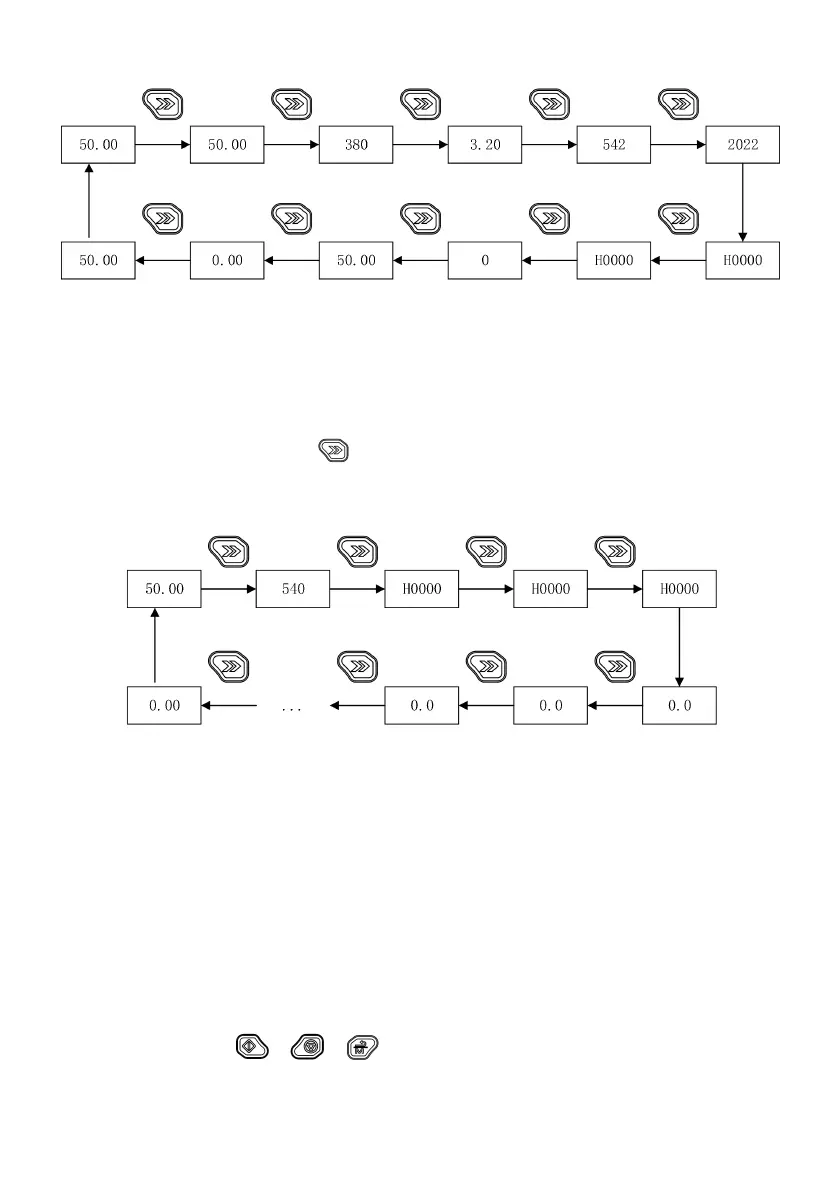
Fig. 5-6 Monitoring status parameter display
5.1.3.5 Switching status parameter display
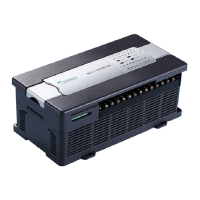
Through the function codes P16.03 and P16.04, you can choose the drive parameters to be displayed on the operating
panel during stop, such as set frequency, bus voltage DI, DO, AI and so on (for details, refer to Group P16). Then, you can
view the chosen parameters through the “ ” key on the operating panel.
Fig. 5-7 shows the parameter display switchover during stop, with P16.03=0xFF.
Fig. 5-7 Switching status parameter display
5.2 Operation mode
In the following chapters, terms related to the control, operation and status of the drive will be frequently mentioned.
Please read this section carefully, which helps you understand and use the subsequent functions.
5.2.1 Operation command channel
The drive operation command channel refers to the physical channel for the drive to receive the operation command:
start, stop, jog and so on. The operation command channel can be controlled through four ways:
(1) Operating panel: use the “ ”, “ ”, “ ” (multi-function key, set to JOG function) keys to control.



 To Next Page