88
(3) Fault display status
When the drive detects a fault signal, it will immediately enter the fault display status and display the fault code, as
shown in Fig. 5-2c.
You can press the “ ” key to view stop parameters and fault codes cyclically. Through the “ ” key, the control
terminal or the communication command, you can reset the fault. If the fault still exists, the fault code will not
disappear.
You can also choose the stop mode or choose to keep the drive running during certain fault through P97.15 to P97.19.
(4) Function code editing status
In the stop, run or fault alarm status, press the “ ”key, then you can enter the editing status (if any user password is
required, refer to the description of P00.01). The editing status is displayed in three-level menu: function code group or
function code → function code parameter → function code parameter value, and you can press the “ ”key to enter
the parameter value display status. In the parameter value display status, you can press the “ ” key to save the
parameter, or press the “ ” key to exit.
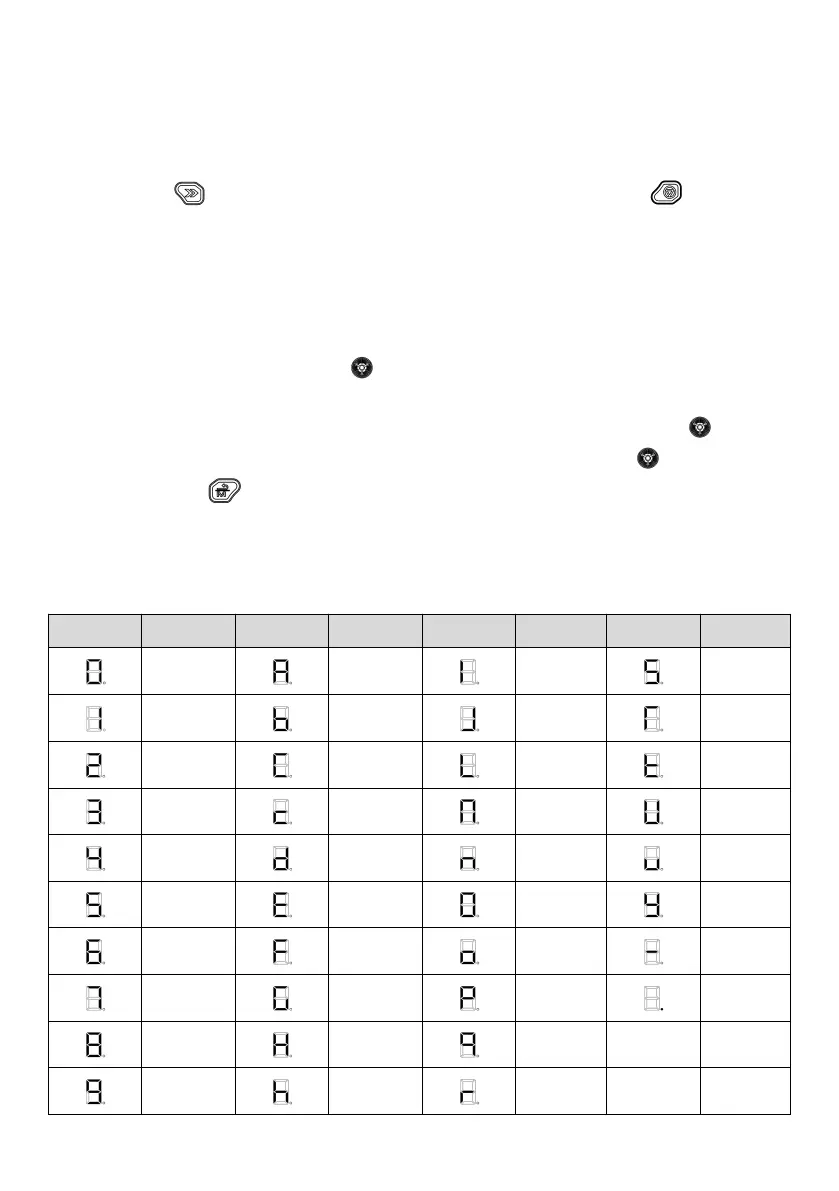
5.1.2 Identification of LED display symbols
The LED display symbols correspond to the following figures/letters:



 To Next Page