44
Chapter 3 Drive Installation
3.1 Assembly/Disassembly of drive components
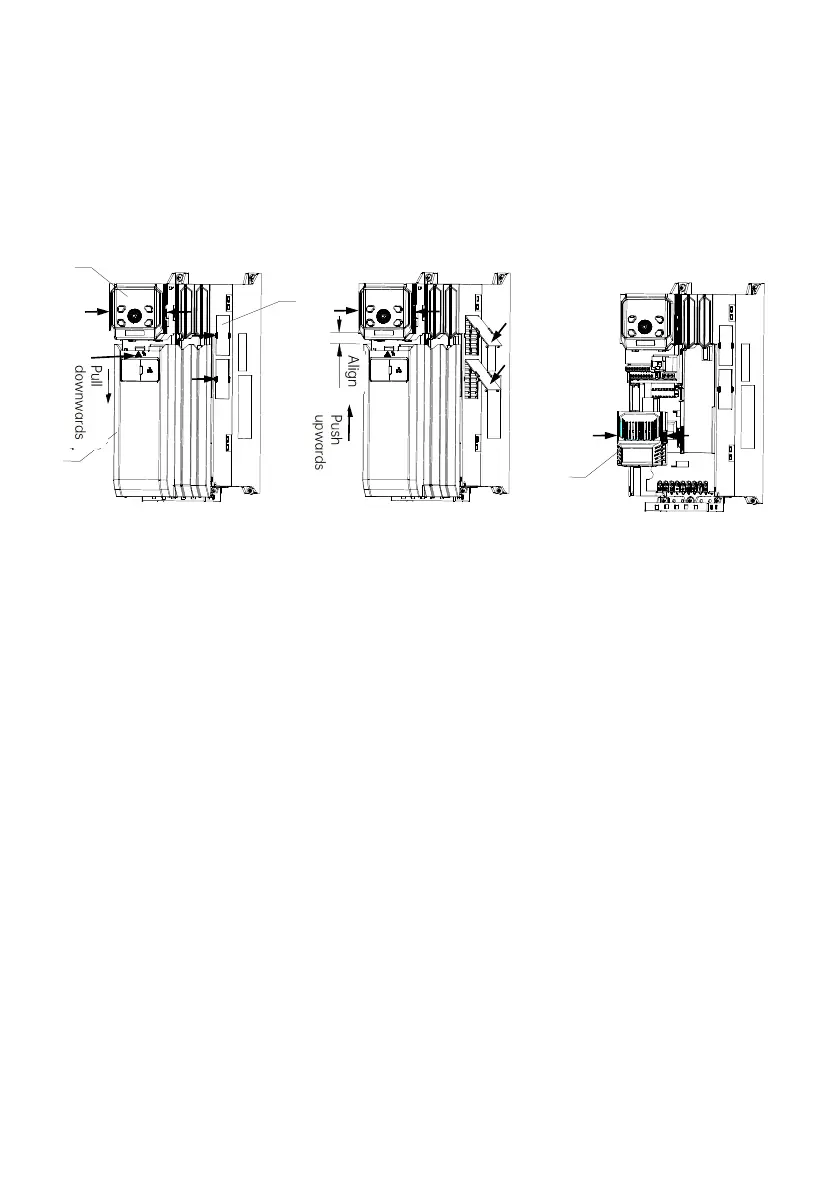
1: Cover 2: Operating panel 3: Dustproof plate 4: Expansion box
Fig. 3-1 Assembly and disassembly of drive components (taking enclosure C as an example)
(1) Assembly/Disassembly of the cover
Disassembly: Press down the granulated part of the cover slightly inwards, then pull it downwards until the snap-fit
joints of the cover are separated from the drive to remove the cover.
Assembly: Align the cover with the chassis, with the upper end 6-15 mm away from the operating panel, the lower cover
in contact with the chassis, then push the cover upwards to buckle the snap-fit joints into the chassis.
(2) Assembly/Disassembly of the dustproof plate
Disassembly: Insert your fingernail or a flat screwdriver to the groove of the dustproof plate, and pry the dustproof
plate.
Assembly: Buckle the snap-fit joints of the dustproof plate into the ventilation hole, and press down.
(3) Assembly/Disassembly of the expansion box
Disassembly: Press down the spring snap at the middle of the expansion box to remove the expansion box.
Assembly: Hold the expansion box, slightly press the spring snap, adjust its location, and release your hands, then the
spring snap is buckled successfully.



 To Next Page