89
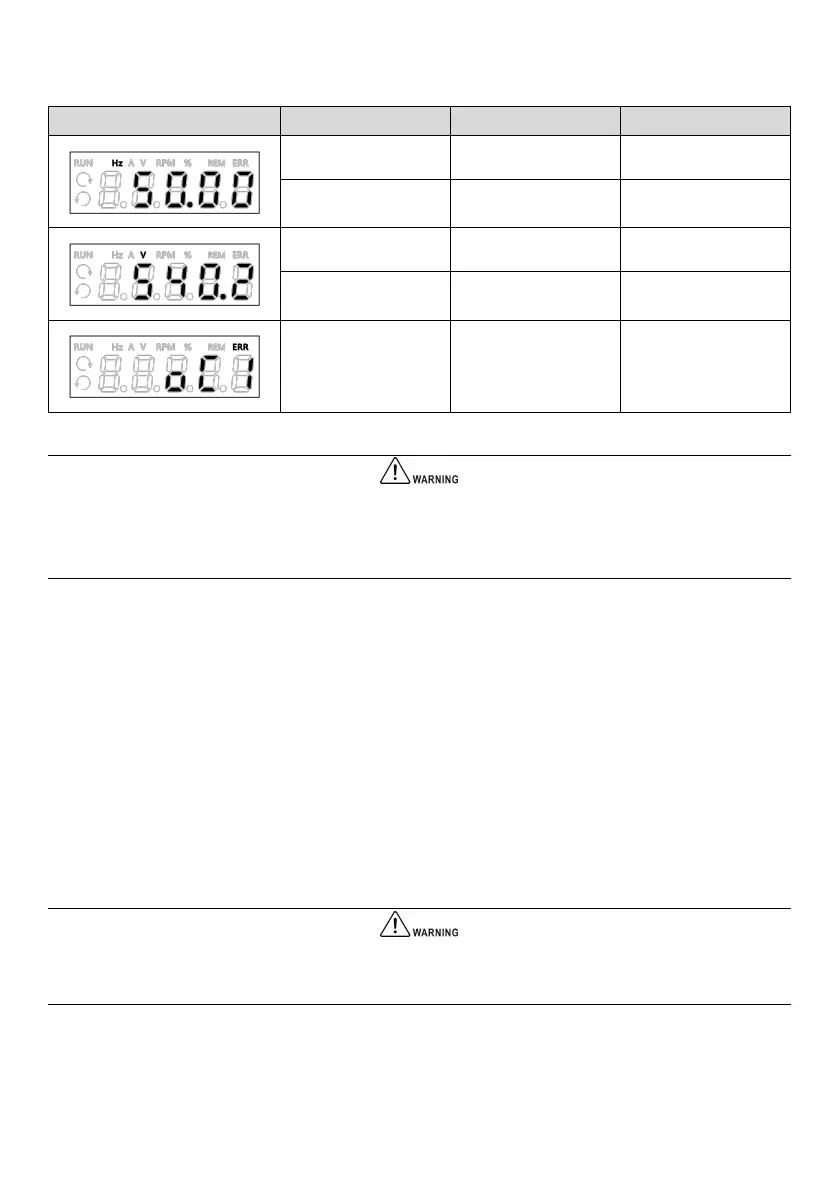
LED panel display example:
Overcurrent during
acceleration
When the drive is in the stop or standby state, the panel value is flashing; and when the drive is in the running or fault
state, the panel value is solid on. To customize parameters displayed during running or stop, refer to “7.17 P16: Keypad
display setting parameters”.
5.1.3 Basic operations
In the below example, the stop display parameter is the set frequency and its factory setting is 50.00 Hz. The black part
in the figure indicates the current editing status.
5.1.3.1 Password setting
To protect the parameters, the drive offers the password protection function. It requires a user to input the correct
password before entering the function code editing status. For the manufacturer’s parameter setting zone and AI/AO
correction group, you need to input the correct manufacturer password.
Do not change the manufacturer’s set parameters. Improper parameter setting may cause abnormal operation or even
damage to the drive.
Function code P00.01 can be used to set the user password.
Assuming that the valid user password is “1368”, the drive is currently locked and no operation can be performed. You
can unlock the drive by entering the user password through the following steps.



 To Next Page