90
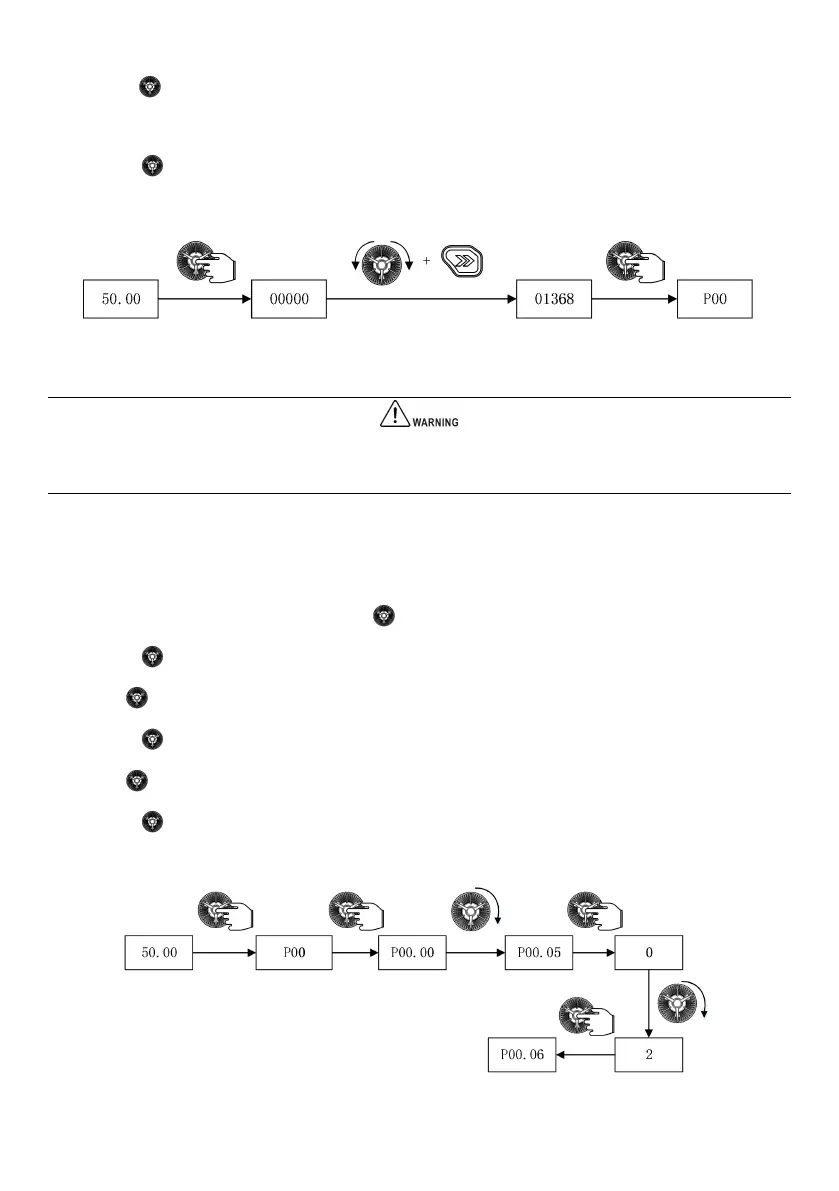
(1) Press the “ ” key in the locked status, and then the LED will enter the password verification status 00000;
(2) Change 00000 to 01368;
(3) Press the “ ” key to confirm and pass the password verification, then the LED displays P00.
The above steps are shown in Fig. 5-3:
Fig. 5-3 Unlock the drive with a user password
You can conduct various operations on the drive after passing the password verification.
If there is no key-pressing operation in 30 s after the correct user password is entered, the password protection will be
triggered again to lock the drive.
5.1.3.2 Restore to factory settings
To restore the parameter values to factory settings, set P00.05 to 2.
(1) In the stop parameter display status, press the “ ” key to enter the first level menu P00;
(2) Press the “ ” key to enter the second level menu P00.00;
(3) Rotate “ ” clockwise to change P00.00 to P00.05;
(4) Press the “ ” key to enter the third level menu;
(5) Rotate “ ” to change 0 to 2;
(6) Press the “ ” key to confirm the change and return to the second level menu. The change is successful.
The above steps are shown in Fig. 5-4:
Fig. 5-4 Restore to factory settings



 To Next Page