91
5.1.3.3 Set frequency
For example, set P02.09=25.00 Hz.
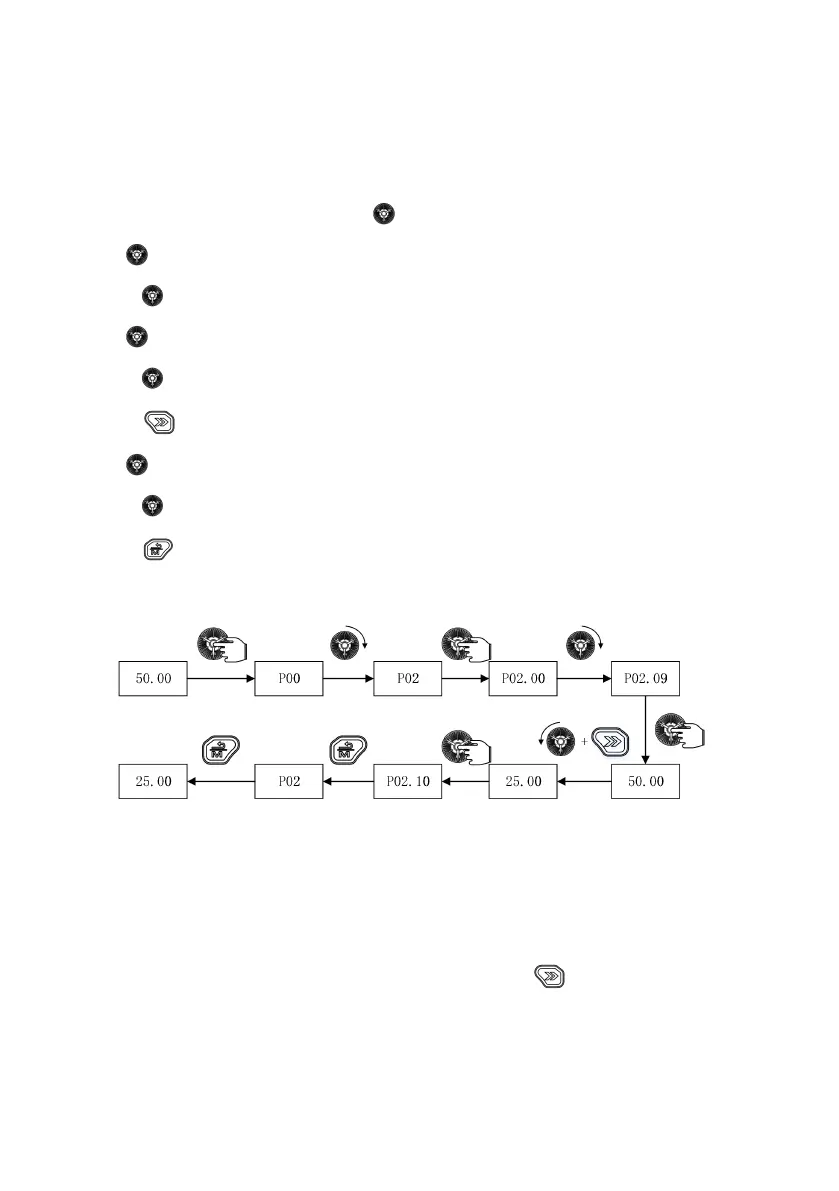
Example: Change the function code P02.09 from 50.00 Hz to 25.00 Hz.
(1) In the stop parameter display status, press the “ ” key to enter the first level menu P00;
(2) Rotate “ ” clockwise to enter the first level menu P02;
(3) Press the “ ” key to enter the second level menu P02.00;
(4) Rotate “ ” clockwise to enter the second level menu P02.09;
(5) Press the “ ” key to enter the third level menu 50.00;
(6) Press the “ ” key to choose the thousands place and the hundreds place;
(7) Rotate “ ” counterclockwise to change 50.00 to 25.00;
(8) Press the “ ” key to confirm the change and return to the second level menu. The change is successful.
(9) Press the “ ” key twice to return to the main menu displaying 25.00.
The above steps are shown in Fig. 5-5:
Fig. 5-5 Configure the set frequency
5.1.3.4 Monitoring status parameter display
Through the function codes P16.00, P16.01 and P16.02, you can choose the drive parameters to be displayed on the
operating panel during running, such as set frequency, output frequency, bus voltage DI, DO, AI and so on (for details,
refer to Group P16). Then, you can view the chosen parameters through the “ ” key on the operating panel.
Fig. 5-6 shows the parameter display switchover during running with P16.00=0xFF, P16.01=0xF and P16.02=4.



 To Next Page