35
2.1.4.8 Installation
Accessory list
For installation, refer to “2.1.1 Installation of accessory cards/options” for details.
2.1.5 MV810-IO01: simple IO option
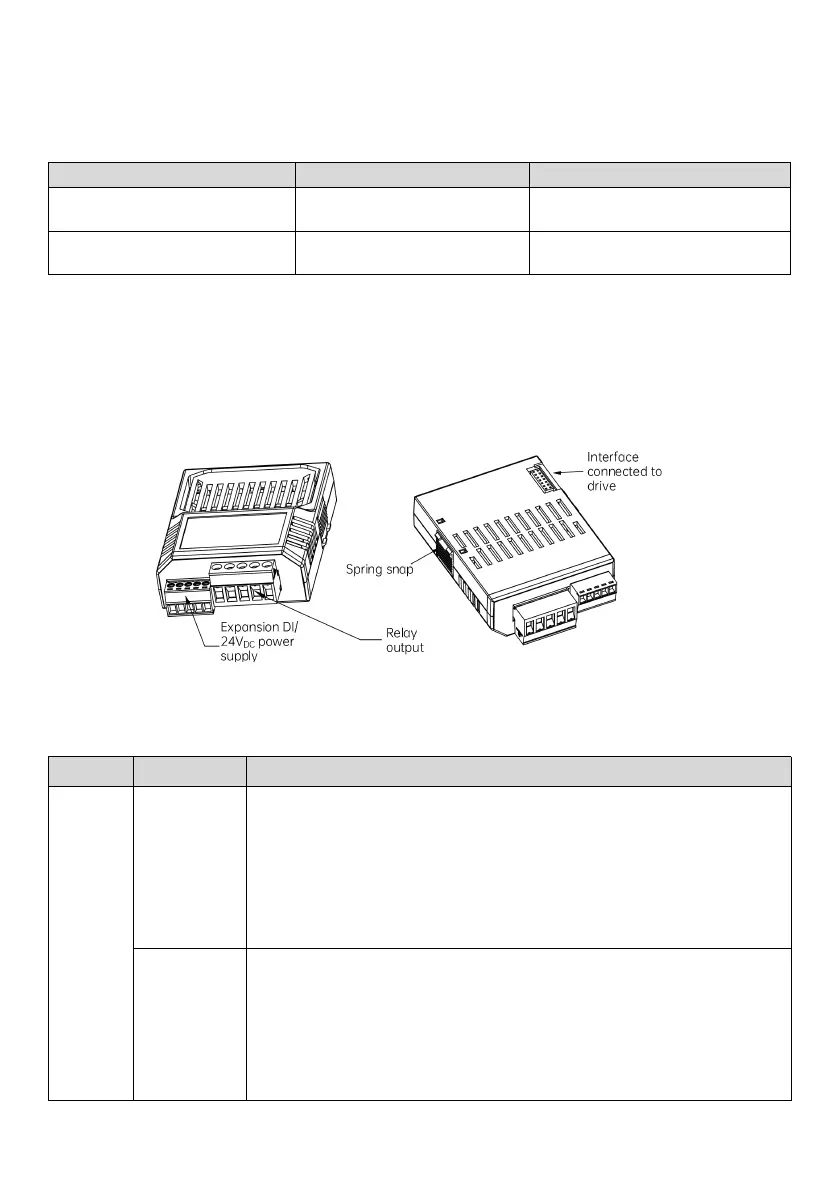
2.1.5.1 Product appearance
Fig. 2-12 Components and terminals
2.1.5.2 Technical specifications
Multi-function input terminals, set by P41.00–P41.02;
Support NPN/PNP input, set by P41.03, active level: 9 V to 30 V;
Power supplied by the option’s terminal (24V
DC
) or external 24 V DC (see wiring details
in 4.2.2.4);
Support filter and switch-on/off delay.
Multi-function output terminals, set by P41.13–P41.14;
RO1 contains one TA1/TB1 (normally closed), one TA1/TC1 (normally open), contact
capacity: 250 V AC/3 A, 30 V DC/1 A;
RO2 contains one TA2/TC2 (normally open), contact capacity: 250 V AC/2 A, 30 V DC/1
A;



 To Next Page