12 System malfunctions
56
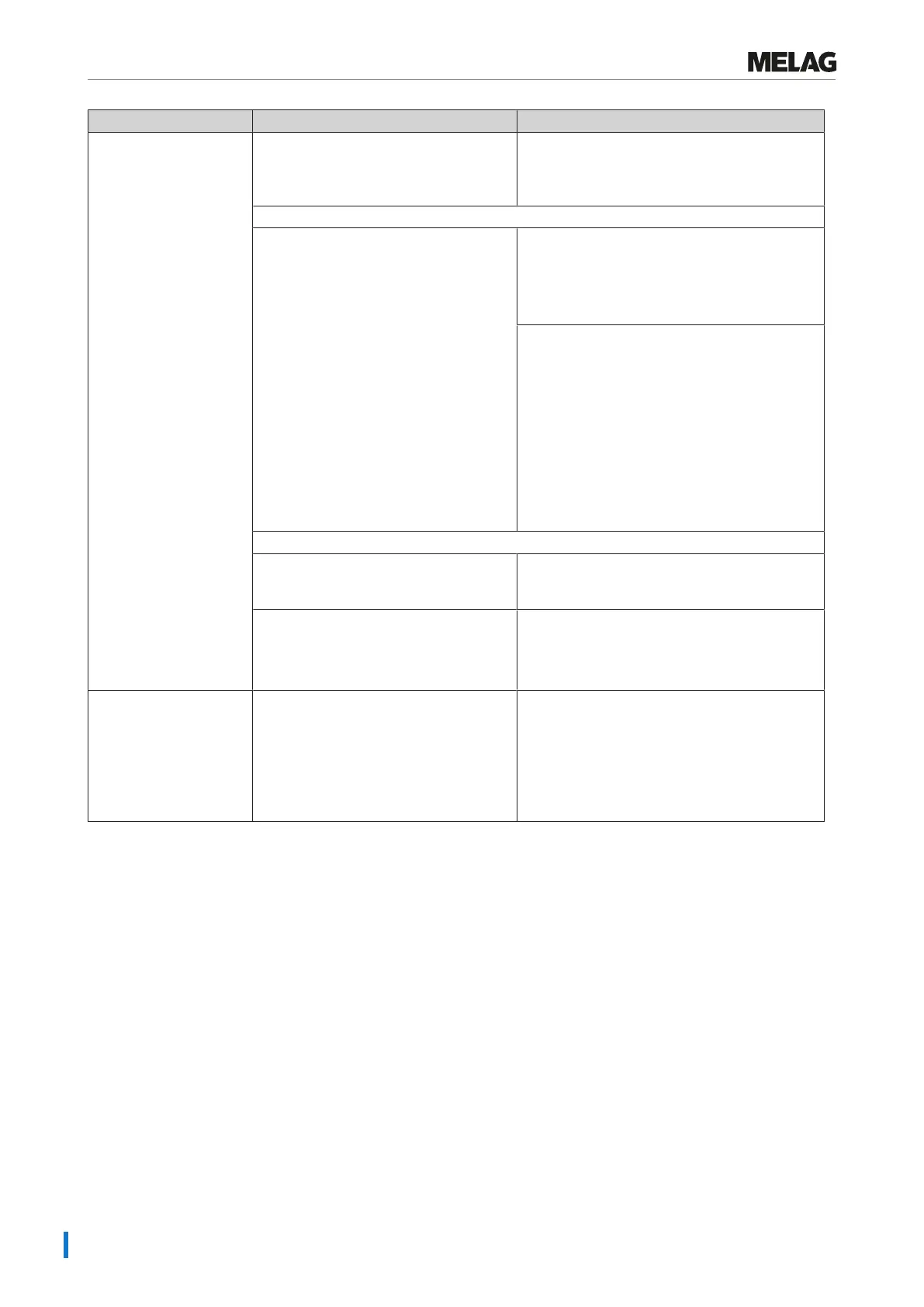
Event Possible causes What you can do
Attention: No feed
water / Check feed water
supply
PLEASE NOTE: This message can
occur once during initial commissioning/
re-commissioning because the pipe
system is not yet completely filled.
Start the program again.
When using a MELAG water treatment unit:
The message will be displayed after a
program start. The installed flow monitor
does not close.
MELAdem 40:
Check the water treatment unit and if necessary,
open the inflow to the system.
Upon repeated incidence, contact an authorised
customer services / stockist technician.
MELAdem 47:
Check the water treatment unit and if necessary,
open the inflow to the system. Perform a new
start with an empty pressure storage after
approx. 1 h.
Upon repeated incidence, contact an authorised
customer services / stockist technician.
PLEASE NOTE: This message can be issued
following commissioning/recommissioning, as
the pipe system has not been filled completely.
Repeat the start.
When using the feed water container:
The message will be displayed after a
program start. The installed flow monitor
does not close.
Upon repeated incidence, contact an authorised
customer services / stockist technician.
The inlet hose has not been connected
correctly.
1. Check that the hose is correctly connected
to the steam sterilizer and the feed water
container.
2. Check that the connections are kink-free.
Attention: Please empty
wastewater tank / Start
not possible
The wastewater container is full. 1. Empty the wastewater container to the
extent that residual water (approx. 10cm
high) remains in the container, see Cleaning
[}page48].
2. If the steam sterilizer does not start after the
acknowledgement, switch the device off and
on again.















 To Next Page