53
Max Level:
Set the Maximum volume level boundary, use the Anubis Rotary Knob to set the value.
Range: -36dB to +12dB
Ref Level:
Determine the Reference listening level you wish to establish when recalled. Set the level by
using the Rotary Knob.
Range: -36dB to +12dB
Dim Level:
Set the desired Dim level value by using the Rotary Knob. The Dim attenuation is applied to the
current volume value of a Speaker Set (Dim does not apply to Headphones or Cues Monitors). Apply
the Dim from the Main Pages Monitoring controls.
Range: -60dB to 0dB
Note: Ref and Dim only apply to Speaker Set Type of Monitor Modes
TALKS Settings
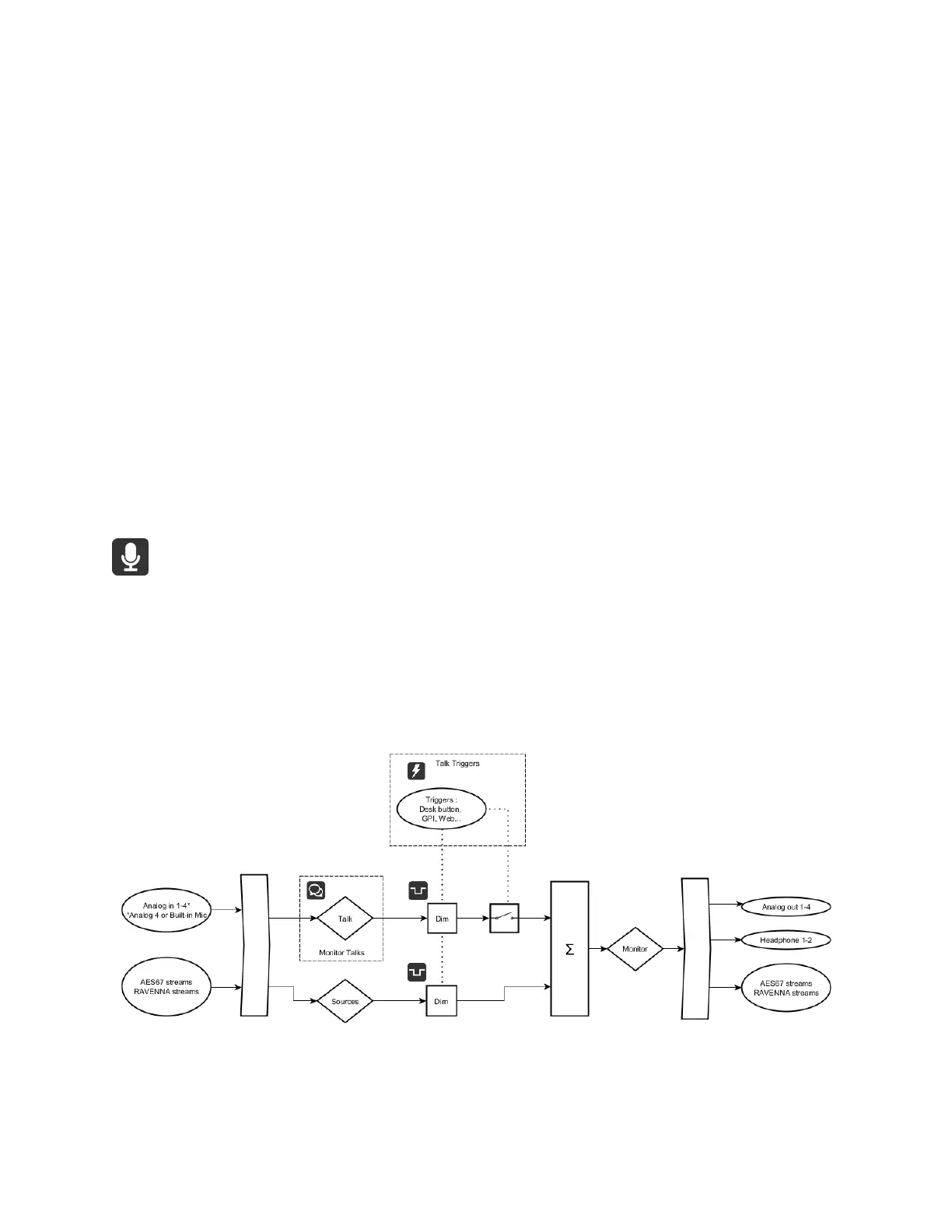
The Anubis Talkback logic is not restricted to the built-in mic but is able to use any other
microphone (including Phantom power condenser mics) as well. With the possibility to setup by
software two Talkback or Listen mics sending out to different Speaker Set/Headphones
monitors.
Talkback Circuitry
The TALKS settings have similarities to the Sources settings.
Enable: Enable or disable the Talk sources



 To Next Page