95
MIDI INTERFACE SETUP
Setups:
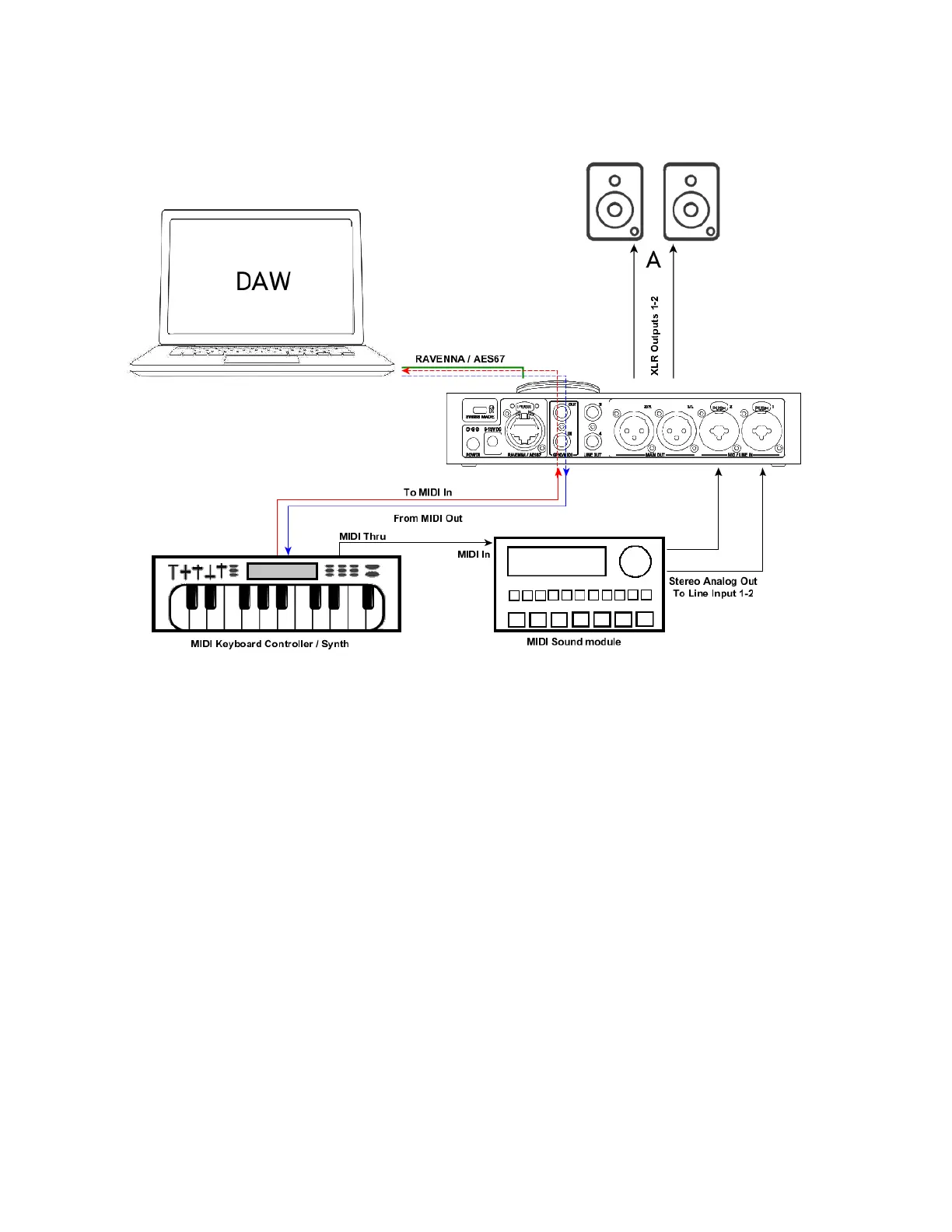
Use Anubis MIDI I/O with your DAW.
Connect a Keyboard MIDI Out -> Anubis MIDI IN and via RAVENNA/RTP configure your MIDI so
that your Keyboard triggers DAW VST instruments. The DAW source stream is then monitored
from ANUBIS.
A DAW/MIDI program can as well return a MIDI out signal, that could play a MIDI partition via the
MIDI Out that would be connected to the MIDI Input of an external Synthesizer.
Use Anubis MIDI I/O with a Sound Module for Recording or Live
Connect a Keyboard MIDI Out to the Anubis MIDI IN and via RAVENNA/RTP configure your MIDI
for recording in your DAW. The DAW playout RAVENNA/AES67 source stream would be
monitored from ANUBIS.
Connect your Keyboard MIDI Thru to a MIDI Sound Module and this one to the Anubis analog
inputs, then configure your DAW for recording the Anubis inputs.
In Live performance you could also do without the DAW, with a Keyboard connected to a Sound
Module and to the Anubis Line inputs 1-2, and can benefit from the Anubis internal Mixer.



 To Next Page