PAGE 42 Metor 6M
Installation and Operating Manual
8. CALIBRATION 92102916 REV 5
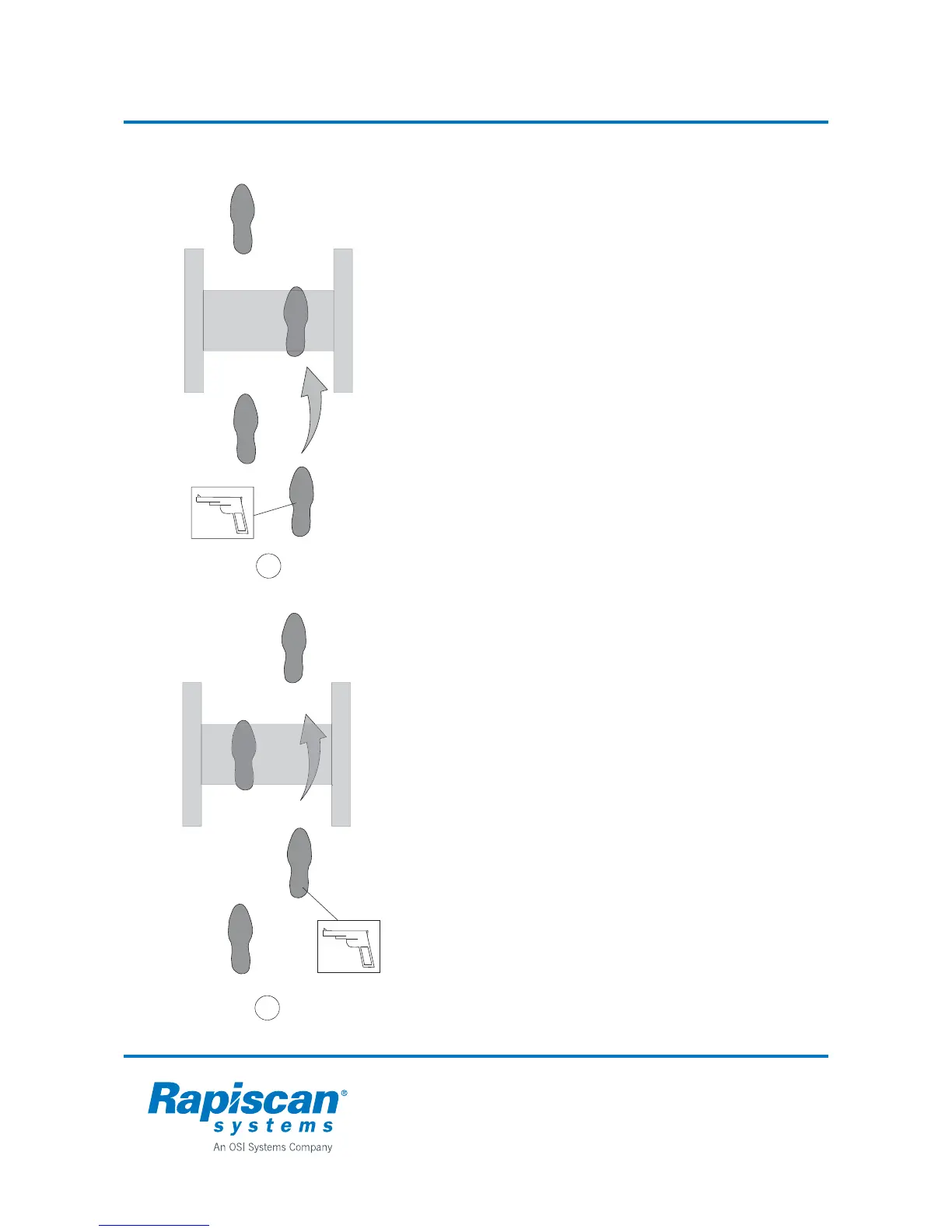
Manual setting of Floor Level Sensitivity
Phase 1
Walk through the gate placing down the foot with the test piece
at the middle of the gate. Seek the lower limit settings that
detect the test object reliably.
1. Test detection by walking through the gate.
2. Adjust ZONE 1 and ZONE 2 sensitivities as follows:
2.1 If the test object caused an alarm each time, first lower
ZONE 1 sensitivity until no alarm. Repeat for ZONE 2.
Select lowest values that cause alarm reliably.
2.2 If the test object did not cause an alarm, first increase
ZONE 1 sensitivity until you get an alarm. Reset
ZONE 1 to original value and increase ZONE 2
sensitivity. Select lower of the two values.
Phase 2
Walk through the gate so that the foot with the test object is
swung at the gate. Seek the lower limit settings at which the
test object is reliably detected.
1. Test detection by walking through the gate.
2. Adjust ZONE 1 and ZONE 2 sensitivity as follows:
2.1 If the test object did not cause an alarm increase first
ZONE 1 sensitivity until you get an alarm. Reset
ZONE 1 to original value and increase ZONE 2
sensitivity. Select lower of the two values.
3. Check calibration by taking test objects through the gate.
1
2



 To Next Page