Witty User Manual - EN - v1.5 P. 135 / 171
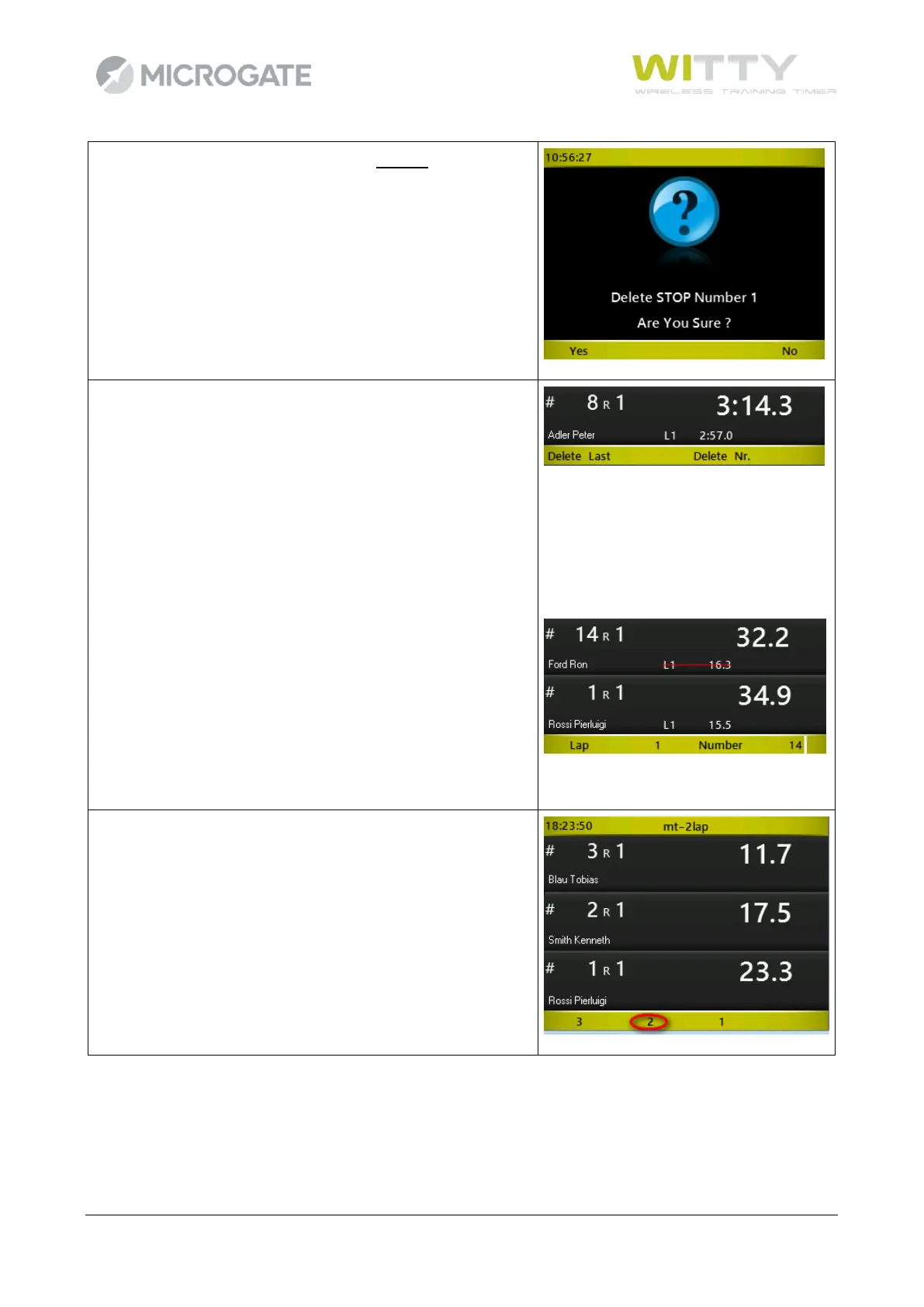
Pressing one of the first 2 function keys, the last event of that
type received (start or stop) is deleted. Confirmation is
required and if you press Yes, the line status is reset to the
previous status (if you delete a Start, the athlete is reset to the
start, but if a Stop is deleted, his time starts running again).
By pressing <F3> you can delete a Lap. You can choose to
delete the last received Lap event or be more precise and
indicate the Lap number and the athlete that it was assigned
to.
Press <F1> Delete Last to delete the last Lap (confirmation
required)
Press <F3> Delete Number and enter the Lap and Bib Number
to delete a specific event (in the example Lap 1 of athlete #14
will be deleted).
If you want to 'disqualify' an athlete (or consider him 'not
arrived'), just press <F4> NA in the Edit sub menu. If there are
several simultaneous athletes, you will need to confirm the
one to be deleted. Using the keys F1 to F4 select the bib of
the athlete to remove (in the example #2 ) .
Instead of the arrival time the writing DNF (Did not finish) is
displayed.



 To Next Page