EasyManua.ls Logo

Millipore Synergy - How to Show Resistivity or Conductivity Units (C01); With Temperature Compensated or Non Temperature Compensated Values

Millipore Synergy
49 pages
Print Icon
To Next Page IconTo Next Page
To Previous Page IconTo Previous Page
Loading...
INSTALLATION
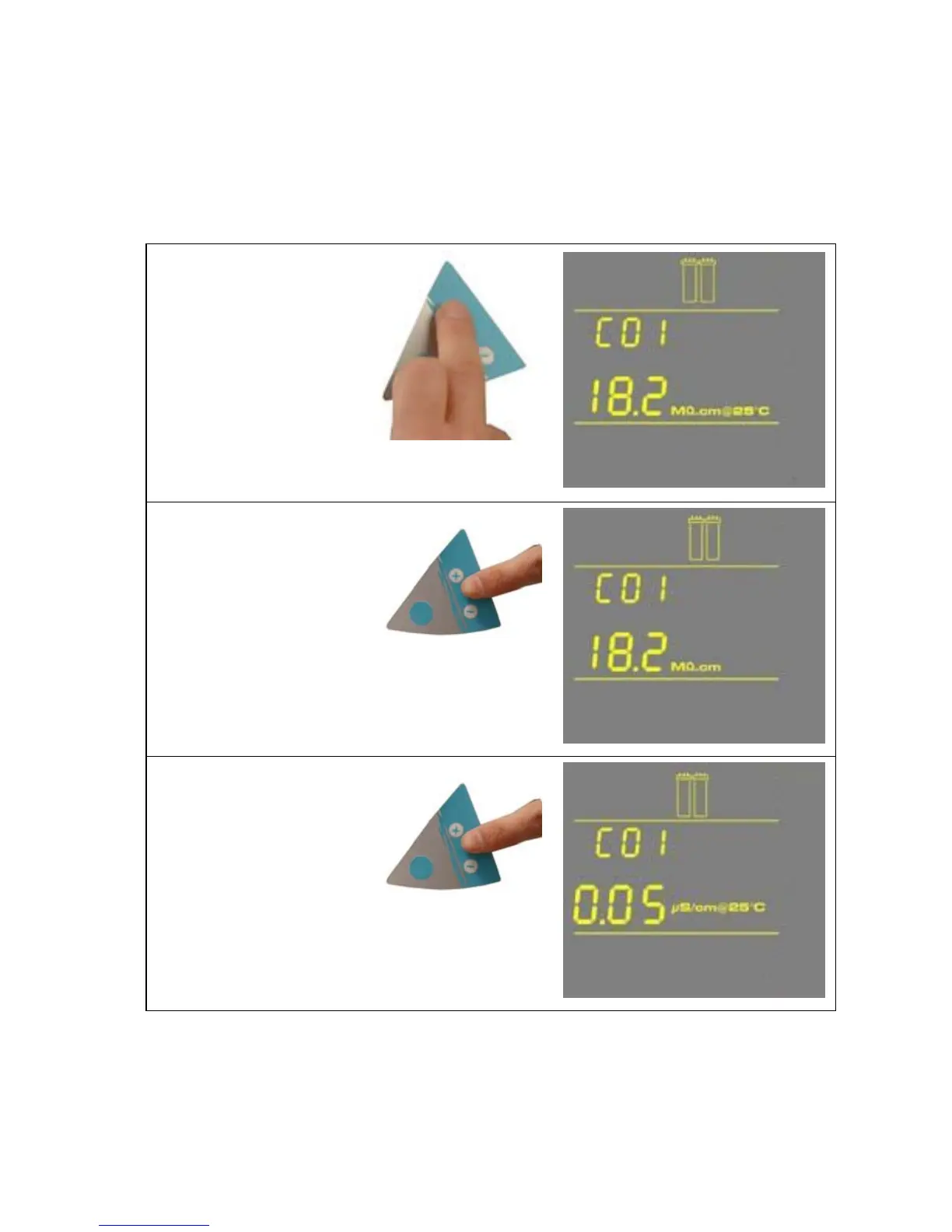
4-10 HOW TO SHOW RESISTIVITY OR CONDUCTIVITY UNITS (C01)
WITH TEMPERATURE COMPENSATED OR NON TEMPERATURE COMPENSATED VALUES
Temperature compensation is a way of ‘standardizing’ Resistivity or Conductivity to measurements
that would be seen if the water temperature was 25 °C.
1. Press the Main and
“+“ Buttons together
to enter the menu. The
Display will show
C01 and the units
chosen. The following
Display shows
Temperature
Compensated
Resistivity Units:
MΩ.cm @25 °C.
2. Press the “+” or “-“
Button to select
Non Temperature
Compensated
Resistivity Units:
MΩ.cm.
3. Press the “+” or “-“
Button to select
Temperature
Compensated
Conductivity Units:
μS/ cm @25 °C.
- 18 -

Table of Contents

Related product manuals