INSTALLATION
4-11 HOW TO SET THE RESISTIVITY SETPOINT (C02)
The Resistivity Setpoint is used to inform you when the Product resistivity is low. When the resistivity is
below the setpoint, the Resistivity display will flash and the red Pack Alarm will be blinking (see
Section
5-6 How to Understand Synergy Messages
). The factory default resistivity value is set to
15 MΩ. cm @25 °C.
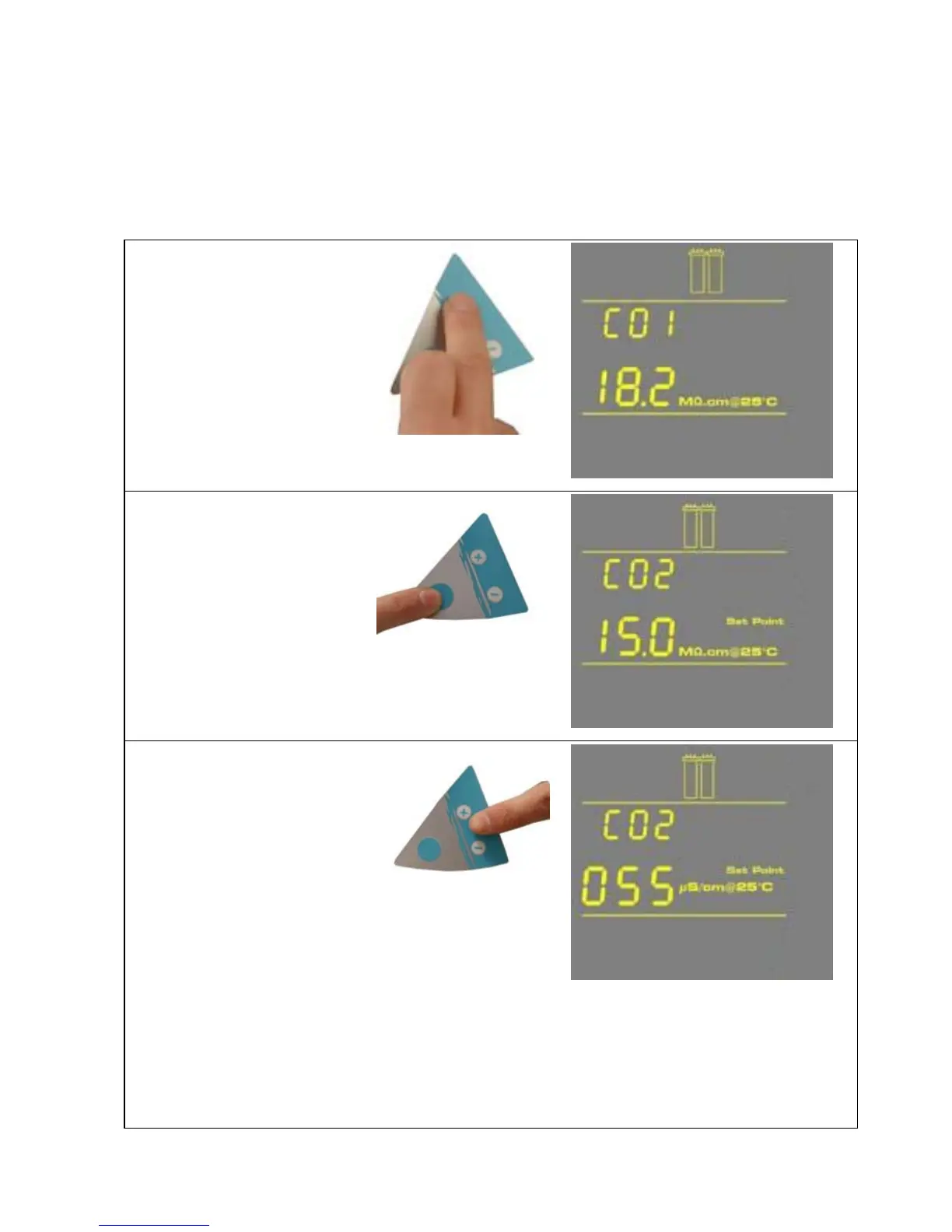
1. Press the Main and “+“
Buttons together to enter
the menu. The Display
will show C01.
2. Press the Main Button
once. The Display will
show C02 and the
Resistivity Setpoint value.
3. Press the “+” or “-“ Button
to adjust the Resistivity
Setpoint from
1.0 MΩ.cm @25 °C
to18.0 MΩ.cm @25 °
C.
If Conductivity Units are chosen in C01, then the Setpoint can be adjusted from
0.999 μS/cm @25 °C to 0.055 μS/cm @25 °C.
NOTE: The Conductivity Setpoint display needs to be multiplied by 0.001 to get the real
value. For example, if the Display reads “055” μS/cm @25 °C, then you would multiply
055 x 0.001 = 0.055. Thus, the real Conductivity Setpoint reading is
0.055 μS/cm @25 °C.
- 20 -








 To Next Page