EasyManua.ls Logo

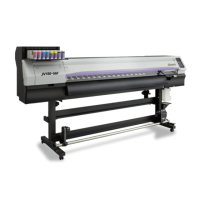
MIMAKI jV100-160 - User Manual

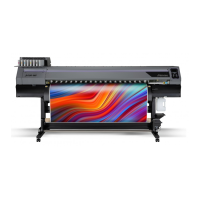
MIMAKI jV100-160
146 pages
Print Icon
To Next Page IconTo Next Page
Loading...
Cartridge-ink model
You can also download the latest manual from official website.
MIMAKI ENGINEERING CO., LTD.
https://mimaki.com/
D203528-11
Original instructions

Table of Contents

Other manuals for MIMAKI jV100-160

Questions and Answers

  • D
    davisjessicaJul 27, 2025
    What to do if my MIMAKI jV100-160 is not printing?
    • T
      Tyler CunninghamJul 27, 2025
      If your MIMAKI Printer is not printing, make sure the cable is securely connected to the USB 2.0 port or the LAN port. Also, verify the LAN cable type. If an error has occurred, check the message on the display.
  • L
    Lindsey RodriguezJul 31, 2025
    Why is printing not possible on my MIMAKI jV100-160 Printer?
    • L
      Lisa DavisJul 31, 2025
      To resolve printing issues, ensure the cable is securely connected to the USB 2.0 port or the LAN port. Also, verify the LAN cable type and check the message displayed on the printer's screen.
  • U
    usheppardAug 4, 2025
    How to fix vertically uneven color on MIMAKI jV100-160?
    • E
      Eric CastroAug 5, 2025
      To improve vertically uneven color, attach the provided NITOFLON tape to the platen.
  • R
    rebeccaclaytonAug 9, 2025
    What to do if the ink has leaked from my MIMAKI jV100-160 Printer?
    • T
      Tina LopezAug 9, 2025
      If you notice an ink leak, immediately turn off the main power and unplug the power cable.
  • M
    Martha EllisAug 13, 2025
    Why is my MIMAKI Printer not turning on?
    • B
      Brittney EwingAug 13, 2025
      Here's what you can try: * Ensure the power plug is securely inserted into the power outlet. * Use the power cable provided with the printer. * Turn on the main power switch. * Turn the power on.
  • H
    harrisrussellAug 18, 2025
    What to do if image defects occur on MIMAKI Printer?
    • V
      Vicki WilcoxAug 18, 2025
      To address image defects: * Remove any paper scraps or debris from areas the print head passes over. * Perform 'Head Cleaning'. * Perform 'Feed Correction'. * Perform 'Wiper Cleaning'. * Perform 'Cap Rubber Cleaning'. * Perform 'Carriage Underside Cleaning'.
  • K
    Kevin Stewart MDAug 21, 2025
    What to do if the heater temperature does not rise to the specified value on my MIMAKI jV100-160 Printer?
    • R
      robinsonsarahAug 22, 2025
      If the heater temperature isn't reaching the set value: * Set the selector switch according to the power supply voltage. * Ensure you have correctly set the heater temperature.

Summary

Safety Information and Precautions

Power Supply Precautions

Critical safety guidelines for using power cables, plugs, and grounded outlets.

Ink Handling and Specifications

Installation Requirements

Installation Precautions

Lists environmental and location-specific precautions to prevent hazards and defects.

Installation Space Requirements

Specifies the necessary clearance around the machine for safe operation and maintenance.

Chapter 1: Initial Setup and Preparation

Connecting the Power Cable

Step-by-step guide on how to connect the machine's power cable correctly.

Connecting to a PC

Instructions for establishing a connection between the PC and the printer via USB or LAN.

Ink Replacement Method

Explains procedures for checking and replacing ink packs when levels are low or depleted.

Chapter 2: Printing Operations

Adjusting Print Head Height

Details how to set the print head height to match media thickness for optimal printing.

Loading the Media

Provides instructions on how to properly load various types of media into the machine.

Head Cleaning Methods

Outlines different head cleaning options to resolve print defects like nozzle clogging.

Chapter 3: System Settings and Configuration

Maintenance Menu Operations

Covers functions for carriage movement, cleaning, and nozzle recovery.

Ink Cartridge Registration

Describes how to register new ink cartridges and their weights for accurate ink level tracking.

Chapter 4: Product Maintenance Procedures

Maintenance Precautions

General safety guidelines and warnings to follow before performing maintenance.

Maintenance Procedure Details

Step-by-step instructions for various cleaning and maintenance tasks.

Consumable Item Replacement

Guides on how to replace worn-out parts like wipers, caps, and filters.

Chapter 5: Troubleshooting Common Issues

General Troubleshooting Steps

Provides solutions for common problems like power issues or printing failures.

Message-Based Problem Solving

Lists common error and warning messages with their causes and corrective actions.

MIMAKI jV100-160 Specifications

General IconGeneral
Print Width1600 mm
ConnectivityUSB 2.0, Ethernet
Ink Cartridge Capacity440 ml
Power RequirementsAC 100-240V, 50/60Hz
Print TechnologyPiezo inkjet
Ink TypeSolvent ink
Number of Colors4 (CMYK)
Media TypeBanner, Paper
Media Thickness1.0 mm or less
InterfaceUSB2.0 / Ethernet

Related product manuals