Using the Calibration Programs
9-15
The calculated calibration factors should be within the 75% - 125%. Any calculated value
that falls between 0%-75% or 125%-9999% will be flagged with a “*”. Other values will not
be displayed. In case of an empty calibration factor, try to find out the reason and if necessary,
contact Mindray customer service department or your local distributor.
You can enter the “Auto – fresh blood” screen of “Sample 2”... “Sample 5” by pressing [2] ...
[5]. Follow the calibration steps of sample 1 to run at least another two fresh blood samples.
When you have obtained the calibration factors of at least 3 fresh blood samples, you can
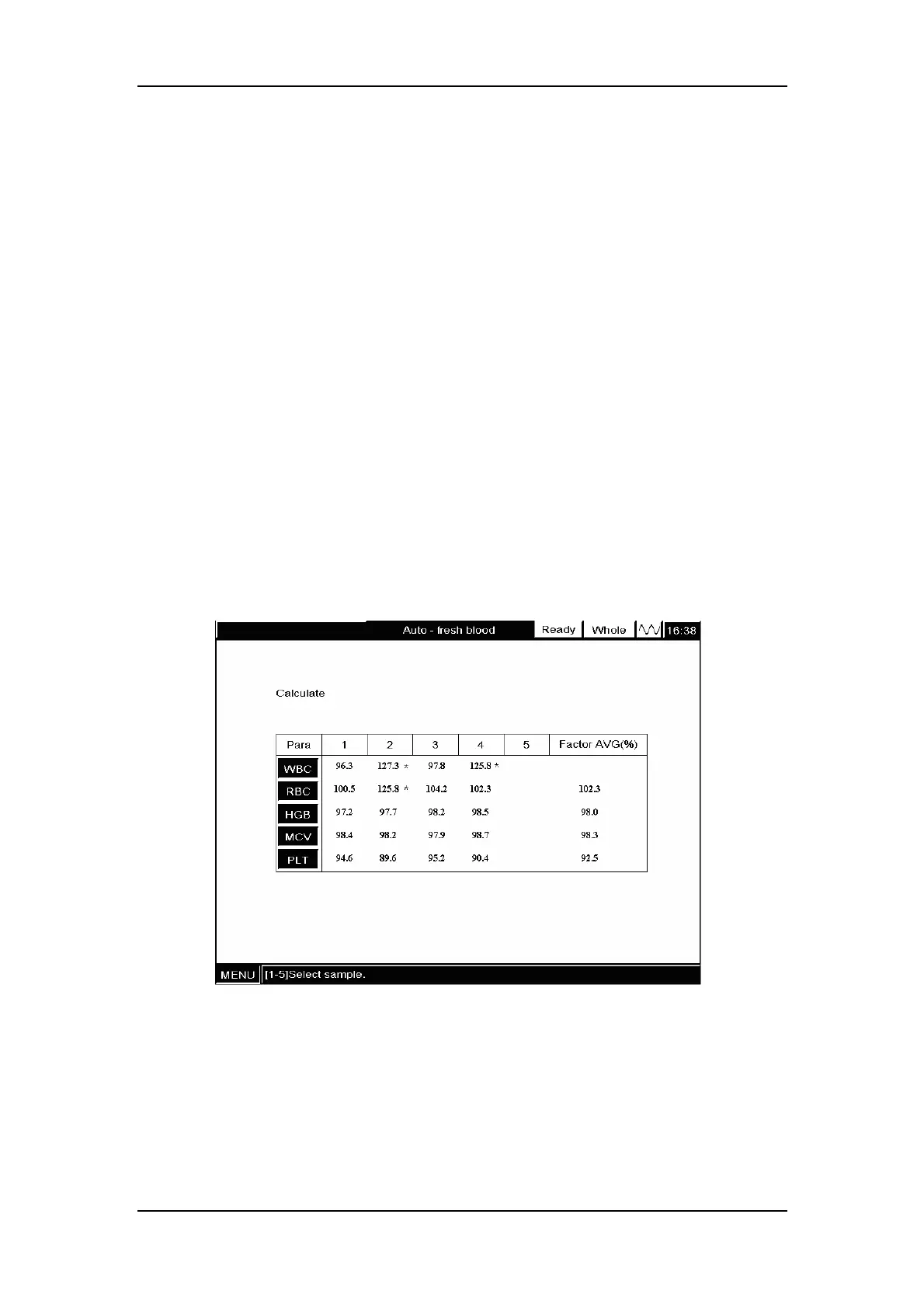
press [6] to enter the “Calculate” screen as Figure9-14 shows. At the screen, the digits “1”, “2”,
“3”, “4”and “5”respectively correspond to the calibration factors of samples 1 - 5.
The “Calculate” screen can maximum display 5 sets of calibration factors. The calculated
calibration factors should be within the 75% - 125%. Any calculated factor that falls between
0% - 75% or 125% - 9999% will be flagged with a “*”. Other values will not be displayed. In
case of an empty calibration factor, try to find out the reason and if necessary, contact
Mindray customer service department or your local distributor. For every parameter, the
analyzer will calculate the average calibration factor, which serves as the new calibration
factor, only when there are at least 3 valid calibration factors(e.g. RBC in Figure9-14).
Otherwise, the average calibration factor will be empty (e.g. WBC in Figure9-14).
Figure9-14 “Calculate” screen
Verifying new calibration factors
Press [MAIN] to enter the “Count” screen, a message box will pop up to confirm the new
calibration factors, as Figure 9-15 shows.



 To Next Page