3 System Preparation
Operator’s Manual 3 - 11
Perform the following procedure:
1. Plug the printer power cord to an appropriate outlet.
2. Power on the system and the printer.
3. Make sure the ultrasound machine and the printer are connected to a same LAN, and turned on
the W-LAN function of the printer.
4. Select in the top-right corner of the screen and select [Setup] > [System] > [Peripheral] >
[Print Service] to choose the report to be printed. Select the printer from the wireless printer
list, and set the printer.
5. Select [Save] to exit the preset and make the settings effective.
3.10 Installing the Ultrasound Gel Holder
The ultrasound gel holder need to be installed before use.
Installation tools: Phillips screwdriver
Item list: Check if the items are complete according to the packing list below. If not, please contact
Mindray Customer Service Department or sales representative.
The following items are supplied with each ultrasound gel holder.
Perform the following procedure:
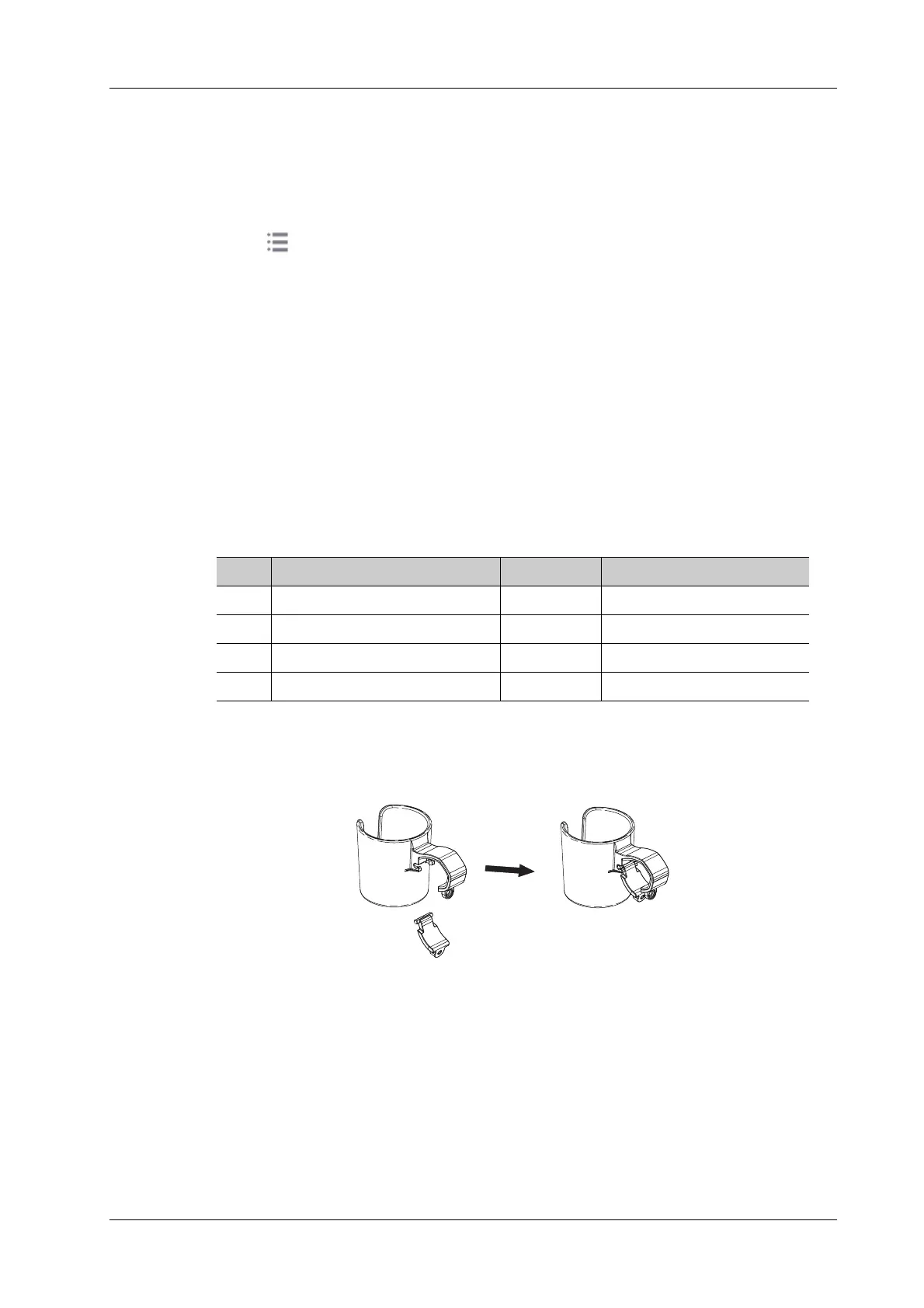
1. Assemble the main body of the ultrasound gel holder and the bracket, and then install it to the
designated position of the handle of the trolley.
No. Name Quantity Remarks
1. Ultrasound gel holder body 1 /
2. Ultrasound gel holder bracket 1 /
3. M3X8 screws 1 /
4. Screw label 2 /



 To Next Page