Preliminary
miniDSP Ltd, Hong Kong / www.minidsp.com / Features and specifications subject to change without prior notice 16
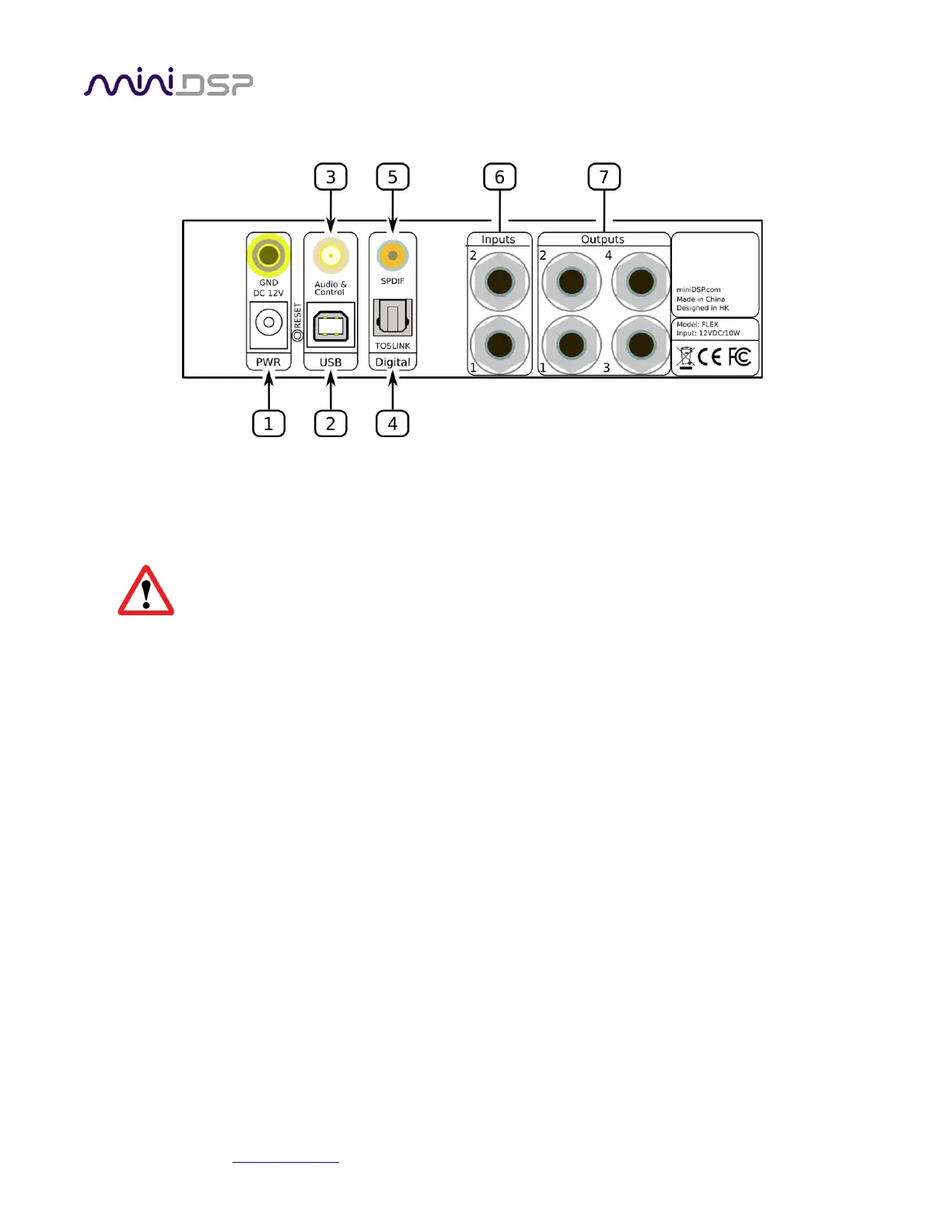
3.1.2 Flex/Balanced
1. DC power. The supplied 12 VDC power supply includes a set of interchangeable power pins for USA, UK,
Europe and Australia. Fit the correct pins for your country. Connect the DC plug to the 12 VDC power
socket.
Apply power to the processor only after all input and output connections have been made.
2. USB port for control and audio streaming. Connect to an available USB port on your computer. This port
can also be connected to a network streamer with USB output for audio playback.
3. Bluetooth antenna. Screw on the supplied Bluetooth antenna here.
4. Optical digital input. Connect a digital source using a TOSLINK optical cable. Sample rates from 32 up to
216 kHz are supported.
5. Coax digital input. Connect a digital source using an RCA cable. Sample rates from 32 up to 216 kHz are
supported. The three digital inputs can be individually selected with the front panel encoder or the remote
control.
6. Analog inputs. Connect an analog source here. The input jacks are balanced TRS (1/4” tip-ring-sleeve)
connectors, so typically XLR to TRS adapter cables would be used. Alternatively, RCA to TRS adapter cables
can also be used. Typically, the left channel is connected to input 1 and the right channel is connected to
input 2. See Specifications for maximum input voltages.
7. Analog outputs. Connect equipment such as a power amplifier or active speakers and subwoofer. The
output jacks are balanced TRS (1/4” tip-ring-sleeve) connectors, so typically TRS to XLR adapter cables
would be used. Typically, output 1 is the left channel and 2 is the right channel. See Section 6.4 for a variety
of other connections. See Specifications for maximum output voltages.



 To Next Page