Preliminary
miniDSP Ltd, Hong Kong / www.minidsp.com / Features and specifications subject to change without prior notice 51
8.3.4 Parametric EQ
Parametric equalization (PEQ) is a flexible type of equalization filter. It can be used to correct for errors in
loudspeaker output, to compensate for acoustic room effects, and to tailor the overall system response for best
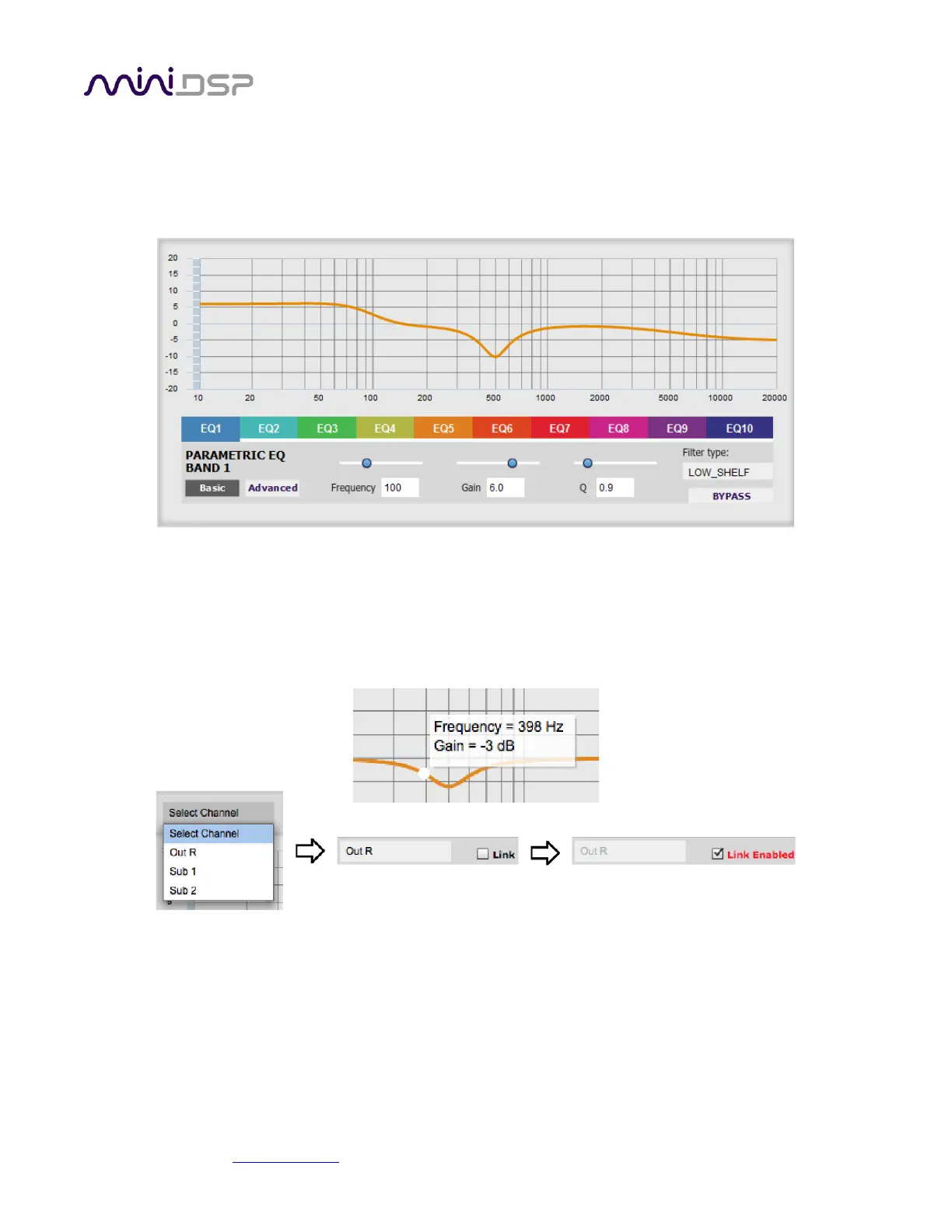
sound. Click on the PEQ button to open the parametric equalizer settings window:
There are ten parametric EQ filters on each input and output channel. The window displays a frequency
response graph showing the combined response of all enabled parametric filters on that channel. For example,
the screenshot above shows a response curve created with a low-shelf boost filter at 100 Hz, a dip at 500 Hz,
and a high-shelf cut filter at 5000 Hz.
Hovering the mouse over the curve brings up an overlay showing the frequency and the gain at that frequency.
Each channel can be linked to one other channel. When a channel is linked to another, the PEQ settings of that
channel are mirrored to the other. Typically, the corresponding drivers on the left and right channels are linked:
left and right tweeter, left and right woofer, and so on. To link a channel, select the other channel from the
drop-down menu at the top left of the PEQ screen, and click the Link checkbox.



 To Next Page