Preliminary
miniDSP Ltd, Hong Kong / www.minidsp.com / Features and specifications subject to change without prior notice 41
6.4.8 Subwoofer control / multisub
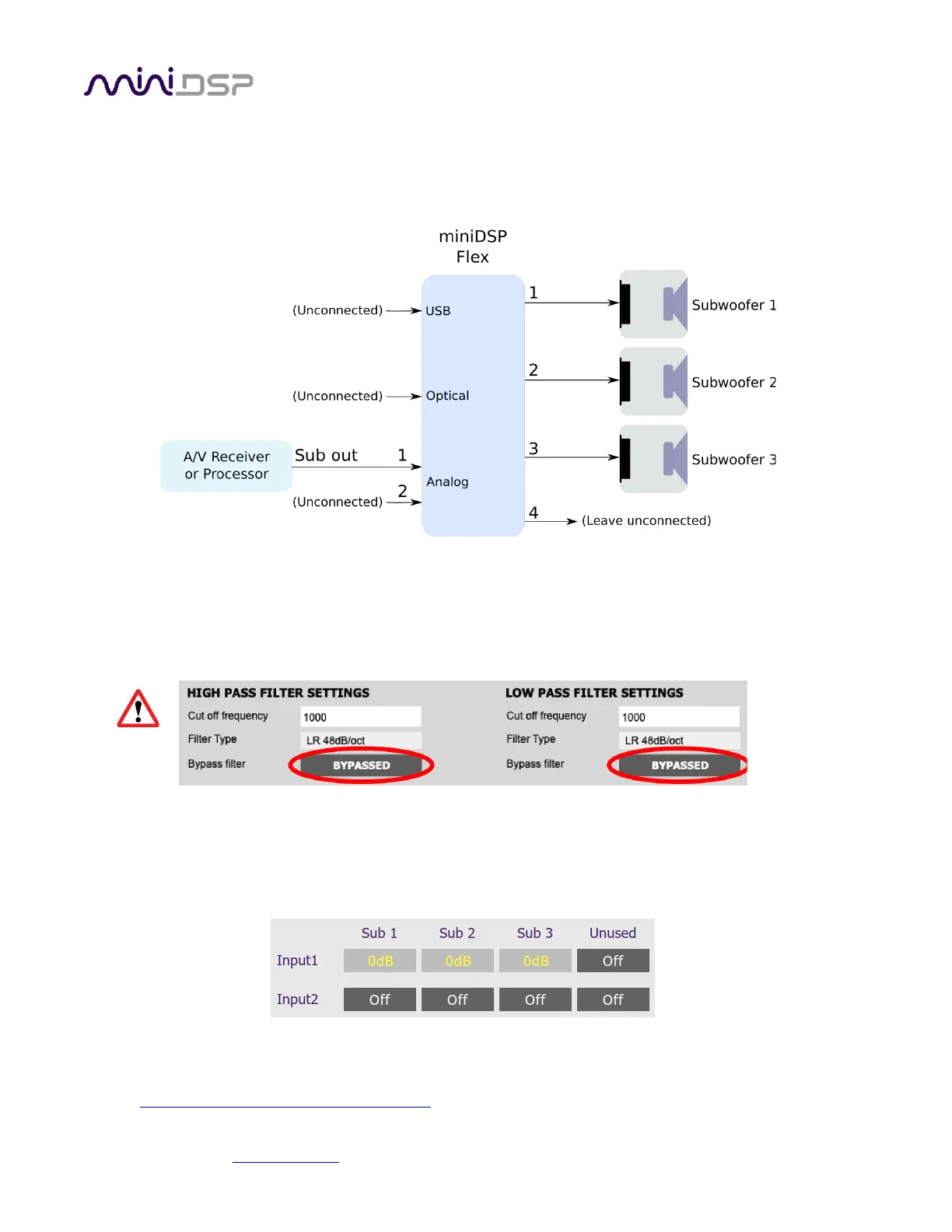
The miniDSP Flex can be used to provide independent control of up to four subwoofers. Each subwoofer can
have individual time delay, gain, and EQ applied as needed. Here is a typical connection diagram for a home
theater system with three subwoofers:
Following is a brief summary of the key configuration settings needed. On the Outputs tab:
• Rename the output channels to match the number of subs you have i.e. “Sub 1,” “Sub 2,” etc.
• Mute any unused output channels.
• Check that the crossover filters of all output channels are bypassed:
(Normally, upstream equipment like the A/V receiver or processor implements lowpass crossover filters
as part of its bass management processing. In some cases, such as when using a Flex to add multisub
capability to a stereo system, you may need to enable lowpass filters in the Xover blocks.)
On the Inputs & Routing tab, set the routing matrix like this (for the three-sub HT example shown above):
After you have set up the plugin, be sure to save your configuration to a file. For detailed information on tuning
multiple subwoofers, see this application note on our website:
• Tuning multiple subwoofers with miniDSP



 To Next Page