Preliminary
miniDSP Ltd, Hong Kong / www.minidsp.com / Features and specifications subject to change without prior notice 26
5 REMOTE CONTROL
The miniDSP Flex has several options for remote control of key runtime functions.
5.1 USING THE MINIDSP REMOTE
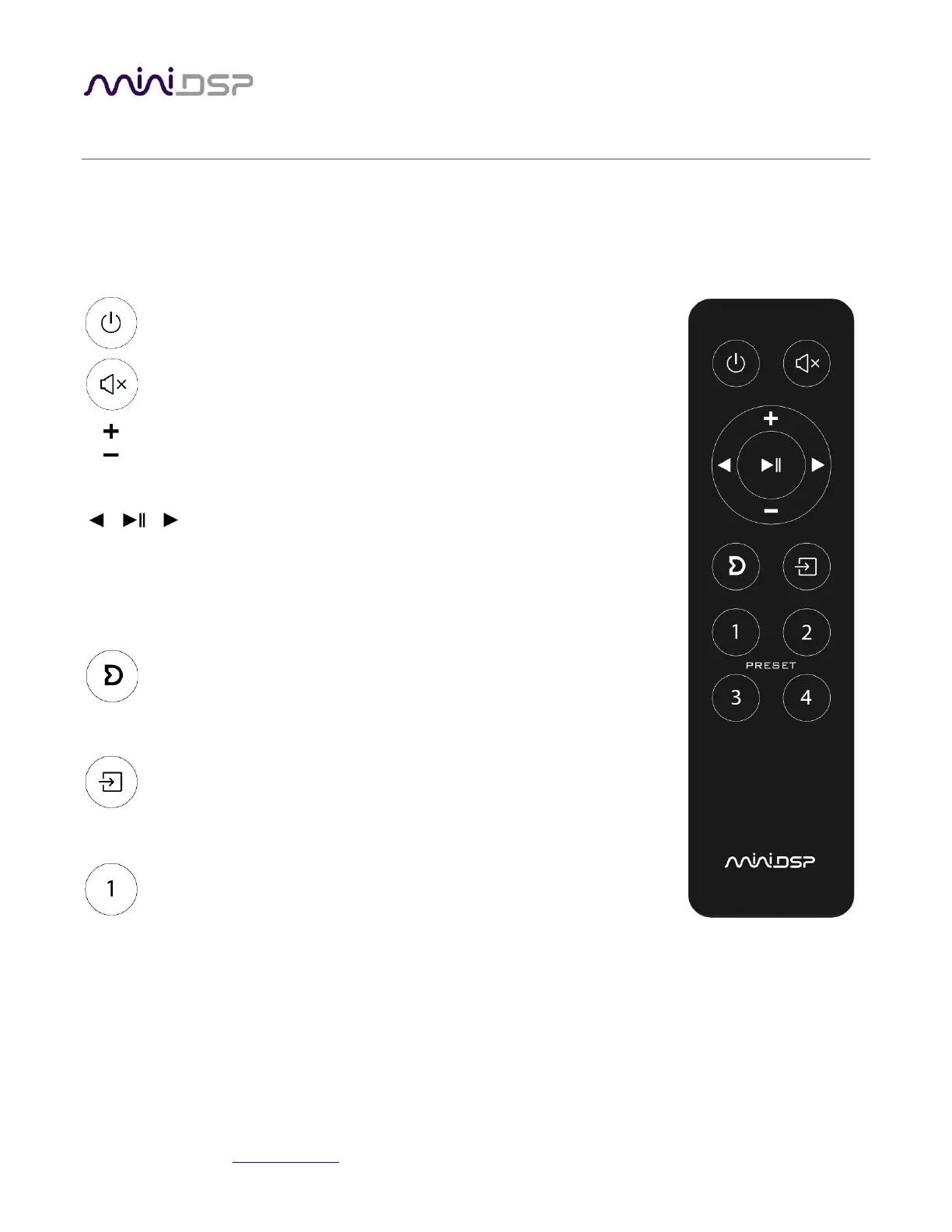
The standard miniDSP infrared remote control provided with the Flex controls all key runtime functions.
Standby
Put the Flex into standby and take it out again.
Mute
Mute and unmute audio output.
Volume
Reduce or increase the volume. Each press changes the volume in 0.5 dB.
Holding down a button will accelerate volume change to 3 dB steps.
Media control
If the selected source is USB or Bluetooth, these buttons control audio
playback. From left to right, the buttons skip back a track, play or pause
audio, and skip forward to the next track.
Dirac Live
Enable or disable Dirac Live filtering. Has an effect only if the Flex is
upgraded with Dirac Live. Dirac Live filtering will be effective only on
presets for which Dirac Live filters have been loaded.
Source selection
Cycle through the available input sources in order: TOSLINK, SPDIF (coax),
USB, Bluetooth, Analog. The Analog input may differ depending on the
specific version of the Flex.
Preset (1 through 4)
Switch to the selected preset. It will take a few seconds for the preset
selection to complete while the processor loads the new filters from its
flash memory into the DSP.



 To Next Page